

TL;DR:
- Choosing MVVM architecture with Kotlin and Jetpack best supports data-heavy AI and blockchain apps.
- Modularizing codebases by features enhances flexibility, security, and parallel development.
- Extensive testing across devices, network conditions, and offline scenarios is critical for stability.
Scaling a modern Android app beyond a basic CRUD interface is where most startups hit a wall. You need AI-driven personalization, blockchain-backed security, and a codebase that won't collapse under the weight of new features, all while shipping fast enough to stay competitive. The architecture decisions you make in week one will either accelerate or haunt every sprint that follows. This guide walks you through a structured, proven approach to building advanced Android applications that integrate AI and blockchain, covering setup, integration, testing, and the hard lessons that separate teams who ship from teams who stall.
Table of Contents
- Preparing your Android app project for advanced development
- Integrating AI into your Android app: Tools and real-world approaches
- Adding blockchain functionality: Security, performance, and key libraries
- Testing, optimization, and troubleshooting advanced Android apps
- What most guides miss: A developer's hard-won insights
- Connect with top Android app and blockchain experts
- Frequently asked questions
Key Takeaways
| Point | Details |
|---|---|
| Choose the right architecture | Opt for MVVM with Kotlin and Jetpack for seamless, scalable Android app builds. |
| Embed AI with benchmarking | Select AI integrations based on performance metrics from tools like Android Bench. |
| Secure blockchain modules | Utilize Android Keystore and threat modeling to safeguard user data and assets. |
| Rigorous testing is essential | Use comprehensive testing platforms to handle device fragmentation and optimize resource use. |
Preparing your Android app project for advanced development
Before writing a single line of feature code, your architecture choice will define how well AI and blockchain layers fit into your app long-term. The three dominant patterns are MVVM (Model-View-ViewModel), MVC (Model-View-Controller), and MVP (Model-Presenter-View). For apps with heavy data flows and asynchronous AI or blockchain calls, MVVM is the clear winner. It keeps UI logic separate from business logic, which makes testing and swapping out AI models far less painful.
Android development best practices confirm that core methodologies include MVVM/MVC/MVP architectures, mobile-first design, CI/CD pipelines, performance optimization, and security prioritization from day one. Skipping any of these early creates compounding technical debt.
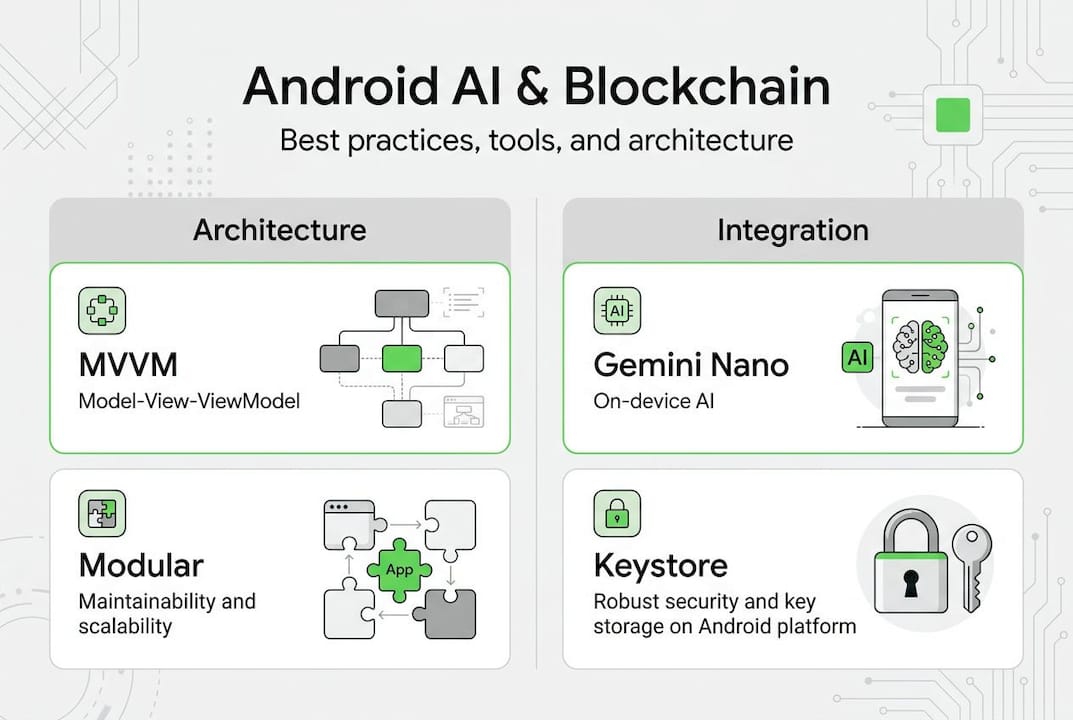
For your tech stack, Kotlin plus Jetpack is the recommended combination for startups and enterprises building AI and blockchain apps. Kotlin's coroutines handle async blockchain transactions cleanly, while Jetpack's lifecycle-aware components prevent memory leaks that are common when running on-device AI models.
| Architecture | Best for | AI/blockchain fit | Testability |
|---|---|---|---|
| MVVM | Data-heavy, async apps | Excellent | High |
| MVP | Legacy codebases | Moderate | High |
| MVC | Simple, fast prototypes | Low | Moderate |
Beyond architecture, set up your CI/CD pipeline before you integrate any advanced features. Automated builds and tests catch integration failures early, which matters enormously when your app depends on external AI APIs or blockchain nodes. Tools like GitHub Actions or Bitrise work well for Android pipelines.
Key setup steps for advanced Android projects:
- Choose MVVM with Kotlin and Jetpack as your base
- Configure dependency injection using Hilt or Dagger
- Set up a modular project structure from day one
- Integrate CI/CD with automated unit and integration tests
- Enable ProGuard or R8 for code shrinking and obfuscation
Pro Tip: Modularize your codebase by feature domain, not by layer. A dedicated ":blockchainmodule and an:ai` module keep dependencies clean and allow teams to work in parallel without stepping on each other. This also makes it easier to follow the full mobile app development process without bottlenecks.
Integrating AI into your Android app: Tools and real-world approaches
With a solid foundation in place, AI integration becomes a matter of choosing the right tools and handling the edge cases that demos never show you. The current landscape for on-device and cloud AI on Android includes Google's Gemini models via AICore, Anthropic's Claude Opus 4.6 via API, and various TensorFlow Lite or ONNX models for offline inference.

Gemini 3.1 Pro Preview tops at 72.4% success on real Android tasks according to Android Bench, which benchmarks AI model performance on actual device workflows. That number matters because marketing claims and lab benchmarks rarely reflect what happens when users interact with your app on a three-year-old mid-range device.
Empirical leaders who use AI strategically grow revenue 3x faster than peers who treat AI as a checkbox feature. The difference is always in how the model is integrated, not which model is chosen.
Step-by-step AI integration with Kotlin and Jetpack:
- Define the specific user problem AI will solve (recommendation, classification, generation)
- Choose between on-device (AICore, TFLite) and cloud inference (Gemini API, Claude)
- Prepare and clean your training or fine-tuning data with real user scenarios
- Implement the AI call inside a ViewModel using Kotlin coroutines
- Add fallback logic for offline scenarios and unsupported devices
- Benchmark task success rates against your specific use case before shipping
| AI tool | Type | Android 14+ required | Offline support |
|---|---|---|---|
| Gemini Nano via AICore | On-device | Yes | Yes |
| Gemini 1.5 Pro API | Cloud | No | No |
| Claude Opus 4.6 | Cloud | No | No |
| TensorFlow Lite | On-device | No | Yes |
A critical technical detail: always check FEATURE_NOT_SUPPORTED when using AICore, since Gemini Nano requires Android 14 and compatible hardware. Ignoring this check causes silent failures that are nearly impossible to debug in production.
Pro Tip: Always handle offline scenarios explicitly. If your AI feature fails silently when the network drops, users blame the app, not connectivity. Build a graceful degradation path for every AI-powered feature. Exploring AI in mobile apps more broadly can help you prioritize which features deliver real user value versus which ones just look impressive in a pitch deck.
Adding blockchain functionality: Security, performance, and key libraries
Blockchain integration in Android apps is where security mistakes are most costly. A single private key exposure can drain user wallets. The architecture decisions you make here are not just technical preferences, they are security commitments to your users.
The standard library for Ethereum interaction on Android is web3j, which handles contract calls, transaction signing, and wallet management. For key storage, Android Keystore for secure key storage is non-negotiable. It stores cryptographic keys in hardware-backed secure storage, making extraction extremely difficult even on rooted devices. Threat modeling and modular architecture are also essential for wallets and DeFi apps.
Security warning: Never store private keys in SharedPreferences, local databases, or hardcoded strings. Any key stored outside Android Keystore is a liability, not a feature.
Blockchain integration steps and common pitfalls:
- Integrate web3j for Ethereum RPC calls and contract interaction
- Use Android Keystore for all key generation and signing operations
- Modularize wallet, DeFi, and NFT features into separate modules
- Implement threat modeling before writing wallet-related code
- Batch RPC calls to reduce network overhead and improve transaction throughput
- Never expose raw private keys to the UI layer under any condition
- Test against testnets (Sepolia, Mumbai) before mainnet deployment
For DeFi or NFT apps, modular architecture pays off immediately. A :wallet module handles key management, a :contracts module manages ABI encoding and smart contract calls, and a :ui module handles display only. This separation also makes security audits far easier and faster. You can explore a deeper breakdown in our blockchain mobile apps guide.
Pro Tip: Separate transaction construction from transaction signing into distinct classes. This limits the scope of code that ever touches private keys, reducing your attack surface and making it easier to swap signing implementations later, for example, when adding hardware wallet support.
Testing, optimization, and troubleshooting advanced Android apps
Integrations that work on your development machine will often fail in the real world. Device fragmentation, varying OS versions, inconsistent network conditions, and hardware differences all create failure modes that only show up at scale.
Critical testing steps for advanced Android apps:
- Test AI features on at least three device tiers: flagship, mid-range, and budget
- Simulate offline and low-connectivity scenarios for both AI and blockchain features
- Run blockchain transaction tests on testnets with real network latency
- Use Firebase Test Lab to automate testing across a matrix of real devices
- Profile battery consumption with AI model inference running in the background
- Validate smart contract interactions with edge-case inputs, not just happy paths
Device fragmentation, battery drain from AI/ML, and network latency for blockchain are the top edge cases that break advanced Android apps in production. Firebase Test Lab addresses fragmentation by running your test suite on actual physical devices across dozens of hardware configurations.
Common integration mistakes and quick fixes:
- AI model crashes on older devices: add API level checks and fallback UI
- Blockchain transactions timing out: implement retry logic with exponential backoff
- Battery drain from background inference: use WorkManager with battery-aware constraints
- Memory leaks from AI model instances: tie model lifecycle to ViewModel, not Activity
- UI freezing during contract calls: always move blockchain operations off the main thread
CI/CD is essential for frequent, reliable releases. Automated pipelines that run your full test suite on every pull request catch regressions before they reach users. For teams building on the mobile app development guide, this is one of the highest-leverage investments you can make early.
Pro Tip: Use Firebase Test Lab with a curated device matrix that mirrors your actual user base. Running tests on 50 random devices wastes time. Running tests on the 10 devices your analytics show are most common saves it.
What most guides miss: A developer's hard-won insights
Most articles on advanced Android development treat architecture and feature integration as separate concerns. They are not. The teams we see succeed consistently are the ones who treat modular architecture as a product decision, not just a technical one. When your :ai module can be swapped out without touching your :blockchain module, you can respond to a better AI model release in days, not weeks.
The bigger trap is the "AI everywhere" mindset. Adding AI to every screen does not make an app smarter. It makes it slower, harder to debug, and more expensive to run. The question is never "can we add AI here?" It is "does AI solve a real problem here that users actually feel?"
Data preparation is also consistently underestimated. In our experience working on advanced app builds, teams spend 60 to 70 percent of their AI integration time cleaning and structuring data, not writing model code. Test with live production data as early as possible. Demo datasets will lie to you.
Finally, use Android Bench results to pick your AI tools. Not all large language models perform equally on real Android tasks, and the gap between top and bottom performers is significant enough to change your product roadmap.
Connect with top Android app and blockchain experts
Building advanced Android apps with AI and blockchain is not a one-size-fits-all process. The right architecture, tool selection, and security model depend on your specific product goals, user base, and timeline.
At Proud Lion Studios, we build custom Android applications that integrate AI and blockchain from the ground up, not as afterthoughts bolted onto existing code. Our UAE-based team has shipped blockchain development services and full-stack Android app development services for startups and enterprises across multiple markets. If you want to see what a production-grade AI and blockchain integration looks like in practice, explore our AI estimator portfolio to understand the depth of what we build.
Frequently asked questions
Which Android architecture should I use for advanced AI and blockchain integration?
MVVM with Kotlin is preferred for startups and enterprises because it cleanly separates UI from business logic, making async AI and blockchain calls easier to manage. MVVM/MVC/MVP architectures are all valid, but MVVM scales best for complex, data-driven apps.
How do I choose the best AI solution for my Android app?
Use benchmarks like Android Bench to compare task success rates and hardware compatibility before committing to a model. Gemini 3.1 Pro Preview leads at 72.4% on real Android tasks, but on-device options like TFLite may serve offline use cases better.
What are the key steps to secure blockchain integration in Android apps?
Use Android Keystore for all key storage and signing, modularize wallet features into isolated code modules, and run threat modeling before writing any wallet-related logic. Web3j and Android Keystore together form the foundation of a secure mobile blockchain stack.
How do I handle device fragmentation and performance bottlenecks?
Test across flagship, mid-range, and budget devices using Firebase Test Lab, and optimize AI models and blockchain networking for varying hardware. Device fragmentation and battery drain from AI inference are the most common production failure points in advanced Android apps.
Recommended
- Build mobile apps with AI, blockchain & game tech in 2026
- Scalable web app development with AI and blockchain
- Mobile Apps in Tech Startup Growth 2026 - Proud Lion Studios
- Types of mobile apps startups use in 2026
- How to Grow AI Engine Engagement: A Step-by-Step Framework for AEO and SEO Success - 1on1 SEO