

Building a mobile app sounds straightforward until you face the reality that 42% of startups fail due to no market need, often from poor app strategies. Mobile app development is not just coding. It is a complex structured process spanning ideation, design, development, testing, and maintenance. This guide explains what mobile app development truly involves, covering the lifecycle, methodologies like Agile and MVP, platform choices, common challenges, and practical advice. Whether you are a tech entrepreneur or product manager, understanding these fundamentals helps you make informed decisions, avoid costly mistakes, and build apps that deliver real business outcomes.
Table of Contents
- Key Takeaways
- Understanding mobile app development: process and phases
- Methodologies and approaches: Agile, MVP, and platform choices
- Navigating challenges and edge cases in mobile app development
- Market realities and best practices to boost app success
- Explore mobile app development solutions with Proud Lion Studios
- Frequently asked questions
Key Takeaways
| Point | Details |
|---|---|
| Full lifecycle coverage | Mobile app development spans ideation through maintenance with structured phases to turn concepts into working products. |
| Agile and MVP | Agile sprints and MVP approaches help reduce costs and validate market fit quickly. |
| Cross platform benefits | Cross platform tools such as Flutter and React Native enable faster delivery across devices with near native performance. |
| Edge case and security | Design for edge cases and security from the start to minimize risk and improve retention. |
| Market need focus | Most apps fail when market needs are not addressed and retention is ignored. |
Understanding mobile app development: process and phases
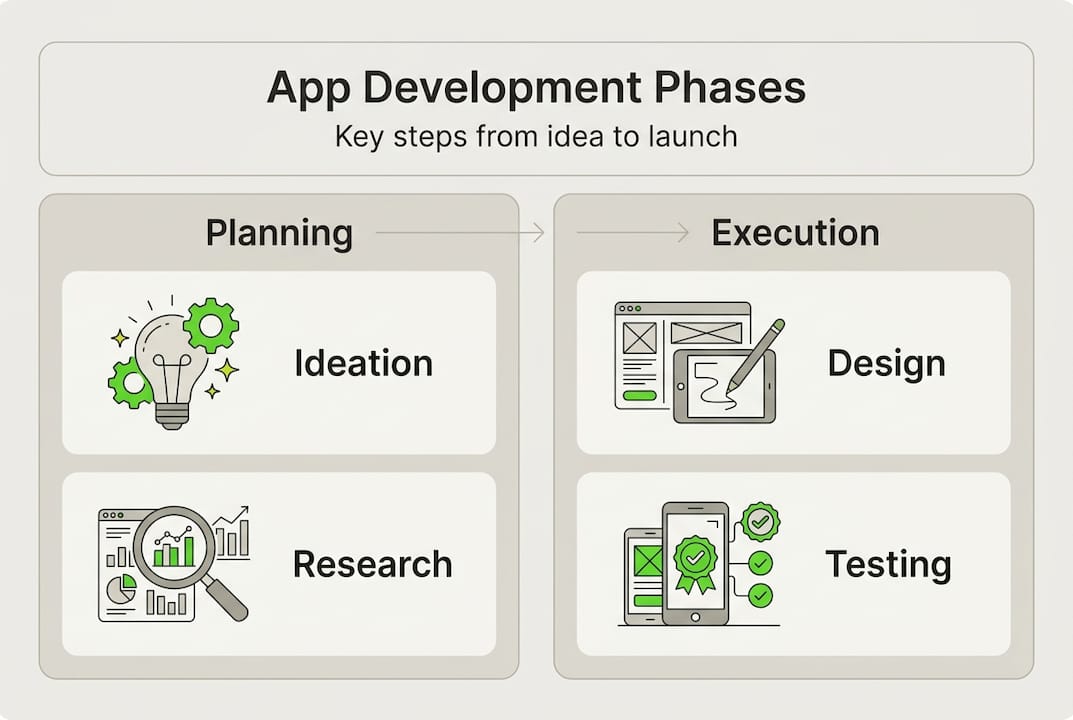
Mobile app development follows a structured lifecycle that includes ideation, planning, design, development, testing, deployment, and maintenance. Each phase serves a specific purpose in transforming your concept into a functional product. Understanding these stages helps you allocate resources effectively and set realistic timelines.
The ideation phase involves defining your app's core value proposition and target audience. You conduct market research, analyze competitors, and identify gaps your app will fill. Planning follows, where you create technical specifications, choose your tech stack, and outline feature priorities. This is when you decide whether to build an MVP or a full-featured product.
Design encompasses both UX and UI work. UX designers map user journeys and create wireframes that optimize flow and usability. UI designers then add visual elements, branding, and interactive components. Strong design directly impacts retention since users abandon apps with poor interfaces within seconds.
Development splits into front-end and back-end work. Front-end developers build what users see and interact with, while back-end developers create server logic, databases, and APIs. Modern mobile app development (iOS & Android) often uses frameworks like React Native, Flutter, or Kotlin Multiplatform for efficiency. Quality assurance runs parallel to development, with testers checking functionality, performance, and security across devices.
App store submission requires meeting Apple App Store and Google Play guidelines. You prepare marketing materials, screenshots, and descriptions while ensuring compliance with privacy policies and security standards. Post-launch maintenance includes monitoring crashes, releasing updates, fixing bugs, and adding features based on user feedback.
Agile methodology structures this work into two-week sprints with iterative cycles. Each sprint delivers working features you can test and refine. MVP development focuses on core functionality first, letting you validate market fit quickly before investing in advanced features. This approach is crucial for startups managing limited budgets.
Key development phases:
- Ideation and market research to validate your concept
- Planning and technical specification creation
- UX/UI design with wireframes and prototypes
- Front-end and back-end development in sprints
- Quality assurance and device testing
- App store submission and approval
- Post-launch monitoring and maintenance
Common development environments and tools include:
- Xcode for native iOS development
- Android Studio for native Android development
- Flutter or React Native for cross-platform apps
- Firebase for backend services and analytics
- GitHub for version control and collaboration
- Jira or Asana for project management
Understanding these phases helps you recognize where delays typically occur and why certain stages demand more resources. Design and testing phases are especially critical for user retention, yet many teams rush through them to hit launch dates. Exploring types of mobile apps startups use can also help you determine which approach fits your business model best.
Methodologies and approaches: Agile, MVP, and platform choices
With the process understood, now consider how methodology and platform choices impact development success and resource use. 70% of developers use Agile because it enables rapid iteration and course correction based on real user feedback. Agile breaks work into two-week sprints where teams deliver functional features, test them, and adjust priorities for the next cycle.
MVP development reduces initial capital needs by focusing only on core features that validate your concept. Instead of spending six months building every feature, you launch a basic version in two to three months. This approach lets you test market demand before heavy investment, significantly lowering your burn rate. Many successful apps started as MVPs that evolved based on user behavior and feedback.
Choosing between native and cross-platform development is a major decision affecting cost, performance, and time to market. Native apps offer superior performance but cost twice as much since you build separate iOS and Android codebases. Cross-platform frameworks like Flutter and Kotlin Multiplatform are 40-50% cheaper and deliver near-native speed, making them attractive for startups.
| Approach | Development cost | Performance | Time to market | Best for |
|---|---|---|---|---|
| Native (Swift/Kotlin) | High (2x) | Excellent | Slower (separate builds) | Apps needing maximum performance or platform-specific features |
| Cross-platform (Flutter) | Medium (40-50% less) | Near-native | Faster (single codebase) | Startups needing speed and cost efficiency with good performance |
| Hybrid (React Native) | Medium | Good | Faster (single codebase) | Apps with standard UI and business logic |
| Progressive Web App | Low | Limited | Fastest | Simple apps not requiring device features |
Key criteria for choosing your development approach:
- Budget constraints and funding runway
- Performance requirements and user experience expectations
- Need for platform-specific features like ARKit or Android widgets
- Time to market urgency and competitive pressure
- Team expertise and available talent pool
- Long-term maintenance and update strategy
Flutter has gained significant traction because it compiles to native code, delivering smooth animations and fast rendering. Kotlin Multiplatform lets you share business logic while keeping native UI, offering flexibility. React Native remains popular for its large ecosystem and community support, though performance can lag behind Flutter for complex animations.
Pro Tip: Focus on market validation before heavy investment. Build an MVP with cross-platform tools to test your concept quickly and cheaply. Once you validate demand and understand user needs, you can rebuild critical components natively if performance becomes a bottleneck. This strategy minimizes risk while preserving capital.
Understanding startup growth strategies for mobile apps helps you align technical decisions with business goals. Similarly, staying current with the future of mobile apps frameworks and tech ensures you choose tools that will remain supported and competitive.
Navigating challenges and edge cases in mobile app development
Understanding methodologies leads naturally to facing real-world challenges developers must handle to build robust apps. Edge cases include platform fragmentation, offline use, poor connectivity, accessibility, and security, with 75% of apps failing basic security tests. These issues are not optional considerations. They directly impact user retention and trust.
Platform fragmentation means your app must work across thousands of device combinations with different screen sizes, OS versions, and hardware capabilities. Testing on real devices matters because emulators miss performance issues, touch responsiveness problems, and hardware-specific bugs. Many teams discover critical flaws only after launch because they relied solely on simulators.

Offline functionality is essential for apps used in areas with unreliable connectivity. Users expect core features to work without internet access, syncing data when connection returns. Implementing offline mode requires careful database design and conflict resolution strategies for data modified on multiple devices simultaneously.
Accessibility compliance with WCAG 2.2 standards ensures your app serves users with disabilities. This includes screen reader support, sufficient color contrast, keyboard navigation, and clear focus indicators. Beyond legal requirements, accessible design expands your potential user base and improves usability for everyone.
Security must be built in from day one, not added later. Common vulnerabilities include insecure data storage, weak authentication, unencrypted communications, and inadequate session management. A single breach destroys user trust and can be fatal for startups. Implementing encryption, secure APIs, and regular security audits protects both users and your business.
Strategies for handling common edge cases:
- Offline mode: Implement local databases with sync logic and conflict resolution
- Shared accounts: Design for multiple users accessing the same account simultaneously
- Name changes: Allow users to update profile information without breaking references
- Stolen phone scenarios: Provide remote logout and data wipe capabilities
- Poor connectivity: Optimize asset sizes and implement progressive loading
- Platform differences: Abstract platform-specific code and test extensively
- Accessibility: Use semantic HTML, proper labels, and test with assistive technologies
Ignoring edge cases tanks retention because users encounter frustrating bugs that make your app unreliable. When an app crashes during poor connectivity or fails to sync data correctly, users uninstall it immediately. The cost of handling edge cases during development is far lower than the revenue lost from poor retention.
Pro Tip: Incorporate edge cases into initial design and QA cycles rather than treating them as afterthoughts. Create a checklist of scenarios like offline use, account switching, and data conflicts. Test these scenarios in every sprint to catch issues early when they are cheaper to fix. This proactive approach prevents the technical debt that slows future development.
Exploring future challenges in app development helps you anticipate emerging issues. Investing in strong UI UX design & prototyping from the start ensures you catch usability problems before they reach production.
Market realities and best practices to boost app success
After handling challenges, conclude with market insights and best practices to maximize your app's performance and business impact. Understanding market data helps you set realistic expectations and allocate resources effectively.
| Metric | Value | Implication |
|---|---|---|
| Global app market size | $407 billion | Massive opportunity but intense competition |
| Day 30 retention rate | 5-8% average | Most users abandon apps quickly without strong value |
| Apps uninstalled within 30 days | 70-80% | First month is critical for proving utility |
| Simple app development cost | $40k-60k | Budget accordingly for basic functionality |
| Complex app development cost | $300k+ | Enterprise features and integrations add significant expense |
| Revenue concentration | Top 1% earns 94% | Distribution is extremely skewed toward winners |
These numbers reveal harsh truths about app success. 42% of startups fail due to no market need, meaning your app solves a problem people actually have and will pay to fix. Day 30 retention averaging only 5-8% shows that most apps fail to deliver ongoing value. The first month determines whether users integrate your app into their routines or forget it exists.
Best practices to maximize app success:
- Validate market need before building through customer interviews and landing page tests
- Invest heavily in user-centric UX/UI design since first impressions determine retention
- Test retention benchmarks continuously and iterate based on user behavior data
- Focus 80% of development time on core user flows rather than edge features
- Implement analytics from day one to understand how users actually interact with your app
- Plan for post-launch marketing since organic discovery is nearly impossible
- Budget for ongoing maintenance and updates, not just initial development
Cost expectations must align with complexity. Simple apps with basic CRUD operations, standard UI components, and minimal integrations cost $40k-60k. Complex apps requiring custom animations, real-time features, third-party integrations, and advanced security run $300k or more. Understanding this spectrum helps you scope features realistically within your budget.
The revenue concentration where the top 1% of apps earn 94% of income highlights the winner-take-most nature of app markets. This does not mean you should avoid building apps, but it emphasizes the importance of differentiation, execution quality, and finding underserved niches. Many successful apps serve specific professional or industry needs rather than competing in crowded consumer categories.
Pro Tip: Measure day 30 retention as your primary success metric and iterate relentlessly based on user data. If retention falls below 10%, investigate why users abandon your app through surveys, session recordings, and usage analytics. Most retention problems stem from unclear value propositions, confusing onboarding, or core features that do not solve real pain points. Fix these issues before adding new features.
Learning about mobile apps startup growth strategies provides frameworks for scaling once you achieve product-market fit. Continuing to refine your UI UX design & prototyping based on user feedback keeps your app competitive as user expectations evolve.
Explore mobile app development solutions with Proud Lion Studios
Having armed yourself with knowledge on development and market realities, here is how an expert partner can support your app journey. Proud Lion Studios offers end-to-end mobile app development (iOS & Android)) services tailored to startups and enterprises seeking scalable, innovative solutions.
Our Dubai-based team specializes in integrating cutting-edge technologies including blockchain development for Web3 applications, AI automation, and advanced UI UX design & prototyping that prioritizes user retention. We focus on real business outcomes rather than templated packages, working closely with you to validate market fit through MVPs and iterative development.
With expertise spanning native and cross-platform frameworks, we help you choose the right technical approach for your budget and timeline. Our process emphasizes security, accessibility, and edge case handling from the start, preventing costly rework later. Whether you need a consumer app, enterprise solution, or blockchain-integrated platform, we deliver intelligent, scalable products that future-proof your business.
Pro Tip: Consult with experienced development partners early in your planning process to align technical strategy with business goals. Expert guidance helps you avoid common pitfalls, choose appropriate technologies, and set realistic budgets and timelines, significantly reducing project risk.
Frequently asked questions
What is mobile app development?
Mobile app development is the process of creating software applications that run on mobile devices like smartphones and tablets. It encompasses ideation, design, coding, testing, deployment, and ongoing maintenance across iOS and Android platforms.
How long does it take to develop a mobile app?
A basic MVP typically takes two to three months to develop, while complex apps with advanced features require six to twelve months. Timeline depends on feature complexity, platform choice, team size, and whether you build native or cross-platform.
What is the difference between native and cross-platform development?
Native development builds separate apps for iOS and Android using platform-specific languages, offering best performance but higher cost. Cross-platform development uses frameworks like Flutter to create one codebase for both platforms, reducing costs by 40-50% with near-native performance.
How much does mobile app development cost?
Simple apps with basic features cost $40k-60k, while complex apps with custom features, integrations, and advanced security run $300k or more. Costs vary based on team location, development approach, design complexity, and ongoing maintenance needs.
Why do most mobile apps fail?
42% of startups fail due to no market need, and 70-80% of apps are uninstalled within 30 days due to poor retention. Common failure reasons include unclear value propositions, bad user experience, inadequate marketing, ignoring user feedback, and launching without validating market demand.
Recommended
- Build mobile apps with AI, blockchain & game tech in 2026 - Software & Web3 Development in Dubai | Proud Lion Studios
- Build mobile apps with AI, blockchain & game tech in 2026
- Mobile apps in tech: startup growth strategies for 2026 - Software & Web3 Development in Dubai | Proud Lion Studios
- Mobile apps in tech: startup growth strategies for 2026