

TL;DR:
- Cross-platform mobile development involves building one codebase that targets multiple operating systems, requiring platform-specific adaptations. Choosing the right architecture—shared UI frameworks, native bridge frameworks, or shared core models—depends on project requirements, with native apps excelling in performance-heavy use cases. Success relies on disciplined code organization, platform-specific UI adjustments, and thorough testing, especially on diverse Android devices, to ensure optimal performance and user experience across platforms.
Cross-platform mobile development has moved well beyond its early reputation as a shortcut for teams that couldn't afford separate iOS and Android projects. What is cross-platform mobile development, really? It's an architectural strategy that lets you build one codebase targeting multiple operating systems while navigating real trade-offs in performance, platform feel, and maintenance. The phrase sounds straightforward until you're three months into a project and debugging a CocoaPods conflict at midnight. This guide cuts through the noise and gives you the technical depth you need to make the right architecture decision before you write a single line of code.
Table of Contents
- Key Takeaways
- What is cross-platform mobile development?
- Comparing leading cross-platform frameworks
- Benefits, challenges, and trade-offs
- Practical strategies for successful implementation
- My honest take on where cross-platform development actually stands
- Build your cross-platform app with Proudlionstudios
- FAQ
Key Takeaways
| Point | Details |
|---|---|
| Not truly "write once, run everywhere" | Real cross-platform development requires platform-specific adaptations even with shared codebases. |
| Framework choice drives architecture | React Native, Flutter, Kotlin Multiplatform, and PWAs serve different use cases and performance needs. |
| Code sharing has limits | Shared core logic is straightforward; shared UI often breaks platform conventions and user expectations. |
| Native remains the benchmark for demanding apps | AR, real-time graphics, and hardware integrations still require native development for reliable results. |
| Hybrid architecture is the pragmatic middle ground | A shared core with thin native UI layers balances performance, maintainability, and platform authenticity. |
What is cross-platform mobile development
Cross-platform mobile app development means writing a single codebase that compiles, runs, or renders on both iOS and Android without duplicating the entire project. That single sentence is simple. The implementation is not.
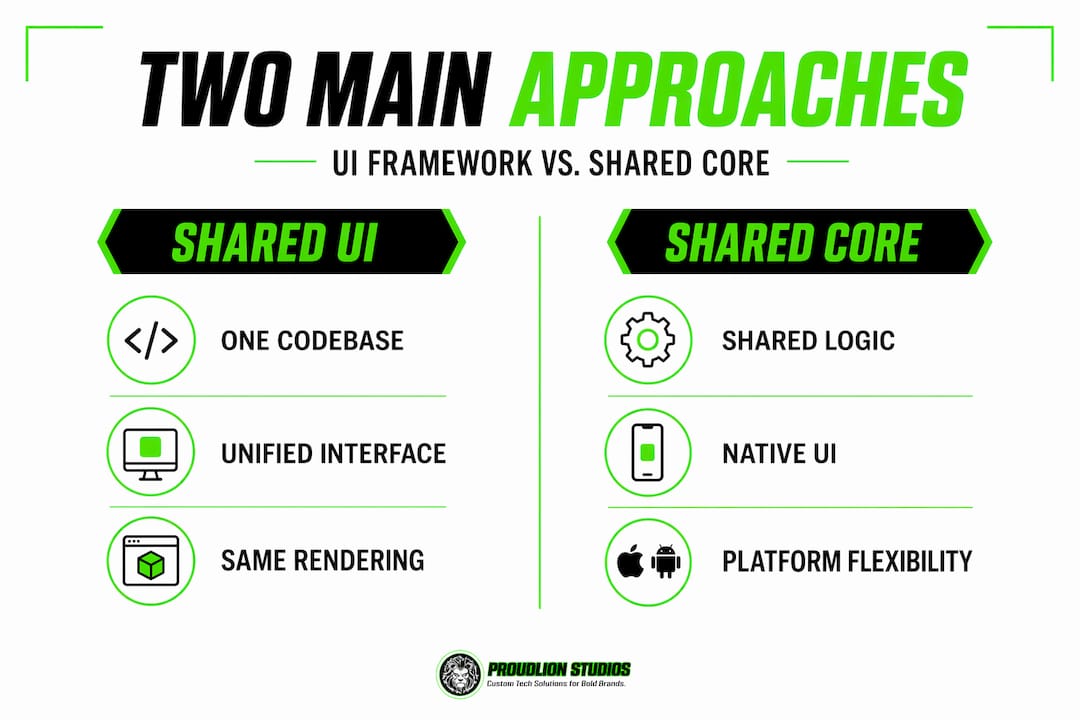
At the architectural level, there are two fundamentally different approaches. The first uses a shared UI framework where your widgets, components, or views are drawn by the framework itself, not the platform. Flutter works this way. Its Skia-based rendering engine draws every pixel independently of iOS UIKit or Android Views, which gives you pixel-perfect consistency across platforms but means your app never truly uses native components. The second approach uses a shared core with platform-specific UI shells. Your business logic, data models, and API calls live in one place, while each platform renders its own native UI on top. This is where shared core and native UI architectures using languages like Rust, Kotlin, or C++ excel.
React Native sits in a middle position. It maps JavaScript components to actual native views, so your "<Text>element becomes aUILabelon iOS and aTextView` on Android. This gives you native component behavior with shared code, but the JavaScript bridge (or the newer JSI layer) introduces latency that pure native code never has to pay.
Here's where the architecture decision actually matters in practice:
- Shared UI frameworks (Flutter): Consistent appearance across platforms, excellent for design systems, performance bottlenecks in complex animations
- Native bridge frameworks (React Native): Access to native components, large ecosystem, bridge overhead and native dependency management
- Shared core models (Kotlin Multiplatform): Maximum native performance per platform, higher setup cost, requires writing platform-specific UI twice
- Progressive Web Apps: Zero install friction, runs in browsers, functional gaps on iOS limit hardware access
Pro Tip: Never design your cross-platform architecture assuming the UI layer will be identical on both platforms. Budget time for platform-specific UI adjustments from day one, and your project timeline will be far more accurate.
Comparing leading cross-platform frameworks
Choosing the right framework is not a matter of picking what's most popular. It's about matching architectural trade-offs to your project's actual requirements.
React Native is adopted by about 35% of global developers as of 2026, making it the most widely used cross-platform solution by a significant margin. It delivers 80 to 95% of native app performance for typical business applications, which is genuinely adequate for the vast majority of commercial projects. Its ecosystem is deep, the community is large, and Meta's continued investment means it's not going away. That said, React Native and Flutter both require managing native dependencies like CocoaPods on iOS and Gradle on Android, which become real maintenance bottlenecks as apps scale in complexity.
Flutter has gained significant ground, particularly among teams that prioritize design consistency and want predictable rendering behavior. Its Dart language has a steeper learning curve for JavaScript developers but offers strong type safety and excellent hot reload cycles. Performance is generally closer to native than React Native for animation-heavy UIs because Flutter bypasses the bridge entirely.
Kotlin Multiplatform Mobile (KMM) takes a different philosophy. Share the logic, own the UI. It's the most architecturally conservative choice and aligns closely with how experienced engineers think about this problem. The trade-off is a higher initial setup cost and the requirement that your team is comfortable writing Kotlin alongside Swift or Objective-C.
PWAs deserve more credit than they get in developer conversations. They eliminate app store fees entirely and let users add apps from a URL, which solves a real distribution problem for B2B tools and internal enterprise apps. The honest limitation is iOS. Apple's Safari imposes restrictions on background sync, push notifications, and hardware APIs that make PWAs a poor choice for consumer apps targeting a mixed audience.
| Framework | Best use case | Code sharing | Performance | iOS limitations |
|---|---|---|---|---|
| React Native | Business apps, dashboards | High (JS logic + UI) | 80-95% native | Minimal |
| Flutter | Design-heavy, consistent UI | Very high | Near-native | Minimal |
| Kotlin Multiplatform | Performance-critical apps | Core logic only | Native per platform | None |
| PWA | B2B tools, Android-first apps | Very high (web) | Browser-limited | Significant |
You can read more about how frameworks are evolving and which ones are gaining traction in the mobile app framework trends for 2026 analysis from Proudlionstudios.
Benefits, challenges, and trade-offs
The benefits of cross-platform development are real, but they require honest framing. The cost savings are not automatic. They emerge from disciplined architecture.
When your team shares business logic, API clients, state management, and data models across platforms, you eliminate the synchronization problem that kills native development teams. How many times have you seen an iOS feature ship two weeks before the Android version, or seen a bug fixed on one platform and reintroduced on the other? A single codebase eliminates that category of problem entirely. For business apps, forms, dashboards, and CRUD workflows, cross-platform development is genuinely the better choice on both cost and speed dimensions.

The challenges arrive when your app touches hardware or rendering pipelines that platforms handle very differently. Native development remains the standard for real-time AR, graphics-heavy gaming, and hardware integrations. A cross-platform framework sitting between your code and the camera pipeline or GPU adds latency and reduces control. For apps where that matters, it matters a lot.
Platform fragmentation is the less-discussed challenge. Android's device ecosystem is enormous, with screen sizes, GPU capabilities, and OS versions spanning a much wider range than iOS. Your cross-platform app will need testing on a representative sample of Android devices that would never occur to an iOS-first team.
Consider these common developer pitfalls before committing to a framework:
- Underestimating native module development time when third-party libraries don't exist for your use case
- Ignoring platform UX conventions, which makes apps feel generic and reduces user satisfaction
- Assuming that code sharing percentages translate directly to development time savings
- Skipping performance profiling on lower-end Android devices until late in the project cycle
Pro Tip: Build a performance testing baseline on a mid-range Android device from day one of development. Cross-platform apps that feel fast on a MacBook simulator often expose real performance gaps on a three-year-old budget Android phone running a background-heavy OS.
Practical strategies for successful implementation
Getting cross-platform right in practice comes down to code organization, testing discipline, and knowing exactly where to draw the line between shared and platform-specific code.
-
Separate business logic from UI code at the architecture level. Your API clients, state management, data transformation, and validation rules should live in a shared module with zero UI dependencies. This makes testing trivial and code reuse genuine rather than superficial.
-
Use platform-specific file extensions and modules deliberately. React Native supports platform-specific file extensions like
.ios.jsand.android.jsalong withPlatform.OSandPlatform.select()APIs. These are not escape hatches. They are proper tools for handling platform conventions without polluting shared code. -
Write platform-specific UI components for interactions that deviate between iOS and Android. Navigation patterns, gestures, modal presentations, and tab bar behavior differ meaningfully between the two platforms. Forcing a single implementation to serve both usually produces something that feels slightly wrong on both.
-
Build your CI/CD pipeline to run tests on both platforms from the start. The biggest cross-platform pitfalls compound over time. A bug that only appears on Android in production is exponentially more expensive to fix than one caught in a pre-merge test run.
-
Manage native dependencies with the same rigor you apply to JavaScript packages. Both React Native and Flutter require native build tool configuration that can silently break across platform OS updates. Pin native dependency versions, test on fresh environment setups regularly, and document the native setup process as part of your onboarding documentation.
For teams integrating blockchain with mobile apps, the shared core model is particularly relevant. Cryptographic operations and wallet logic belong in a shared, well-tested core module. The platform-specific UI handles only presentation and user interaction, keeping your security-critical code out of the UI layer entirely.
My honest take on where cross-platform development actually stands
I've worked across enough mobile projects to have a strong opinion on this, and it's not the one you'll find in most framework marketing materials.
The line between native and cross-platform has blurred significantly, but the gap hasn't closed. In my experience, the teams that get the best outcomes from cross-platform development are the ones who stop thinking about it as a way to write less code and start thinking about it as an architectural discipline for managing shared state and logic across two platforms that genuinely differ.
What I've found actually works is the shared core model. Write your business logic once in a language that compiles cleanly on both platforms, and let each platform's native UI layer do what it's designed to do. This approach feels like more work upfront, but the long-term maintenance reality is dramatically cleaner than a full cross-platform UI framework where every React Native or Flutter update potentially breaks your layout on one platform or the other.
The frameworks are genuinely good now. React Native's new architecture is a real improvement. Flutter's rendering is impressive. But I'd still push any team building a complex, long-lived product toward shared core architecture over full cross-platform UI, especially if the app has any performance-sensitive screens or needs to evolve with platform design language over years.
Cross-platform development is worth it. Just go in with architectural honesty rather than the assumption that code sharing automatically means simplicity.
— Amal
Build your cross-platform app with Proudlionstudios
If you've worked through the architecture trade-offs and know what your app needs, the next question is execution. Proudlionstudios builds mobile applications for iOS and Android with the technical depth that complex products require, whether that means React Native for a fast-moving SaaS product, Flutter for a design-system-driven enterprise app, or a shared core architecture for a performance-critical platform.

The team at Proudlionstudios brings experience across cross-platform and native development, with additional specialization in blockchain-integrated mobile applications. If your product roadmap includes wallet features, on-chain transactions, or decentralized data, their mobile app development services cover the full stack from architecture to App Store submission. For projects that extend into blockchain infrastructure, their blockchain development practice works alongside the mobile team to deliver integrated solutions.
FAQ
What is cross-platform mobile development?
Cross-platform mobile development is the practice of writing a single codebase that targets both iOS and Android, sharing code across platforms while managing platform-specific behavior through native modules or UI layers. It reduces duplication of business logic but requires deliberate handling of platform differences.
How does cross-platform development differ from native development?
Native development uses platform-specific languages and tools, Swift or Objective-C for iOS and Kotlin or Java for Android, while cross-platform targets multiple OSes from one codebase. Native offers maximum performance and platform integration; cross-platform offers faster iteration and shared logic at the cost of some control.
Which cross-platform framework should I choose?
React Native suits most business apps and has the largest developer community. Flutter excels when design consistency across platforms is a priority. Kotlin Multiplatform is the right choice when you need native UI fidelity on both platforms with shared core logic. PWAs work well for B2B or Android-first applications where app store distribution is not required.
Are cross-platform apps slower than native apps?
React Native delivers 80 to 95% of native performance for typical business applications. Performance gaps are most noticeable in real-time graphics, AR, and hardware-intensive workflows, where native development remains the better technical choice.
When should I choose native over cross-platform?
Choose native when your app requires real-time AR, complex GPU rendering, or deep hardware integration. Native development remains the standard for these demanding workflows because cross-platform frameworks add an abstraction layer between your code and the platform's performance ceiling.