
Start with visibility, rightsizing, and a prioritized FinOps roadmap. Those three moves, executed in sequence, deliver the fastest return on effort and build the foundation every other optimization depends on.
Here is what you can act on today:
- Stop idle instances. Scan for EC2, Azure VMs, or GCP Compute Engine instances with near-zero CPU utilization over the past 14 days and stop or terminate them. This is often the single fastest win.
- Enable cost visibility. Turn on AWS Cost Explorer, Azure Cost Management, or Google Cloud Billing dashboards if they are not already active. You cannot fix what you cannot see.
- Enforce a tagging baseline. Require environment, team, and service tags on all new resources. Untagged spend is unallocated spend, and unallocated spend never gets fixed.
- Schedule nonproduction resources. Dev and staging environments running 24/7 waste a significant portion of their budget. A simple instance scheduler cuts that immediately.
- Run a rightsizing scan. AWS Compute Optimizer, Azure Advisor, and Google Cloud Recommender all surface oversized instances in minutes. Pick the top five recommendations and act on them this week.
Top tools to start with: AWS Cost Explorer and Compute Optimizer aggregate recommendations across accounts and let you sort by effort versus estimated savings. Spot.io (Spot by NetApp) automates Spot and Reserved Instance management across clouds. CloudZero maps spend to engineering teams and product features. Azure Cost Management and Google Cloud Billing are the native starting points for their respective platforms. VMware CloudHealth handles multi-cloud governance at scale. Kubecost is the go-to for Kubernetes cost allocation.
One thing most teams get wrong: they chase the most dramatic savings opportunity first, not the easiest one. Prioritize low-effort, high-savings recommendations first, then automate the checks so waste cannot quietly creep back in. The AWS Cost Optimization Hub sorts recommendations exactly this way.
Pro Tip: Set up a weekly automated scan using your provider's cost management API or a CLI tool. Savings estimates from open-source scanners are directional, often plus or minus 20%, so treat them as a prioritization signal, not a commitment.
Key Takeaways
The fastest path to lower cloud spend is visibility first, idle resource elimination second, and a FinOps governance cadence that prevents waste from returning.
| Point | Details |
|---|---|
| Start with visibility | Enable provider cost dashboards and enforce tagging before touching any resource. |
| Stop idle spend immediately | Terminate orphaned resources and schedule nonproduction environments in the first week. |
| Prioritize low-effort, high-savings actions | Use the AWS Cost Optimization Hub or provider Advisor tools to sort recommendations by effort versus savings. |
| Automate enforcement | Embed cost checks in IaC pipelines and set anomaly detection alerts to catch regressions early. |
| Adopt a FinOps cadence | Assign cost stewards, run monthly reviews, and track wasted spend % as your primary 30-day metric. |
Table of Contents
- What does cloud cost optimization actually cover?
- Which cost-management tools should you evaluate?
- How do you build a 30/60/90-day optimization roadmap?
- How do governance and FinOps practices sustain your savings?
- Provider-specific quick actions you can run this week
- What should you measure to prove cloud savings are real?
- The pitfalls most teams hit and how to avoid them
- Sources
What does cloud cost optimization actually cover?
Cloud cost optimization, the practice formally called Cloud Financial Management (CFM) in the AWS Well-Architected Framework, is the continuous discipline of matching cloud resource consumption to actual workload demand while reducing cost per unit of work over time. The goal is not a one-time cleanup. It is a repeatable operating model that prevents waste from accumulating in the first place.
Rightsizing compute
Overprovisioned instances are the most common source of wasted spend. The fix is straightforward: measure CPU, memory, network I/O, and request rates over a representative window (14–30 days minimum), then match the instance type and size to the 95th-percentile peak, not the theoretical maximum.
Safe rightsizing follows a three-step flow: observe metrics, select a smaller instance type, then run a canary deployment or a parallel test before cutting over production. Never resize a stateful database instance without a snapshot and a rollback plan. AWS Compute Optimizer and Azure Advisor both surface specific replacement recommendations with estimated savings attached.
Autoscaling and instance scheduling
Autoscaling policies let compute capacity track real demand instead of sitting idle at peak-provisioned levels. Horizontal pod autoscaling in Kubernetes, EC2 Auto Scaling groups, and Azure Virtual Machine Scale Sets all work on the same principle: define a metric threshold, set a minimum and maximum, and let the platform adjust. The key discipline is setting the minimum low enough to actually save money, not just high enough to feel safe.
Instance scheduling is the simpler cousin of autoscaling. AWS Instance Scheduler, Azure Automation, and GCP Cloud Scheduler all handle this natively.
Purchase models: Reserved Instances, Savings Plans, and Spot
The right purchase model depends on workload predictability. Oracle's guidance frames this as aligning resources to actual demand, and the same logic applies across providers.
- Reserved Instances (RIs) and Savings Plans suit steady-state workloads with predictable usage. A one-year Savings Plan commitment on AWS can yield substantial savings versus on-demand pricing. Start with a small commitment, validate utilization, then expand.
- Spot/Preemptible instances work for fault-tolerant, interruptible workloads: batch jobs, CI/CD runners, model training, and stateless web tiers behind a load balancer. Spot.io automates the bidding and fallback logic so your team does not have to manage it manually.
- On-demand remains the right choice for unpredictable spikes and new workloads where you have not yet established a usage baseline.
Storage optimization
Storage costs compound quietly. Three practices keep them in check:
- Apply S3 Intelligent-Tiering or explicit lifecycle policies to move objects to cheaper tiers (Standard-IA, Glacier) after defined inactivity windows.
- Audit EBS volumes for snapshots older than 90 days and delete orphaned volumes not attached to any instance.
- Migrate gp2 EBS volumes to gp3, which offers the same or better performance at a lower base price.
Network and data transfer costs
Egress fees are one of the most overlooked line items on cloud bills. Cross-region transfers, NAT gateway traffic, and internet egress all accumulate fast, especially in microservices architectures where services call each other across availability zones. CoreSite notes that direct cloud connectivity can reduce egress rates by up to 70% in scenarios with large, predictable data flows. For architectures with consistent high-volume transfers, a direct connection (AWS Direct Connect, Azure ExpressRoute, or a Network-as-a-Service provider) pays for itself quickly. For everything else, audit your data paths and co-locate services that talk frequently.
Pro Tip: Cross-AZ traffic is billed in both directions on AWS. Place services that communicate heavily in the same Availability Zone, or use VPC endpoints to keep traffic off the public internet and avoid NAT gateway charges.
Licensing and third-party services
SaaS and marketplace spend often hides in shadow IT. Audit your AWS Marketplace, Azure Marketplace, and GCP Marketplace subscriptions quarterly. Consolidate overlapping tools, negotiate enterprise agreements for high-volume services, and check whether a managed cloud-native service (RDS instead of a self-managed database with a commercial license) is cheaper than the licensed alternative. AI workloads, in particular, generate new cost patterns that Microsoft Azure's guidance flags as requiring tailored optimization separate from standard compute budgets.
Which cost-management tools should you evaluate?
The seven tools below cover the main use cases: native provider visibility, multi-cloud governance, Kubernetes cost allocation, and automated commitment management. Savings estimates from any tool are directional; validate before acting on large commitments.
Quick recommendations by use case:
- Small infrastructure, AWS-only: Start with AWS Cost Explorer and Compute Optimizer. They are free, already connected to your account, and surface the highest-impact recommendations within minutes.
- Kubernetes-first team: Kubecost gives you namespace and pod-level cost visibility that provider tools do not. Pair it with Spot.io's Ocean product for automated node rightsizing.
- Multi-cloud finance or platform team: VMware CloudHealth or CloudZero. CloudHealth excels at policy governance and chargeback at scale; CloudZero is stronger for unit economics and engineering team accountability.
The AWS Cost Optimization Hub consolidates recommendations across accounts and regions and lets you filter by effort versus estimated savings, making it a natural first stop before evaluating third-party tools.
How do you build a 30/60/90-day optimization roadmap?
A timeboxed roadmap prevents the common failure mode: spending three months on a rightsizing analysis while idle instances keep running. Sequence for maximum early impact.
Days 1–30: visibility and quick wins
- Enable cost visibility tools on all accounts (Cost Explorer, Azure Cost Management, or GCP Billing). Confirm data is flowing and dashboards are accessible to the team.
- Establish a tagging baseline. Define required tags (environment, team, service, cost-center) and apply them to all existing resources. Use AWS Tag Editor, Azure Policy, or GCP Resource Manager to enforce going forward.
- Stop idle and orphaned resources. Run a scan for instances with near-zero utilization, unattached EBS volumes, unused load balancers, and forgotten snapshots. Terminate or stop them after a 48-hour confirmation window.
- Schedule nonproduction environments. Implement instance scheduling for dev and staging. Target off-hours and weekends first.
- Make a small, safe Savings Plan or RI commitment. Identify your most stable, predictable workloads and buy a one-year commitment for that baseline only. Do not commit more than you can validate.
- Set budget alerts. Configure alerts at 80% and 100% of expected monthly spend so anomalies surface before they become surprises.
Days 31–60: rightsizing and storage cleanup
- Collect 30 days of utilization data and run rightsizing recommendations through Compute Optimizer or Azure Advisor.
- Execute the top 10 rightsizing changes in non-production first, then promote to production using a canary or blue-green approach.
- Audit storage: apply lifecycle policies to S3/Blob Storage, migrate gp2 volumes to gp3, and delete snapshots outside your retention policy.
- Review network topology for cross-AZ and cross-region traffic patterns. Identify the top three egress cost drivers and plan architecture changes.
Days 61–90: automation and governance
- Embed cost checks in your IaC pipelines. Tools like Infracost can estimate the cost of a Terraform plan before it applies, catching expensive resources before they launch. Azure's guidance specifically calls out IaC as an early control for pre-provisioning cost estimates.
- Expand Savings Plan or RI coverage based on validated utilization from the first 60 days.
- Stand up a monthly cost review cadence with defined owners.
- Implement anomaly detection alerts in your cost management tool.
Prioritization matrix
Score each opportunity on two axes: implementation effort (low/medium/high) and estimated monthly savings (low/medium/high). Attack high-savings, low-effort items first. The AWS Cost Optimization Hub does this scoring automatically for AWS accounts.
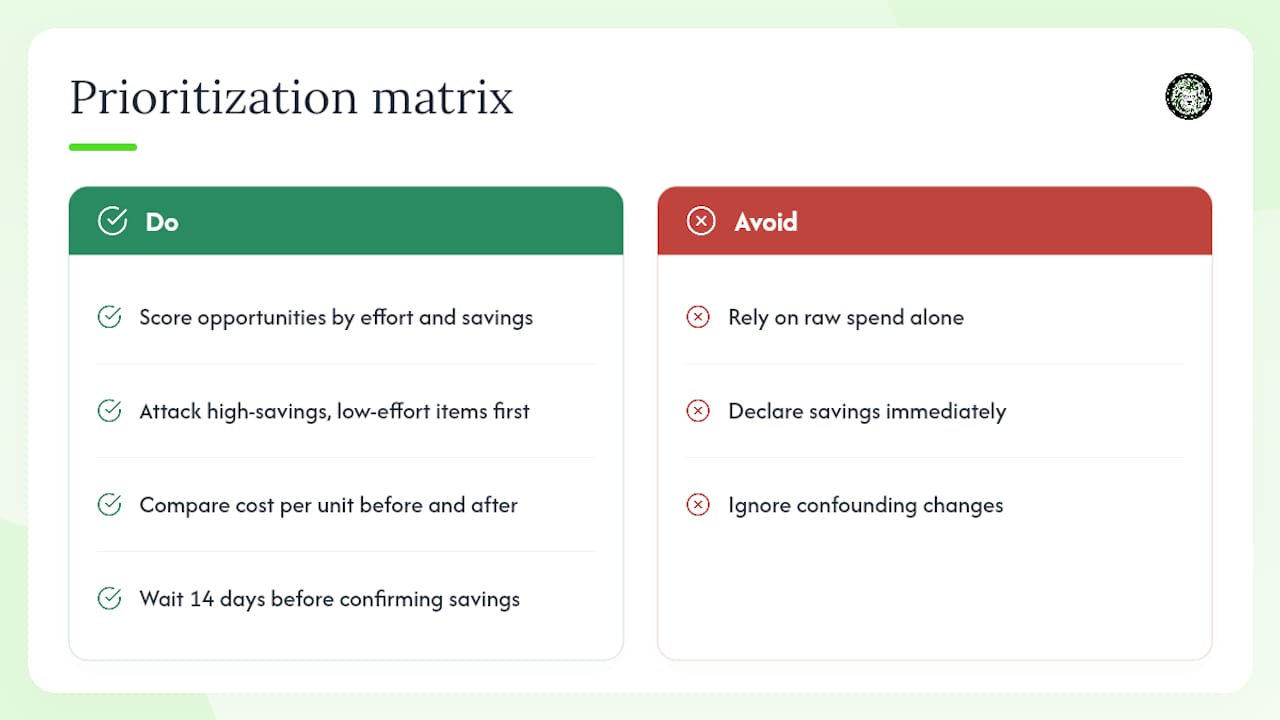
Validating claimed savings: Compare cost per unit of work (cost per API call, cost per active user, cost per GB processed) before and after, not just raw spend. Raw spend changes with traffic. Normalize for volume, check for confounding changes (new features, traffic spikes), and use a 14-day post-change window before declaring a saving confirmed.
How do governance and FinOps practices sustain your savings?
Technology alone does not stop waste from returning. CoreSite's analysis makes this point directly: FinOps creates the cross-team accountability that sustains optimization where tooling alone cannot. The AWS Well-Architected Framework treats Cloud Financial Management as a formal organizational capability, not a project.
Roles and responsibilities
| Role | Primary responsibility | Key interaction |
|---|---|---|
| FinOps Lead | Owns cost reporting, KPIs, and the monthly review cadence | Bridges finance and engineering |
| Cloud Owner / Architect | Approves resource provisioning standards and purchase model decisions | Works with FinOps Lead on RI/SP strategy |
| SRE / Infra Engineer | Implements rightsizing, scheduling, and IaC cost guardrails | Executes recommendations from tooling |
| Cost Steward (per team) | Monitors team-level spend and tags resources correctly | Reports anomalies to FinOps Lead |
Tagging and cost allocation
A tagging policy is only as good as its enforcement. Define required tags in a policy document, then enforce them at the infrastructure layer: AWS Service Control Policies, Azure Policy deny effects, or GCP Organization Policies can block resource creation without required tags. Automate a weekly report of untagged spend so the gap is visible and owned.
Chargeback allocates actual cloud costs back to business units or product teams, creating direct financial accountability. Showback reports the same data without transferring the charge, which is a gentler starting point for teams new to cost accountability.
KPIs and reporting cadence
- Wasted spend %: the share of total spend on idle, oversized, or unallocated resources. Target below 10%.
- RI/Savings Plan coverage: the percentage of eligible on-demand spend covered by commitments. Target 70%+ for stable workloads.
- Cost per transaction / cost per active user: unit economics that normalize spend against business output.
- Unallocated spend %: the share of spend with no team or service tag. Target below 5%.
Run a monthly cost review with all cost stewards. Review anomalies, validate savings from the previous month's actions, and assign the next month's top three optimization targets.
Pro Tip: Embed Infracost or a similar cost-estimation step in your Terraform or Pulumi CI/CD pipeline. A pull request that would add $2,000/month in new resources should require explicit approval before merging, not after the bill arrives.
Provider-specific quick actions you can run this week
AWS
| Action | Tool | Where to start |
|---|---|---|
| Rightsizing recommendations | AWS Compute Optimizer | Compute Optimizer console, "Recommendations" tab |
| RI and Savings Plan analysis | AWS Cost Explorer | Cost Explorer, "Savings Plans" and "Reservations" tabs |
| Stop underused RDS instances | AWS Cost Explorer + RDS console | Filter for RDS instances with < 5% CPU over 14 days |
| Delete unattached EBS volumes | AWS Console / CLI | EC2 console, "Volumes" filtered by "available" state |
| Identify idle load balancers | AWS Trusted Advisor | Trusted Advisor, "Cost Optimization" checks |
| Egress cost audit | AWS Cost Explorer | Group by "Usage Type" and filter for "DataTransfer-Out" |
Pro Tip: Enable AWS Cost Anomaly Detection with a daily alert threshold. It uses machine learning to flag unusual spend patterns before they compound into a large monthly surprise.
Azure
| Action | Tool | Where to start |
|---|---|---|
| Rightsizing and shutdown recommendations | Azure Advisor | Advisor console, "Cost" recommendations |
| VM start/stop automation | Azure Automation | Automation account, "Start/Stop VMs during off-hours" solution |
| Storage tiering | Azure Blob Storage lifecycle management | Storage account, "Lifecycle management" policy |
| Snapshot cleanup | Azure Portal | Managed Disks, filter snapshots by age |
| Budget alerts | Azure Cost Management | Cost Management, "Budgets" blade |
GCP
| Action | Tool | Where to start |
|---|---|---|
| Rightsizing recommendations | GCP Recommender | Recommender console, "VM machine type" recommendations |
| Committed use discounts | GCP Console | "Committed use discounts" under Billing |
| Preemptible / Spot VM migration | GCP Console | Instance group settings, change provisioning model |
| Storage lifecycle rules | Cloud Storage | Bucket settings, "Lifecycle" rules |
| Egress audit | GCP Billing | Billing reports, filter by "Network" SKU |
Pro Tip: GCP's Recommender API can be queried programmatically, making it straightforward to pull recommendations into a Slack alert or a Jira ticket automatically. Automate the ticket creation and you remove the manual review step entirely.
What should you measure to prove cloud savings are real?
Tracking the right metrics is what separates a team that claims savings from one that proves them.
Core KPIs
- Total cloud spend by service and team: the baseline every other metric depends on.
- Wasted spend %: idle, oversized, and unallocated resources as a share of total spend.
- RI/Savings Plan coverage %: eligible on-demand hours covered by commitments.
- Spot adoption %: share of eligible workloads running on Spot or Preemptible instances.
- Egress spend as % of total: tracks whether network optimization efforts are working.
- Cost per unit of work: cost per API call, per active user, per GB processed, or per transaction, depending on your product.
Dashboard components
A practical cost dashboard has three layers:
- Daily anomaly alert: a chart of spend versus a rolling 7-day baseline, with alerts when spend exceeds a defined threshold. AWS Cost Anomaly Detection, Azure Cost Management alerts, and CloudZero all support this natively.
- Monthly cost-change summary: a table showing spend by service, team, and environment for the current month versus the prior month, with variance flagged.
- Efficiency trend: a line chart of cost per unit of work over time. This is the metric that proves optimization is real and not just a traffic dip.
Validating claimed savings
False attribution is a real risk. Validate correctly:
- Use a control window of at least 14 days before and after the change.
- Normalize for volume: compare cost per unit of work, not raw spend.
- Check for confounding changes: new features, traffic campaigns, or architectural changes in the same window can inflate or mask savings.
- Apply confidence bands: if the change is smaller than the natural week-to-week variance in your spend, it is not yet statistically meaningful.
The AWS Well-Architected Framework's cost optimization pillar recommends comparing cost per unit of work as the primary validation method, precisely because raw spend is too noisy to be reliable on its own.
Statistic to watch: Track wasted spend % as your single most important metric in the first 30 days. It is the clearest signal of whether your quick wins are holding.
The pitfalls most teams hit and how to avoid them
Most cloud cost programs fail not because the tools are wrong but because the process breaks down. Here is what I see repeatedly.
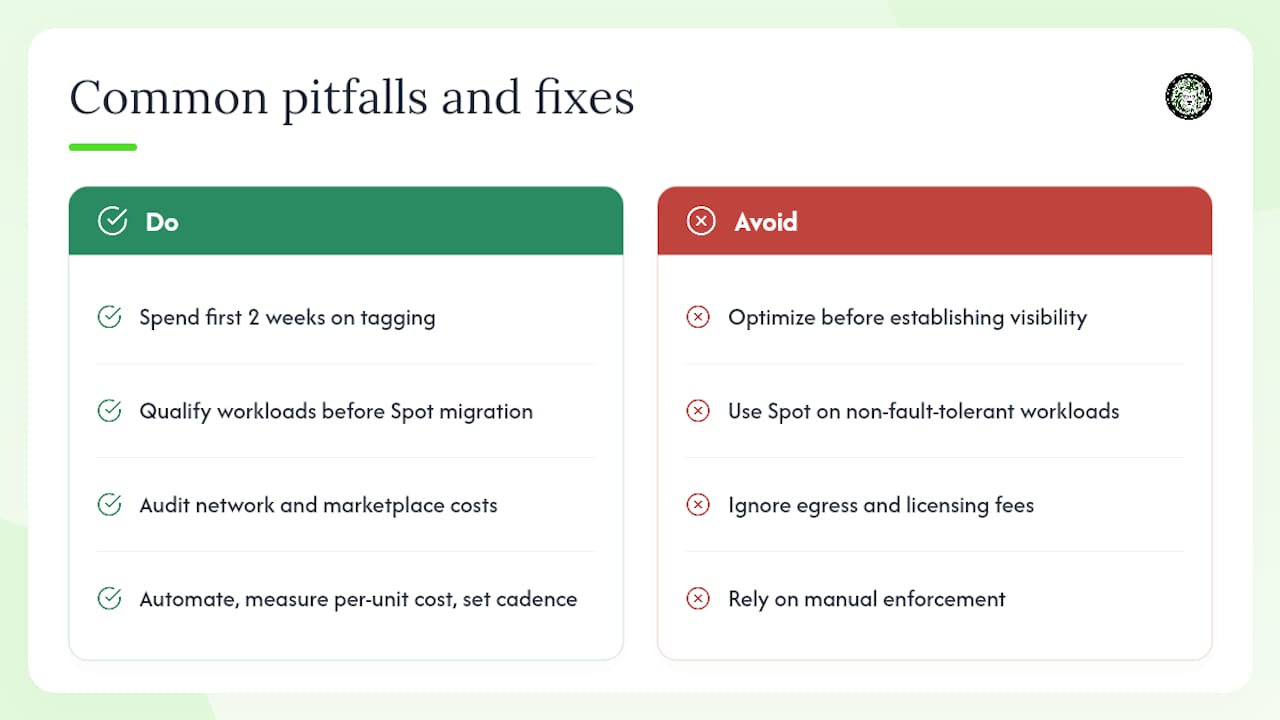
Pitfall 1: Optimizing without a visibility baseline first. Teams jump straight to rightsizing or Spot adoption before they have clean cost allocation data. The result is savings that cannot be attributed, regressions that go unnoticed, and stakeholders who stop trusting the numbers. Fix: spend the first two weeks entirely on tagging, cost allocation, and dashboard setup. Do not touch a single instance until you can see where the money is going.
Pitfall 2: Chasing Spot savings on workloads that cannot tolerate interruption. Spot and Preemptible instances are powerful, but they require fault-tolerant architecture. Stateful databases, synchronous API backends, and anything without graceful shutdown handling will cause incidents, not savings. Fix: qualify workloads before migrating. Batch jobs, CI/CD runners, and stateless web tiers are the right starting point.
Pitfall 3: Ignoring data transfer and licensing costs. Most optimization programs focus on compute and storage because those line items are visible. Egress fees and marketplace licensing charges accumulate quietly and can represent a significant share of total spend in data-heavy or multi-cloud architectures. CoreSite's research highlights egress as a major hidden cost that direct connectivity can address. Fix: add a network cost audit and a SaaS/marketplace spend review to your first 30-day checklist.
The pragmatic rules of thumb that actually sustain a cost program: automate enforcement so humans do not have to remember, measure cost per unit of work so traffic changes do not fool you, and set a governance cadence so savings do not silently erode. Building scalable app architecture from the start is far cheaper than retrofitting cost controls onto a system that was never designed with them in mind.
Sources
These are the primary references worth bookmarking for ongoing cloud expense management work.
- Cost Optimization Pillar - AWS Well-Architected Framework
- AWS Cost Optimization Hub
- cloud-cost-cli (GitHub)