
TL;DR:
- Effective AI integration in game development starts with focusing on dev-time tools like code assistants and asset generators to boost productivity and reduce risks. Thorough validation, human oversight, and early inclusion of accessibility ensure high-quality, inclusive features, while measuring performance through specific metrics guides continuous improvement. Approaching AI as a core architectural element rather than a plugin leads to more reliable, engaging, and successful AI-driven games.
Most game developers know AI has changed how games get built. Far fewer know how to actually integrate it without wasting weeks on the wrong tools, generating content that breaks at runtime, or shipping features that frustrate players instead of delighting them. This ai game development guide cuts through that noise. Whether you're a solo hobbyist or a studio lead, you'll get a clear picture of which AI techniques matter, how to layer them into your workflow, and how to avoid the mistakes that trip up even experienced teams. The goal is practical, specific, and usable from day one.
Table of Contents
- Key takeaways
- Your AI game development guide: tools, techniques, and prerequisites
- Step-by-step: integrating AI into your workflow
- Common pitfalls and quality assurance
- Measuring success with AI features
- My honest take on where developers go wrong
- Ready to build your AI-powered game?
- FAQ
Key takeaways
| Point | Details |
|---|---|
| Start with dev-time AI | Use AI for coding and prototyping first before adding it to shipped features, where failure costs are higher. |
| Validate all AI output | Pass every piece of AI-generated content through schema validation and human review before it hits the game. |
| Design AI around outcomes | Define what players should feel, then build your AI systems backward from those gameplay goals. |
| Accessibility cannot be an afterthought | Include diverse testers and assistive technology checks from the beginning, not after feature lock. |
| Measure before you iterate | Track production speed, player retention, and engagement data to know what your AI systems are actually doing. |
Your AI game development guide: tools, techniques, and prerequisites
Before writing a single line of AI code, you need to understand the terrain. AI in game development covers several distinct areas, and confusing them leads to scope creep and wasted effort.
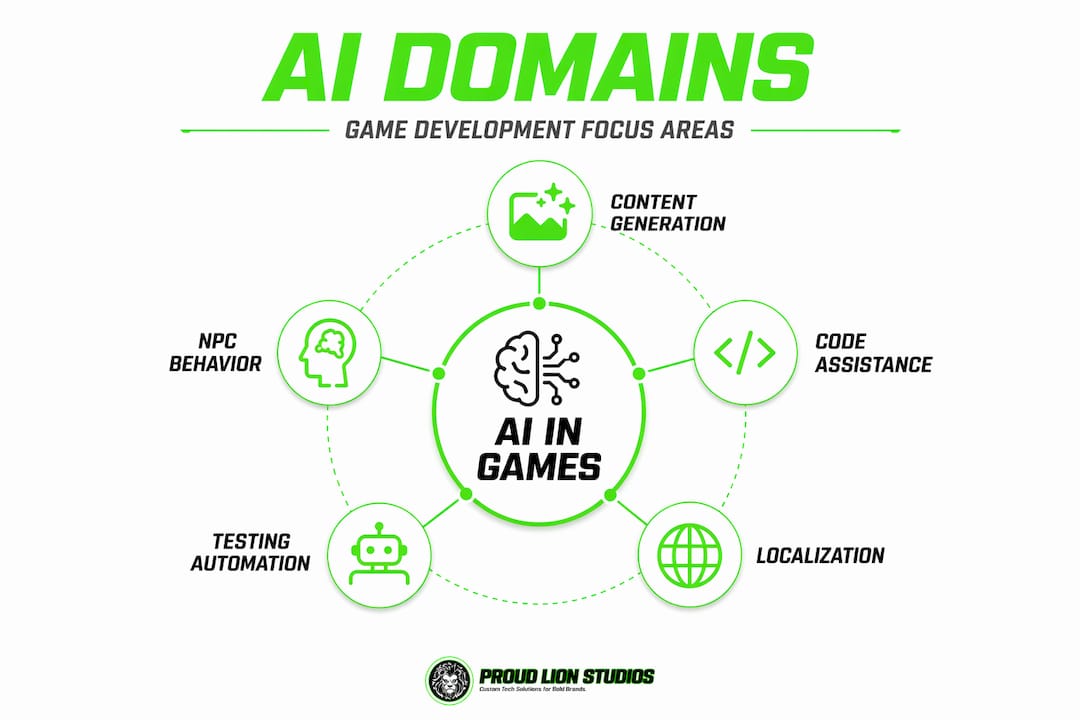
The main domains you'll work across are: procedural content generation, NPC behavior and decision-making, code assistance, animation and physics, dialogue systems, and asset creation. Each of these has its own toolset and risk profile. NPC logic errors are embarrassing but patchable. A corrupted procedural dungeon generator that ships in a live game is a customer support nightmare.
AI tools and frameworks worth knowing
Here's a quick reference for the platforms most relevant to game development with AI techniques:
| Tool / Framework | Primary use case | Best for |
|---|---|---|
| Unity ML-Agents | NPC training, reinforcement learning | Mid to large teams, complex behavior |
| Inworld AI | Real-time NPC dialogue and memory | Story-driven games, RPGs |
| Scenario.gg | AI asset generation (sprites, textures) | Indie and solo developers |
| GitHub Copilot | Code completion and boilerplate | All skill levels |
| Meshy / Luma AI | Text-to-3D model generation | Rapid prototyping, mobile games |
| ElevenLabs | Voice synthesis for NPCs | Narrative games, accessibility |
Your hardware baseline matters too. Most AI code assistants run in the cloud and need only a decent internet connection. On-device ML inference (for NPC behavior or procedural generation at runtime) demands more. Plan for at least 16GB RAM and a mid-tier GPU if you're running local models during development.

For game engines, Unity and Unreal Engine both have established AI integration pathways. Godot's ecosystem is catching up fast, especially for hobbyists who want lower overhead. Make sure you're working with the relevant AI SDK or plugin before committing to an architecture.
Pro Tip: Before adding any AI tool to your pipeline, apply a simple three-question test: Is the input schema-bound? Can a human review the output in under 30 seconds? Is the cost of a bad output low? If any answer is no, add more guardrails or skip it for now.
This heuristic for AI tasks keeps your workflow honest and prevents you from automating things that genuinely need human judgment.
Step-by-step: integrating AI into your workflow
This is where most tutorials fail. They show you a tool demo and call it a guide. Real AI-driven game development requires an integration sequence, not just a list of cool software.
-
Define your player outcomes first. What should the player feel during combat? What makes exploration rewarding? Successful studios engineer AI backward from player outcomes rather than forward from available technology. Write a one-paragraph outcome statement for each AI system before choosing your tools.
-
Layer your AI by integration type. Think in three layers. Dev-time AI supports your team during production: code assistance, rapid prototyping, asset drafts. Ship-time AI runs inside the shipped game: NPC behavior, dynamic difficulty, procedural levels. Ops-time AI runs after launch: player analytics, live balance tuning, support automation. Dev-time AI compounds value without introducing major production risks. Start there.
-
Use AI to accelerate asset creation. Specialized AI pipelines can generate 3D models in 30 to 60 seconds, 2D sprite sheets in 5 to 10 seconds, PBR textures under 20 seconds, background music in 30 to 120 seconds, and voice lines in 2 to 5 seconds per line. These numbers are not theoretical. Use them to cut concept-to-playable time dramatically, then apply human polish on the assets that players will see most.
-
Build NPC behavior with a human oversight loop. Unity ML-Agents and behavior tree systems like Behavior Designer let you train or script NPC logic. Whatever you use, build in a review step. Log NPC decisions during playtests, flag outliers, and tune. Never ship NPC AI that hasn't been stress-tested by a human playing adversarially against it.
-
Integrate localization and accessibility from the start. AI localization tools can translate at speed, but tone and cultural nuance require cross-functional human review. Build your localization pipeline to flag low-confidence translations automatically for expert review. For accessibility, design your AI systems around diverse abilities in training data and test with screen readers, switch controls, and cognitive load assessments early.
-
Set up debugging and playtesting for AI content. AI-generated maps, quests, and dialogue need the same QA rigor as hand-authored content. Use automated playtest bots to stress-test procedural systems. Record player paths through AI-generated levels to spot dead ends or pacing breakdowns.
Pro Tip: When generating assets with AI, always keep the raw outputs in a version-controlled folder separate from your finalized assets. This gives you a rollback path and makes it easy to regenerate variations when design direction changes.
Common pitfalls and quality assurance
Knowing how to create AI games is only half the picture. Knowing what breaks them is the other half.
The most common mistake is skipping dev-time integration entirely and wiring AI directly into shipped features. This is one of the clearest anti-patterns in AI game development. Ship-time AI can introduce complex cascading failures that are hard to diagnose, especially in live service games where patches need approval cycles.
The second most common mistake is trusting raw AI output. Every piece of AI-generated game data should pass through schema validation before it touches your game state. Tools like Zod (JavaScript) and Pydantic (Python) let you validate AI output strictly with typed schemas. Add a secondary LLM review pass for content that affects game balance, such as AI-generated loot tables or procedural quest rewards.
Here's a short list of anti-patterns worth memorizing:
- Generating NPC dialogue without filtering for tone consistency or lore accuracy
- Using AI-generated textures without checking for tiling artifacts or resolution mismatches
- Shipping procedural level generation without fallback templates for edge cases
- Applying AI localization to culturally sensitive content without native speaker review
- Training reinforcement learning agents on synthetic data that doesn't reflect actual player behavior
"Treat AI like a junior team member who is fast, creative, and occasionally very wrong. Your job is to review the work, not rubber-stamp it."
Accessibility is another area where teams consistently underinvest. Participatory design with diverse abilities is not just an ethical practice. It produces more robust AI systems, because edge cases caught by players with disabilities often reveal logic flaws that affect everyone. Budget time for assistive technology testing in every sprint that touches AI-facing systems.
Measuring success with AI features
Building AI features is satisfying. Knowing whether they actually worked is harder.
The metrics that matter most fall into three categories. Production speed tells you how much faster your team ships content with AI assistance. Track time from concept to playable per feature or asset type, comparing pre-AI and post-AI baselines. Player retention and engagement tell you whether your AI systems are improving the experience. AI-driven difficulty and pacing adaptation adjusts gameplay in real time based on player behavior, and the downstream effect should show in session length and return rates.
| Metric | What it measures | Target signal |
|---|---|---|
| Asset production time | Team efficiency gain from AI tools | 30 to 60% reduction vs. baseline |
| Player session length | Engagement impact of AI-driven pacing | Upward trend post-feature release |
| Retention rate (Day 7, Day 30) | Long-term engagement from AI personalization | Improvement vs. control group |
| QA defect rate for AI content | Validation pipeline effectiveness | Declining trend over sprints |
| Localization turnaround time | Speed gain from AI translation tools | 50%+ reduction with quality parity |
Set up a continuous integration pipeline for AI content just as you would for code. Automated playtest bots can run thousands of simulated playthroughs overnight, surfacing balance issues in procedural systems that would take a human QA team weeks to find manually. Pair this with structured human QA for content that requires contextual judgment.
Pro Tip: Run an A/B test on AI-generated vs. hand-authored content for at least one feature before committing to full AI production. The data will tell you exactly where AI adds value and where human craftsmanship still wins.
For a deeper look at selecting the right tools before you build your measurement framework, the AI tools for game studios guide at Proudlionstudios covers tool selection by workflow impact and failure risk.
My honest take on where developers go wrong
I've watched a lot of teams approach AI integration the wrong way. Not because they lack skills, but because they treat it like a plugin rather than an architectural decision. You bolt on a dialogue AI at the end of production, and suddenly your save system, your localization pipeline, and your QA process all need surgery. Fixing that costs more time than the AI ever saved.
What I've found actually works is starting with one high-ROI, low-risk AI task and owning it completely. Code generation for boilerplate logic is the single best entry point. It's fast to adopt, easy to review, and fails quietly rather than dramatically. Once your team trusts the process, you expand.
I'm also skeptical of the idea that AI removes the need for human judgment in games. The opposite has been true in my experience. AI raises the ceiling on what you can produce, but it also raises the floor of judgment required to keep quality consistent. Every generative system you add needs a human with taste reviewing its outputs. If you don't have that person, the AI will produce technically correct content that feels hollow.
The developers I've seen get the most out of AI are not the ones who automate the most. They're the ones who stay deeply involved in what the AI produces, iterate on it constantly, and treat AI as architecture from the first design doc. That discipline is what separates studios that ship great AI-driven games from the ones that ship demos.
— Amal
Ready to build your AI-powered game?

At Proudlionstudios, we work with game studios and independent developers to build AI systems that actually ship. From AI agent development to full mobile game production, our UAE-based team brings both the technical depth and the production experience to make AI integration work in practice, not just in theory. We also connect game mechanics with blockchain game development for studios building on-chain economies, play-to-earn systems, and NFT-native experiences. If you're ready to move from experimenting with AI tools to building a production-grade game, let's talk.
FAQ
What is the best starting point for AI in game development?
Start with dev-time AI tools like code assistants and AI asset generators. These deliver measurable productivity gains without the risks that come with shipping AI inside the live game.
How do I validate AI-generated content in my game?
Run all AI output through schema validation libraries like Zod or Pydantic, then add a human review step for anything affecting game balance or narrative tone.
Can AI tools handle NPC behavior and dialogue?
Yes, platforms like Inworld AI and Unity ML-Agents support NPC dialogue and decision-making, but both require human oversight during design and QA to prevent tone inconsistencies and logic errors.
How does AI help with game localization?
AI localization tools significantly cut translation time, but cultural nuance and tone still require native-speaker review. Build in a flagging system for low-confidence translations.
What metrics should I track for AI game features?
Track asset production time, player retention at Day 7 and Day 30, session length, and QA defect rates for AI-generated content to get a clear picture of what your AI systems are delivering.