

TL;DR:
- Successful Unity live-ops games require disciplined workflows, early profiling, and robust architecture.
- Key tools include Unity LTS, version control, test frameworks, CI/CD, and local multiplayer simulation.
- Continuous profiling and testing at each development milestone ensure performance and launch readiness.
Shipping a Unity game that holds up under live-ops pressure is a fundamentally different challenge than building a working prototype. Studios that skip the discipline of structured workflows, early profiling, and proper network architecture often discover their technical debt at the worst possible moment: right before launch, when the cost of fixing it is highest. This guide walks you through every phase of a modern Unity development cycle, from the tools you set up on day one to the final verification pass before you go live, with practical tactics drawn from real multiplayer and mobile game production in 2026.
Table of Contents
- What you need before you start
- Step-by-step Unity game development workflow
- Troubleshooting technical edge cases and maximizing performance
- Testing, profiling, and ensuring launch-readiness
- Hard-won lessons: Why Unity success is about workflow, not features
- Next steps: Build your Unity game with expert support
- Frequently asked questions
Key Takeaways
| Point | Details |
|---|---|
| Performance starts early | Treat performance as a design constraint from project initiation, not during polish. |
| Know your tech stack | Choose Unity tools and techniques suited to your game's scope and future plans. |
| Test and profile proactively | Continuous testing and profiling catch issues before they become launch blockers. |
| Avoid common pitfalls | Be aware of batcher incompatibilities and Netcode bugs to save time and budget. |
| Workflow discipline wins | A disciplined, test-driven workflow is more valuable than adopting new features alone. |
What you need before you start
With the overview addressed, the next step is equipping your team with the right technology and frameworks.
Getting the toolchain right before writing a single line of game logic saves you from painful migrations later. The choice of Unity version alone can determine whether you spend weeks fighting editor instability or shipping features. Always start a new project on the current Unity LTS (Long-Term Support) release. LTS versions receive bug fixes for two years without introducing breaking API changes, making them the only sensible choice for production projects. Pair this with a capable IDE such as JetBrains Rider or Visual Studio 2022 for full C# debugging and code analysis support.
Essential tools checklist
Here is what every Unity project needs from the first commit:
- Unity LTS version (currently 6.x LTS in 2026) for stability and long-term patch support
- Git with Git LFS for version control and large binary asset tracking
- Unity Test Framework for unit and integration testing inside the editor
- A dedicated asset repository (Unity Asset Manager or a shared NAS/cloud drive) to prevent asset duplication
- CI/CD pipeline (GitHub Actions, Unity Cloud Build, or Jenkins) to automate builds and test runs
- ParrelSync for local multiplayer client simulation without multiple Unity installs
- Profiler and Frame Debugger built into Unity, enabled from day one
Team roles that matter
For a multiplayer or mobile title, you need more than just engineers. A project manager owns the milestone calendar and risk log. A lead engineer sets architectural patterns. A network specialist designs the server-authoritative model. A QA tester writes and runs test suites. Skipping any of these roles creates a gap that always shows up as a crisis later.
| Tool | Purpose | Priority |
|---|---|---|
| Unity LTS | Stable engine foundation | Critical |
| Git + Git LFS | Version control for code and assets | Critical |
| Unity Test Framework | Automated unit and integration tests | High |
| CI/CD pipeline | Automated build verification | High |
| ParrelSync | Local multiplayer simulation | Medium |
| Frame Debugger | Batching and draw call analysis | High |
Good architecture starts before the first scene. C# scripting best practices include event-driven architectures, object pooling to avoid garbage collection pressure, cache-friendly coding by avoiding repeated "GetComponent` calls, and unit testing with Unity Test Framework. These are not optional refinements. They are the foundation that lets your codebase scale without becoming unmanageable.
You should also track current mobile game trends 2026 early in planning, because platform-specific constraints like memory budgets and input latency on mobile will shape your architecture from the start.
Pro Tip: Set up your unit tests and CI/CD pipeline at project kickoff, not as an afterthought. A test suite built after the fact requires rewriting code to be testable, which is expensive and demoralizing.
Step-by-step Unity game development workflow
Once the foundation and team are in place, it's time to move systematically through the project workflow.
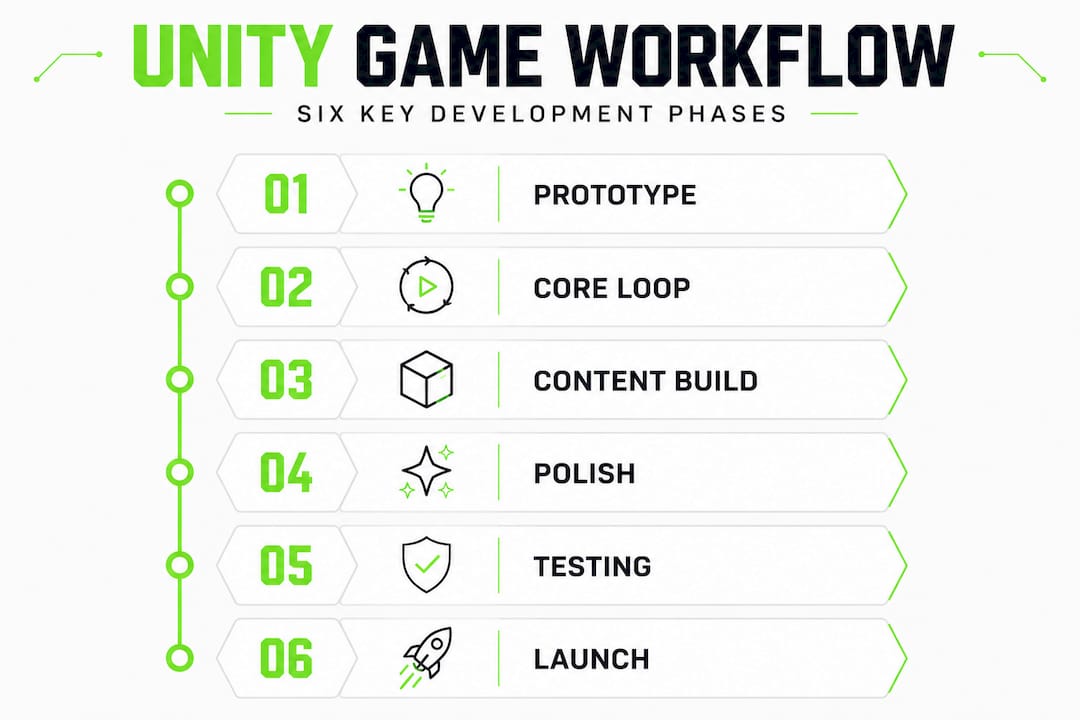
A disciplined workflow is what separates studios that ship on time from those that spend months in "almost done" territory. The key insight here is that performance is not a polish step. It is a design constraint you enforce at every milestone. Studios succeed by treating performance as a design constraint from day one, not a polish step, and benchmarks show that disciplined workflows scale to live-ops without late refactoring.
The core development phases
-
Prototype and validate the core loop. Build the minimum playable version of your game's central mechanic in a throwaway scene. This is not production code. The goal is to answer one question: is this fun? Keep it under two weeks.
-
Establish the production architecture. Once the core loop is validated, rebuild it properly. Define your folder structure, scripting conventions, event bus or messaging system, and scene management strategy. This is when you create your base prefabs and set up object pools for frequently spawned entities.
-
Integrate assets incrementally. Bring in 3D models, audio, and UI assets in batches tied to feature milestones, not all at once. Each asset batch should be profiled immediately after integration to catch memory spikes before they compound.
-
Build the network layer. For multiplayer titles, implement server-authoritative movement using
ServerRpcfor input andNetworkTransformfor position sync. Set up scene loading viaNetworkManager.SceneManagerto prevent disconnects during transitions. Test with two clients locally before expanding to remote sessions. -
Implement and test game systems. Economy, inventory, progression, and AI systems each get their own feature branch, unit tests, and integration tests before merging to main.
-
Profile after every milestone. Run the Unity Profiler and check the Stats panel for Batches and SetPass calls after each major feature lands. Do not wait until the end.
-
Soft launch and live-ops readiness check. Simulate live-ops conditions with load testing, remote multiplayer sessions, and crash reporting enabled. Fix everything that surfaces before the public launch.
| Phase | Key tools | Success metric |
|---|---|---|
| Prototype | Unity Editor, test scene | Core loop validated in under 2 weeks |
| Architecture | Git, coding standards doc | Clean folder structure, no spaghetti dependencies |
| Asset integration | Profiler, Asset Manager | No unexpected memory spikes per batch |
| Network layer | NGO, ParrelSync | Stable 2-client local session |
| Game systems | Unity Test Framework, CI/CD | All unit tests passing on merge |
| Profiling milestone | Frame Debugger, Stats panel | Batches and SetPass within target budget |
| Launch readiness | Load testing, crash reporting | Zero critical bugs in 48-hour stress test |
Working with experienced Unity mobile developers can accelerate phases two through four significantly, especially when the network architecture is complex.
Pro Tip: Profile play modes after each milestone. A performance regression caught at milestone three costs an hour to fix. The same regression caught at launch costs a week and delays your ship date.
Troubleshooting technical edge cases and maximizing performance
With the gameplay systems implemented, troubleshooting emerging bugs and performance spikes becomes critical.

This is where most Unity projects run into real trouble. The bugs are subtle, the symptoms are misleading, and the fixes require understanding how Unity's rendering and networking pipelines actually work under the hood.
Common edge cases you will encounter
- SRP Batcher vs. GPU Instancing conflict. These two optimizations are mutually exclusive. SRP Batcher is incompatible with GPU Instancing. Enabling both silently disables one of them, which can cause unexpected draw call counts.
- Static Batching memory cost. Static Batching increases memory 3 to 5 times for affected meshes because Unity duplicates geometry into a combined mesh. On mobile, this can blow your memory budget fast.
- Dynamic Batching CPU overhead. Dynamic batching CPU overhead often exceeds the savings it provides and is considered a legacy feature. Avoid it unless you are specifically targeting low-end devices where draw call count is the bottleneck.
- NetworkTransform desync after respawn. This is one of the most frustrating multiplayer bugs.
NetworkTransformdesyncs after repeated respawns, ownership changes, or disable/enable cycles on theNetworkObject. - ClientRpc silent failures. A
ClientRpcfails silently if theNetworkObjectit is called on has not been spawned yet. No error, no warning, just missing behavior. - Texture atlasing UV rework. Texture atlasing enables batching by combining textures, but it requires UV coordinate rework on every affected mesh. Plan for this time in your asset pipeline.
Warning: Always validate your batching setup in the Frame Debugger and test network ownership logic in live lobby sessions with real clients. What looks correct in the editor often breaks under actual network conditions.
For multiplayer with Netcode for GameObjects (NGO), use server-authoritative movement via ServerRpc for input and NetworkTransform for sync. Load scenes via NetworkManager.SceneManager to avoid disconnects. These patterns are not suggestions. They are the architecture that prevents the most common class of multiplayer bugs.
If your project involves blockchain integration or AI-driven systems, the complexity increases further. Explore how blockchain and AI multiplayer architectures handle these challenges, and consider whether your team needs specialized support for AAA multiplayer solutions at scale.
Pro Tip: Use ParrelSync to simulate multiple clients on one machine and monitor Batches and SetPass calls in the Stats panel during every test session. This catches both rendering and networking regressions in a single workflow.
Testing, profiling, and ensuring launch-readiness
With technical hurdles addressed, comprehensive project verification is the last step before a confident launch.
Testing in Unity is not just about finding bugs. It is about proving that your game behaves correctly under the conditions your players will actually experience: variable network latency, different device memory profiles, and concurrent user loads that stress your server-authoritative systems.
Your launch verification checklist
- Run all unit tests in the Unity Test Framework and confirm zero failures on the main branch.
- Run integration tests that cover full game flow: lobby creation, scene load, gameplay session, and disconnect/reconnect.
- Simulate local multiplayer with ParrelSync using at least two clients and one host.
- Run a remote multiplayer session with team members on different networks to expose real latency behavior.
- Open the Frame Debugger and verify that your batching strategy is working as intended. Check for unexpected draw call spikes.
- Check the Stats panel during peak gameplay moments. Monitor Batches, SetPass calls, and triangles rendered.
- Review the Profiler for memory allocation spikes, particularly around object instantiation and scene transitions.
- Enable crash reporting (Unity Cloud Diagnostics or a third-party tool) and run a 48-hour stress test before launch.
Key statistic: Static Batching increases mesh memory by 3 to 5 times for batched objects. If you have 200 static mesh objects in a scene, your memory footprint for that geometry could be five times larger than expected. Always verify this in the Profiler before targeting mobile platforms.
The Light Brick Studio team building LEGO Voyagers demonstrated this discipline clearly. They found that verifying batching in Frame Debugger and monitoring Batches and SetPass in Stats was essential, and that multiplayer physics co-op required custom network architectures to handle prediction and reconciliation correctly. These are not exotic requirements. They are standard practice for any serious multiplayer title.
For games with in-game economies or monetization layers, add in-game economy checks to your verification pass. Economy bugs that ship to production are expensive to fix and damaging to player trust.
Hard-won lessons: Why Unity success is about workflow, not features
Before wrapping up, it is worth considering why workflow choices matter more than ever in cutting-edge Unity development.
Here is something we see repeatedly: a studio spends three months integrating the latest Unity rendering features, VFX Graph, DOTS, and custom shaders, and then ships a game that crashes on mid-range devices because nobody profiled the memory budget until week eleven. The features were impressive. The workflow was broken.
The studios that consistently ship quality games are not always the ones using the most advanced technology. They are the ones that treat testing as a first-class activity, profile after every milestone, and make architectural decisions based on data rather than enthusiasm. A future-proof workflow is built on process discipline, not on being first to adopt every new API.
Technical debt in game development is particularly brutal because it compounds. A poorly structured event system at week two becomes a race condition bug at week eight and a complete networking rewrite at week fourteen. The cost of skipping early discipline is not linear. It is exponential.
The studios that endure and grow are the ones that bridge game design vision with engineering discipline. That means your game designer and your lead engineer need to be in the same room when architectural decisions are made. It means your QA tester writes test cases before features are built, not after. And it means your profiling sessions are scheduled events on the milestone calendar, not something that happens when someone notices the frame rate is bad.
Chasing features is tempting. The Unity ecosystem in 2026 offers more powerful tools than ever. But the studios we have seen succeed are the ones that master their workflow first and layer in new technology deliberately, not reactively.
Next steps: Build your Unity game with expert support
Building a Unity game that is truly ready for next-gen platforms requires more than good intentions. It requires the right team, the right architecture, and proven experience shipping multiplayer, mobile, and blockchain-integrated titles.

At Proud Lion Studios, we support studios at every stage of the development lifecycle, from architecture planning and network layer design to blockchain integration and live-ops readiness. Whether you need blockchain integration for Unity to power NFT-driven game economies, want to explore our portfolio of Unity and NFT projects for real examples of what is possible, or are ready to accelerate your roadmap with dedicated mobile game development services, our UAE-based team is built to deliver. Reach out to discuss your project and see how a structured, expert-led workflow can get your game to launch faster and with fewer surprises.
Frequently asked questions
What scripting practices improve Unity game performance?
Object pooling and cache-friendly code minimize garbage collection pressure, while event-driven architectures and Unity Test Framework integration keep your codebase reliable and testable at scale.
How do I handle common Netcode for GameObjects bugs?
Always ensure NetworkObject components are fully spawned before calling ClientRpc, and thoroughly test respawn and ownership-change logic to prevent NetworkTransform desync from surfacing in live sessions.
When should I use static or dynamic batching in Unity?
Use static batching carefully because it increases memory 3 to 5 times for batched meshes, and avoid dynamic batching unless you are targeting low-end devices where the CPU overhead is justified by draw call reduction.
How can I verify that my Unity game is launch-ready?
Run full profiling passes using the Frame Debugger and Stats panel, and complete multiplayer simulations with real network conditions. As demonstrated by Light Brick Studio, verifying batching and monitoring SetPass calls are non-negotiable steps before any production release.