
TL;DR:
- Embedding AI models into existing workflows enables smarter decision-making and handling of unstructured data. Successfully scaling requires pilots, clear success metrics, governance, and choosing architectures suited to the use case. Organizational change management and governance are crucial to turning the pilot into a reliable, trusted enterprise AI system.
An AI integration workflow embeds AI models directly into your existing business processes so they participate in decisions, handle unstructured data, and adapt over time — not just execute fixed rules. If you're evaluating whether to move forward, here are three things to do right now:
- Run a short pilot on one well-documented, high-volume workflow (ticket triage, lead scoring, or document processing are strong starting points).
- Define 1–2 success metrics before you start — time saved per task, error rate reduction, or throughput increase. Baselines matter more than you think.
- Put governance in place first. A control-plane layer and human-in-the-loop checkpoints are not optional extras; they are what keeps AI decisions auditable and safe to scale.
The sections below cover architecture patterns, a six-step implementation framework, vendor selection questions, and a governance checklist — everything you need to scope, run, and scale a pilot confidently.
Pro Tip: Before you read further, write down the one workflow in your organization that is high-volume, well-documented, and currently handled manually. That is your pilot candidate.
Table of Contents
- What counts as an AI integration workflow?
- What are the essential building blocks you need to plan for?
- How do common AI workflow architectures actually differ?
- What business benefits and use cases justify the investment?
- What risks should you plan for before you start?
- How do you implement an AI workflow in six practical steps?
- How do you evaluate tools and partners without making a costly mistake?
- How do you keep AI workflows safe, auditable, and maintainable at scale?
- Key Takeaways
- The gap between AI workflow promises and what actually moves the needle
- Proud Lion Studios builds the AI integrations enterprise teams actually ship
- Useful sources and further reading
What counts as an AI integration workflow?
Not every automation qualifies. A rule-based bot that routes tickets by keyword is automation. An AI workflow automation system that reads ticket text, interprets customer sentiment, summarizes the issue, and routes it to the right team — while learning from past resolutions — is an AI integration workflow. The distinction matters because the two require different infrastructure, governance, and success metrics.
Three types you'll encounter:
- Augmentation workflows — AI assists a human (drafts a response, flags an anomaly, suggests a next step). The human decides.
- Autonomous agentic workflows — AI agents invoke tools, call APIs, and complete multi-step tasks with minimal human intervention. These require the most governance.
- RAG-enhanced decision steps — AI retrieves relevant documents or records from a vector store before generating a response, grounding outputs in your actual data rather than general training.
Two short examples that show the difference in practice:
- Ticket triage: An incoming support ticket is read by an LLM, which classifies urgency, extracts key entities, writes a one-sentence summary, and routes the ticket to the correct queue — all before a human agent opens it.
- Resource allocation: An AI model reviews open project tasks, checks team member skills and current workload from your project management system, and suggests optimal assignments with a confidence score. A manager reviews and approves.
Both examples share three technical prerequisites: clean, structured data in accessible systems; documented workflows with clear decision points; and API access to the systems the AI needs to read from or write to. Without those three, your pilot will stall before it produces a result.
What are the essential building blocks you need to plan for?
Every AI integration workflow shares the same core architecture, regardless of use case. Miss one component and you'll hit it later — usually at the worst possible moment.

| Component | Role |
|---|---|
| AI models / agents (LLMs) | Generate responses, classify inputs, make decisions, or invoke tools |
| Orchestration / control plane | Coordinates agent behavior, enforces policies, manages sequencing |
| Integration layer and APIs | Connects AI to source systems (CRM, ERP, ticketing, databases) |
| Data stores and pipelines | Feeds clean, current data to models; stores outputs and logs |
| RAG / vector store | Retrieves relevant context from your documents or records at inference time |
| Monitoring and logging | Tracks latency, accuracy, cost per call, and override frequency |
| Human-in-the-loop interfaces | Approval screens, review queues, and escalation paths for sensitive decisions |
| Security and identity controls | Least-privilege credentials, secrets management, and access policies |
The flow looks like this: source systems push data through an ingestion pipeline into a model or RAG layer. The orchestration plane decides which agent or tool to invoke and under what conditions. Action connectors write results back to your systems. Human approval gates sit between high-stakes outputs and final execution. Every decision is written to an audit log.
Beyond the technical stack, three non-technical components determine whether the project actually succeeds: a governance owner (often a data steward or CISO), a change management plan that involves end users early, and living documentation that captures the workflow's before-and-after state.
Pro Tip: Assign a named owner to each component before the pilot starts. "The team" owns nothing. A named person owns everything.
How do common AI workflow architectures actually differ?
Orchestration layers act as conductors — they decide when an agent runs, which tools it calls, and what happens with the output. Choosing the wrong architecture for your use case creates either too much engineering overhead or too little control.

| Pattern | Best-fit use cases | Trade-offs |
|---|---|---|
| API-first / embedded model calls | Single-step enrichment, classification, summarization | Fast to build, limited multi-step logic |
| Agentic orchestration | Multi-step tasks, tool-calling, autonomous workflows | High control and flexibility, higher engineering effort |
| Middleware / control plane | Enterprise-scale, multi-system, policy-driven workflows | Strong observability, requires platform investment |
| Native-in-tool AI features | Early pilots, low-code teams, existing platform users | Fastest time to value, limited customization |
Choosing your data access method matters as much as the architecture:
- RAG is the right choice when your AI needs to reference proprietary documents, policies, or records without retraining the model. It keeps data current and reduces hallucination risk.
- Direct database access works for structured queries where latency is critical and data is already clean.
- Fine-tuning is rarely the right starting point — it is expensive, requires labeled data, and creates a model you must maintain. Reserve it for cases where RAG and prompt engineering have already been exhausted.
The practical recommendation: start with native features inside your existing platforms or a simple API-first pilot. Many teams find that 70–80% of their early needs are covered without custom builds. Move to full agentic orchestration only after you've validated the use case and understand the data flows.
What business benefits and use cases justify the investment?
The core benefits of a well-designed AI process integration are measurable and appear quickly in the right workflows:
- Time savings on repetitive, high-volume tasks (triage, classification, data entry)
- Error reduction in document processing and data extraction
- Faster decisioning through real-time scoring and recommendations
- Consistent customer responses at scale, without proportional headcount growth
- Predictive operations that surface issues before they become incidents
High-value use cases worth prioritizing:
- Customer support triage and summarization
- Automated lead enrichment and scoring in CRM systems
- Intelligent scheduling and resource allocation
- Document processing with OCR and NLP (contracts, invoices, intake forms)
- Predictive maintenance triggered by sensor or log data
MIT Sloan research found that generative AI boosted productivity for highly skilled workers significantly, with the largest gains in tasks involving writing, analysis, and information synthesis — exactly the tasks that appear most often in enterprise AI workflow pilots.
For a practical startup-stage checklist on which AI tools to prioritize first, the AI tools checklist for startups published by Proud Lion Studios is a useful reference.
What to measure and when: Track time saved per ticket or task in the first two weeks. By week four, add mean time to resolution and the percentage of issues auto-resolved without escalation. User adoption rate (are people actually using the AI-assisted interface?) is the leading indicator most teams forget to instrument.
What risks should you plan for before you start?
Technical complexity is rarely the primary barrier. Organizational change resistance is. Teams that involve end users in designing the human-AI collaboration loop see meaningfully higher adoption than those that deploy AI as a fait accompli.
Key risks and mitigations:
- Change resistance — Co-design the workflow with the people who will use it. Show them the before/after metrics, not just the technology.
- Model drift and accuracy loss — Schedule regular accuracy reviews. Set threshold alerts that trigger a human review when confidence scores drop below a defined level.
- Data quality problems — Run a data audit before the pilot. AI amplifies bad data; it does not fix it.
- Privacy and regulatory exposure — GDPR and CCPA compliance requires knowing where customer data is routed, whether prompts are retained for model training, and what your vendor's deletion policies are. Ask these questions before signing.
- Black-box decisioning — Require explainability outputs or confidence scores for any decision that affects a customer or employee. Log every decision.
- Credential sprawl — Use least-privilege connectors and a secrets manager. Never hardcode API keys in workflow definitions.
Pre-pilot readiness checklist:
- Is the target workflow documented end-to-end?
- Is the data clean, accessible, and governed?
- Have you identified the human approval points?
- Do you have a named data steward and security owner?
- Have you reviewed vendor data residency and deletion policies?
- Have you briefed the end users who will work alongside the AI?
Score yourself on all six before committing budget. A "no" on items 1, 2, or 4 is a blocker — fix those first.
How do you implement an AI workflow in six practical steps?
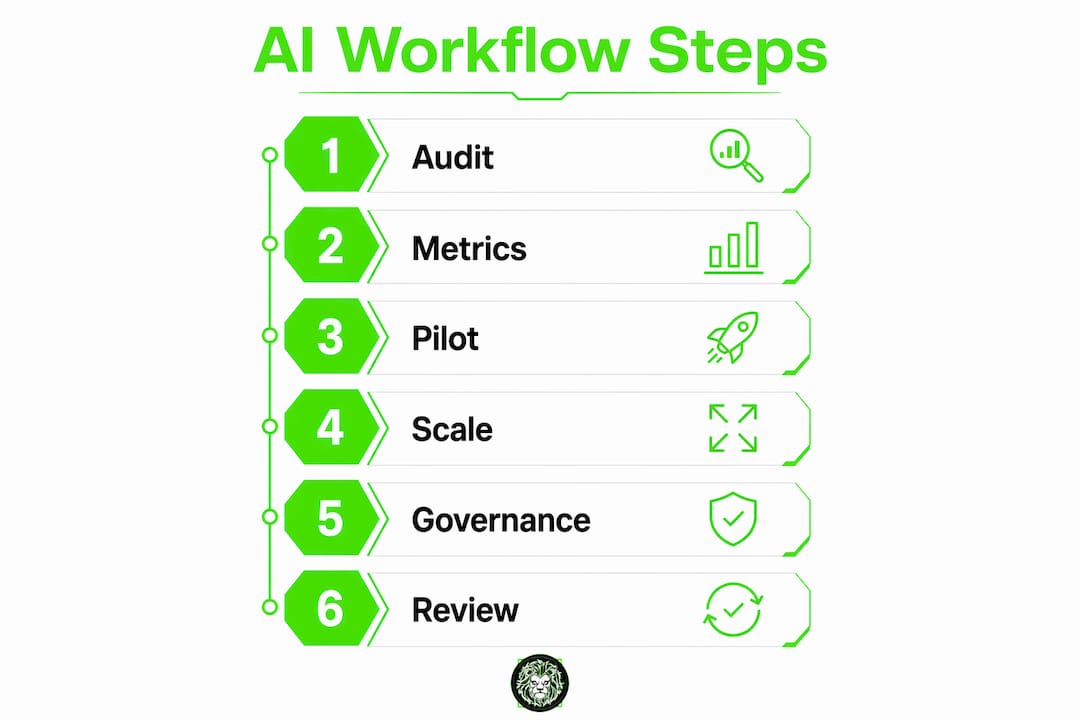
This six-step framework is the most widely recommended structure for enterprise teams in 2025–2026. It is designed to be repeatable across use cases.
-
Audit workflows for AI readiness. Map your top five candidate workflows. Score each on: data quality, documentation completeness, volume, and current error rate. Pick the one with the highest score.
-
Define success metrics and baseline. Before touching any AI tooling, measure the current state. How long does the task take? What is the error rate? What is the throughput? These numbers are your before-state.
-
Choose your integration approach. Based on the architecture table above: native features for speed, API-first for moderate customization, agentic orchestration for complex multi-step tasks. Match the approach to the use case, not to what sounds most impressive.
-
Run a focused pilot. Four to eight weeks is the right window. Scope it tightly: one workflow, one team, one set of success criteria. Document everything. A developer-level implementation guide can accelerate the technical setup.
-
Manage change and train users. Hold a kickoff session with the team using the workflow. Explain what the AI does, what it does not do, and how to escalate when it is wrong. This session is not optional.
-
Monitor, iterate, and scale. Run monthly reviews in the first quarter. Track your defined KPIs. If accuracy or adoption is below target at week eight, diagnose before scaling. If both are on target, expand to the next workflow.
| Step | Owner | Timeline |
|---|---|---|
| Workflow audit | Business lead + data team | Week 1 |
| Metrics and baseline | Business lead + analytics | Week 1–2 |
| Approach selection | Platform + security | Week 2 |
| Pilot execution | Platform + workflow owner | Weeks 3–8 |
| Change management | Business lead + HR | Weeks 3–6 |
| Monitor and iterate | Platform + workflow owner | Ongoing (monthly Q1) |
Pilot roll/fail gates: At week four, check whether accuracy meets the defined threshold and whether users are engaging with the interface. If both are green, continue. If either is red, pause and diagnose. At week eight, make the scale/stop decision based on the full KPI set.
For a broader enterprise roadmap view, the enterprise AI roadmap guide covers ROI framing and strategic sequencing across multiple workflow initiatives.
How do you evaluate tools and partners without making a costly mistake?
The build-vs-buy decision comes down to three variables: how fast you need value, how much customization your use case genuinely requires, and how much ongoing maintenance your team can absorb.
When to choose each path:
- Native platform features (e.g., Microsoft Copilot Studio): fastest time to value, lowest maintenance, limited to what the platform exposes.
- Middleware or control-plane platforms: right for multi-system, policy-driven workflows where observability matters.
- Custom engineering: justified only when your use case is genuinely unique, your data is proprietary, or compliance requirements rule out SaaS vendors.
Vendor evaluation checklist:
- Does the platform provide full audit logs, including model inputs and outputs?
- Where is customer data routed, and is it used to train the vendor's models?
- What are the data residency options and deletion policies?
- Does it support bring-your-own-model (BYOM) if you need to swap models later?
- What is the connector library depth — does it cover your CRM, ERP, and ticketing systems?
- Is SOC 2 Type II certification current?
- How is pricing structured — per model call, per connector, per seat?
Questions to ask a service partner:
- How do you document the workflow before and after integration?
- What does your change management process look like for end users?
- Who owns the runbooks and monitoring dashboards post-launch?
- What is your escalation path if model accuracy degrades in production?
Procurement red flags: No audit logs. Vague answers about whether your prompts are used for model training. SLAs that define uptime but not accuracy or response quality. Any partner who cannot explain their governance approach in plain language is not ready for enterprise deployment.
How do you keep AI workflows safe, auditable, and maintainable at scale?
A centralized control plane solves the false choice between locking AI down entirely and opening it without guardrails. It enforces consistent policies across models and apps — so when you swap an underlying model, your governance travels with it.
What a control plane manages:
- Centralized credential and secrets management (no hardcoded keys in workflow definitions)
- Action-level restrictions (which agents can write to which systems, under what conditions)
- Model access controls (which teams can invoke which models)
- Policy enforcement that persists across model upgrades
Monitoring metrics to instrument from day one:
| Metric | Why it matters |
|---|---|
| Model latency | Catches performance degradation before users notice |
| Response accuracy over time | Early signal of model drift |
| Override frequency | High override rate = low model confidence or poor prompt design |
| Cost per model call | Prevents budget surprises at scale |
| Audit log completeness | Compliance and debugging baseline |
| User adoption rate | Leading indicator of real-world value |
Human-in-the-loop placement: Put approval gates at the highest-stakes decision points — any output that triggers a financial transaction, modifies customer records, or affects an employee. Log the decision, the model's confidence score, and the human's action. That log is your compliance artifact and your debugging tool.
Governance roles and artifacts:
- CISO or security lead: owns credential policy and access controls
- Data steward: owns data quality, residency compliance, and deletion workflows
- Workflow owner: owns SLA, runbooks, and escalation paths
- Required artifacts: SLA document, incident runbook, monthly audit report, and a model versioning log
Key Takeaways
A successful AI integration workflow requires a pilot-first approach, defined metrics, and governance in place before you scale — not after.
| Point | Details |
|---|---|
| Pilot before scaling | Pick one high-volume, well-documented workflow and run a 4–8 week pilot with clear success criteria. |
| Define metrics upfront | Baseline time-per-task, error rate, and throughput before any AI tooling is deployed. |
| Governance is non-negotiable | A control-plane layer and human-in-the-loop checkpoints must be in place before production deployment. |
| Match architecture to use case | Start with native features or API-first; move to agentic orchestration only when the use case demands it. |
| Proud Lion Studios as a partner | Proud Lion Studios delivers custom AI workflow integration, CRM/ERP connectivity, and pilot-to-scale roadmaps for enterprise teams. |
Pro Tip: When your pilot hits week four, run a 30-minute review with end users before looking at the metrics. Their friction points will explain the numbers.
The gap between AI workflow promises and what actually moves the needle
Most organizations approach AI workflow integration as a technology problem. It is not. The technology is the easier half.
The harder half is the organizational layer: who owns the workflow after the pilot, how you handle the team member who sees AI as a threat to their role, and whether your data is actually clean enough to produce reliable outputs. These are not soft concerns — they are the primary reasons pilots stall before they scale.
What I've seen work consistently is treating the pilot as an experiment with a documented hypothesis, not a deployment with a deadline. Teams that write down their before-state, define a specific success threshold, and commit to a roll/fail decision at week eight make better decisions than teams that run open-ended pilots and declare success based on gut feel.
The control-plane governance approach deserves more attention than it typically gets in early-stage discussions. Most teams think about governance after something goes wrong. The organizations that build durable AI integrations think about it before the first model call hits production — because retrofitting audit logs and approval gates into a live workflow is significantly more expensive than designing them in from the start.
The pilot-first, governance-first mindset is not cautious. It is the fastest path to production-grade AI workflows that your organization will actually trust and use.
Proud Lion Studios builds the AI integrations enterprise teams actually ship
Custom AI workflow integration is where most organizations need the most help — not in understanding the concept, but in executing the technical and organizational work required to go from pilot to production.

Proud Lion Studios delivers end-to-end AI integration projects for startups and enterprise teams: custom API and agent orchestration, CRM/ERP integration with AI workflows, and mobile and web app development that embeds AI features natively. The team handles the full stack — architecture, governance setup, change management support, and post-launch monitoring — so your internal team is not left maintaining a system they did not build.
What Proud Lion Studios delivers:
- Technical integration: custom AI agents, API connectors, orchestration layers, and data pipelines
- Governance and monitoring: control-plane setup, audit logging, human-in-the-loop interfaces, and SLA documentation
- Pilot-to-scale roadmap: scoped pilot delivery, KPI instrumentation, and a structured path to production rollout
If you're ready to scope a pilot or need a technical partner for a CRM/ERP-connected AI workflow, reach out to Proud Lion Studios to start with a discovery session. For teams building mobile-first AI experiences, the mobile app development service) covers native iOS and Android integration as part of the same engagement.
Useful sources and further reading
These references are worth bookmarking for internal proposals and deeper technical research:
- AI Workflow Integration: The 6-Step Guide for Teams — Teamwork: The most practical enterprise implementation framework available; covers pilot scoping, KPI selection, and the audit-first approach in detail.
- AI Integration: How to Bring AI into Your Workflows — Zapier: Strong on privacy checklists (GDPR/CCPA), native feature recommendations, and the organizational change management argument. Read the data residency section before any vendor conversation.
- What Is AI Workflow Automation? — Atlassian: Grounding definition of AI workflow automation with Jira-based examples; useful for teams already in the Atlassian ecosystem.
- Advanced AI Workflow Automation Software and Tools — n8n: Best technical reference for orchestration patterns, agentic workflow design, and when-to-run logic for agent tool-calling.
- How Okta Deploys and Secures AI — Okta: The definitive practical argument for a centralized control-plane governance approach; essential reading before any production deployment.
- Step by Step AI Integration: A 2026 Developer Guide — Proud Lion Studios: Technical implementation checklist and developer playbook for teams moving from pilot to production; covers environment setup, API patterns, and testing.
- How Generative AI Can Boost Highly Skilled Workers' Productivity — MIT Sloan Management Review: Research-backed evidence for productivity gains in knowledge work; useful for building the business case internally.
- For Success with AI, Bring Everyone on Board — Harvard Business Review: Covers the organizational and cultural dimensions of AI adoption; pairs well with the change management step in the implementation framework.
For teams exploring domain-specific agentic workflow platforms, QuantGenie offers a no-code environment for algorithmic trading workflows — a useful reference for what a production-grade, domain-focused AI workflow looks like in a regulated industry.