
TL;DR:
- Successful AI integration follows a structured, six-step process, including defining clear objectives, preparing quality data, and building an abstraction layer for seamless provider switching. Implement streaming responses and continuous testing to enhance UX and maintain output quality while controlling costs through rate limiting and monitoring. Starting small, validating quickly, and expanding iteratively reduces risk and increases the likelihood of long-term success.
Step by step AI integration is the structured process of embedding AI capabilities into existing or new systems through defined phases, from feature scoping to live deployment. Modern tools like OpenAI APIs, Anthropic's Claude, Vercel AI SDK, and Bubble's API Connector have compressed what once took months into days. Basic AI features can be implemented within hours using these platforms, which means the barrier to entry is lower than most teams assume. This guide walks you through every phase of the AI integration process, covering prerequisites, execution steps, troubleshooting, and provider selection, so you can ship AI features with confidence.
What are the key prerequisites for AI integration?
Before writing a single line of integration code, three foundations must be in place: data readiness, API access, and the right development environment. Skipping any one of these creates bottlenecks that surface at the worst possible moment, usually during testing or after launch.
Data readiness means your inputs are clean, structured, and accessible. AI models are only as useful as the data you feed them. If you are building a document summarizer, your files need to be parseable. If you are building a recommendation engine, your product catalog needs consistent schema.
API access means active accounts with your chosen AI providers. OpenAI, Anthropic, Google Gemini, and Cohere each require API keys, and some require billing setup before rate limits unlock. Provision these accounts before development starts, not during it.
Development environment refers to the platform and tooling your team will use. Here is a comparison of the most common options:
| Platform / Tool | Best For | Key Feature | Complexity |
|---|---|---|---|
| Bubble + API Connector | No-code / low-code apps | Visual AI workflow builder | Low |
| Next.js + Vercel AI SDK | Web apps with streaming | Built-in streaming hooks | Medium |
| Make (formerly Integromat) | Workflow automation | LLM triggers and routing | Low to Medium |
| LangChain (Python/JS) | Custom LLM pipelines | Chain and agent orchestration | High |
| FastAPI + OpenAI SDK | Backend AI microservices | Full control over logic | High |
Pro Tip: Assemble at least one team member who understands prompt engineering before you start. The quality of your prompts determines the quality of your AI outputs, and no amount of code fixes a poorly designed prompt.
Your team does not need to be AI specialists, but someone must own the AI layer. That person should understand token limits, model context windows, and how to evaluate output quality. Without that ownership, AI features drift in quality after launch.
How to execute each step of AI integration: a detailed walkthrough
AI integration in 2026 follows a six-step workflow: define the feature, gather inputs, select a model, configure the integration, build the UX, and test. Each step builds on the last, and skipping ahead creates rework.
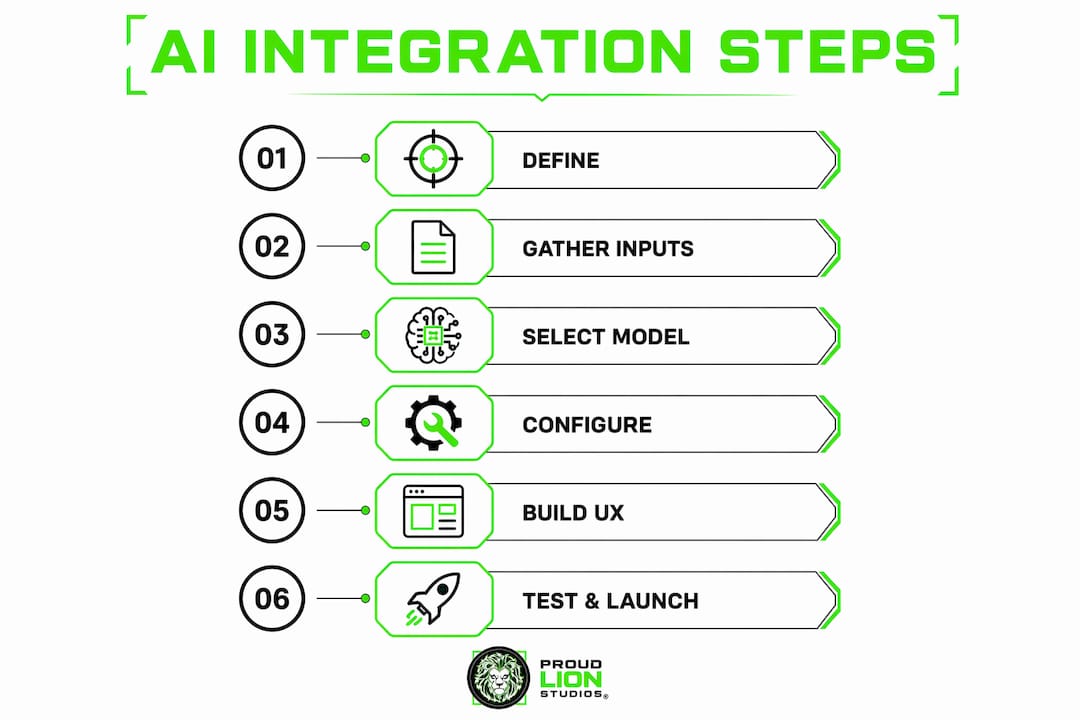
Step 1: Define your AI feature and objectives. Start with a specific business problem, not a technology. "We want to add AI" is not a feature. "We want to auto-generate product descriptions from SKU data to reduce copywriting time by 60%" is a feature. Specificity here determines everything downstream, from model selection to success metrics. Review your AI use cases in business before committing to a direction.

Step 2: Collect and prepare your inputs. Every AI feature needs structured input. A chatbot needs a knowledge base or conversation history. A summarizer needs document ingestion logic. A classifier needs labeled examples. Map out what data enters the AI call, what format it needs to be in, and where it comes from in your existing system.
Step 3: Select and connect to an AI provider. OpenAI's GPT-4o handles general-purpose text tasks well. Anthropic's Claude 3.5 Sonnet excels at long-context reasoning and document analysis. Google Gemini 1.5 Pro offers strong multimodal capabilities. Match the model to the task, not to brand familiarity. Once selected, configure your API key securely using environment variables, never hardcoded in source files.
Step 4: Configure the integration via a provider abstraction layer. Avoid scattering API calls directly in code by wrapping all AI service calls inside a dedicated service module or class. This pattern mirrors the repository pattern used in database management. If you later switch from OpenAI to Anthropic, you change one file instead of hunting through your entire codebase.
"`` // Example abstraction layer (Node.js) class AIService { async generateText(prompt) { return await openai.chat.completions.create({ model: "gpt-4o", messages: [{ role: "user", content: prompt }] }); } }
**Step 5: Build the user experience with streaming in mind.** Delays beyond 3 to 5 seconds are perceived negatively by users, and full AI responses often take longer than that. Streaming transforms a blank wait into a live, typing-style interaction. Vercel AI SDK provides ready-made React hooks for streaming responses, making this straightforward for Next.js apps. For non-React environments, use server-sent events or WebSockets to push tokens as they arrive.
**Pro Tip:** *Display a "thinking" indicator immediately on user submit, before the first token arrives. This single UX detail reduces perceived latency significantly and sets user expectations correctly.*
**Step 6: Test thoroughly before and after launch.** [Testing AI features requires dedicated frameworks](https://blog.hanadkubat.com/blog/testing-in-startups-what-b2b-saas-founders-must-know) and continuous validation, not just a quick smoke test. Write unit tests for your abstraction layer, integration tests for the full AI call cycle, and regression tests for known edge cases. Log every AI request and response in staging so you can replay failures. For chatbot-style features, build a set of adversarial prompts that test for hallucinations, off-topic responses, and prompt injection attempts.
> "The teams that ship reliable AI features are not the ones with the best models. They are the ones with the most disciplined testing pipelines." This holds true whether you are a two-person startup or a 200-person engineering org.
## What common challenges arise during AI integration?
Even well-planned AI implementations hit friction. Knowing where the friction lives lets you prepare for it rather than react to it.
- **API failures and timeouts.** AI provider APIs occasionally return errors, rate limit responses, or time out under load. Implement retry logic with exponential backoff, and always define fallback behavior. If the AI call fails, your app should degrade gracefully, not crash.
- **Cost overruns.** Token-based pricing scales with usage in ways that surprise teams who did not model it upfront. AI cost-aware middleware and user rate limiting are the two most effective controls. Set hard limits per user per day, and monitor token consumption by feature, not just by total spend.
- **Data privacy and security.** Sending user data to third-party AI APIs creates compliance obligations under GDPR, CCPA, and similar frameworks. Anonymize or pseudonymize personal data before it leaves your system. Review each provider's data retention policy before you send anything sensitive.
- **Output quality drift.** AI model behavior can shift when providers update their models. A prompt that worked perfectly in January may produce different results in June. Pin your model versions explicitly (e.g., `gpt-4o-2024-11-20`) and run regression tests when you upgrade.
- **UX bottlenecks.** Streaming solves latency perception, but it does not solve every UX problem. Long responses still overwhelm users. Design your interface to chunk, summarize, or paginate AI output rather than dumping everything at once.
**Pro Tip:** *Build a lightweight internal dashboard that logs AI feature usage, average response time, error rates, and cost per call. You cannot manage what you cannot measure, and this data pays for itself within weeks.*
Incremental feature additions like smart search and content generation are feasible without rewriting your architecture. Add AI surgically to one workflow at a time, validate it, then expand. This approach limits blast radius when something goes wrong.
## How to choose the right AI models and providers?
Choosing the right AI provider depends on aligning tool capabilities with specific business requirements and integration complexity. The table below maps the major providers against the criteria that matter most for integration decisions.
| Provider | Strengths | Best Use Case | Integration Complexity | Cost Profile |
| --- | --- | --- | --- | --- |
| OpenAI (GPT-4o) | General-purpose, function calling | Chatbots, code gen, summarization | Low | Medium to High |
| Anthropic (Claude 3.5) | Long context, safety, reasoning | Document analysis, legal, research | Low | Medium |
| Google Gemini 1.5 Pro | Multimodal, large context window | Image + text tasks, enterprise | Medium | Medium |
| Cohere | Retrieval-augmented generation | Search, enterprise knowledge bases | Medium | Low to Medium |
| Open-source (Llama 3, Mistral) | Full control, on-premise | Privacy-sensitive, custom fine-tuning | High | Low (infra cost) |
Provider abstraction layers allow switching providers with minimal disruption, which means your initial provider choice carries less long-term risk than it appears. The real decision is whether you need a hosted API or a self-hosted model. Hosted APIs (OpenAI, Anthropic, Gemini) offer speed and simplicity. Self-hosted models (Llama 3, Mistral) offer data control and lower per-token cost at scale, but require infrastructure investment.
For most businesses starting their AI implementation steps, OpenAI or Anthropic is the right starting point. Both have mature SDKs, strong documentation, and active developer communities. Migrate to a specialized or self-hosted model once you have validated the use case and understand your volume requirements.
## Key takeaways
Successful AI integration requires a structured six-step process, a provider abstraction layer, streaming UX, and continuous testing to deliver reliable, cost-controlled AI features.
| Point | Details |
| --- | --- |
| Start with a defined problem | Specify the business outcome before selecting any AI model or tool. |
| Use a provider abstraction layer | Wrap all AI calls in a service module to swap providers without rewriting your app. |
| Stream responses for better UX | Delays over 3 to 5 seconds hurt user perception; streaming keeps interactions dynamic. |
| Control costs from day one | Implement rate limiting and cost-aware middleware before going to production. |
| Test AI features continuously | Use dedicated frameworks and adversarial prompts to catch quality drift early. |
## Why most AI integrations fail in the first 90 days
I have seen teams spend weeks selecting the perfect AI model, only to ship a feature that users abandon because the response takes eight seconds and returns a wall of unformatted text. The model was excellent. The integration was not.
The single most underestimated decision in the entire AI integration process is the provider abstraction layer. Teams skip it because it feels like extra work upfront. Six months later, when a better model ships or a provider raises prices, they are facing a full refactor. The abstraction layer is not optional architecture. It is the decision that determines how much your future self will hate your past self.
Streaming is the second thing teams consistently defer. "We will add it later" is almost always wrong. Retrofitting streaming into an existing UI is harder than building it in from the start, and the UX difference is dramatic. Users who experience streaming stay engaged. Users who stare at a spinner leave.
My strongest advice for 2026: start with a pilot that solves one specific problem for one specific user group. Validate the value before scaling the infrastructure. The teams I have seen succeed with AI integration are not the ones who planned the most. They are the ones who shipped the smallest useful thing first, learned from real usage, and iterated from there. Read the [AI chatbot development guide](https://blog.proudlionstudios.com/blog/how-to-develop-an-ai-chatbot-for-business-success) if you want a concrete example of this approach applied to one of the most common AI use cases.
> *— Amal*
## Ready to build your AI integration with expert support?
Proudlionstudios works with startups and enterprises across the UAE and beyond to design and build production-grade AI integrations, from initial scoping through deployment and monitoring. The team at Proudlionstudios brings hands-on experience with OpenAI, Anthropic, and custom LLM pipelines, combined with deep expertise in [blockchain development services](https://proudlionstudios.com/services/blockchain-development) and smart contract architecture for projects that require both AI and Web3 capabilities.
[](https://proudlionstudios.com/)
Whether you need a focused AI feature added to an existing platform or a full-scale AI-powered product built from scratch, Proudlionstudios delivers tailored solutions grounded in real business outcomes. Reach out to discuss your project and get a clear implementation roadmap.
## FAQ
### What is step by step AI integration?
Step by step AI integration is the process of embedding AI capabilities into a system through structured phases: defining the feature, preparing data, selecting a model, configuring the API, building the UX, and testing. This six-step workflow applies to both new builds and existing applications.
### How long does AI integration take?
Basic AI features can be implemented within a few hours using modern tools like Bubble's API Connector or Vercel AI SDK. More complex integrations involving custom pipelines, fine-tuned models, or enterprise security requirements typically take two to six weeks.
### Which AI provider is best for most businesses?
OpenAI and Anthropic are the most practical starting points for most businesses due to mature SDKs, strong documentation, and broad capability coverage. The right choice depends on your specific use case, context length requirements, and budget.
### How do I control AI costs during integration?
Implement user rate limiting and AI cost-aware middleware before going to production, and pin specific model versions to avoid unexpected behavior changes. Monitor token consumption per feature, not just total spend.
### Do I need to rewrite my app to add AI features?
No. Incremental AI feature additions are feasible with existing architectures using a provider abstraction layer. Add AI to one workflow at a time, validate it, and expand without touching unrelated parts of your codebase.
## Recommended
- [AI Game Development Guide for Developers in 2026](https://blog.proudlionstudios.com/blog/ai-game-development-guide-for-developers-in-2026)
- [AI Tools for Game Studios: The 2026 Developer's Guide](https://blog.proudlionstudios.com/blog/ai-tools-for-game-studios-the-2026-developers-guide)
- [Custom AI agent development: A step-by-step guide](https://blog.proudlionstudios.com/blog/custom-ai-agent-development-step-by-step-guide)
- [AI in software development: Innovation in 2026](https://blog.proudlionstudios.com/ai-in-software-development-innovation-2026)