
TL;DR:
- UI/UX design combines the visual, interactive, and experiential aspects of digital products to ensure usability and satisfaction. Proper understanding and validation of both disciplines prevent costly rework and enhance user loyalty. Integrating continuous research, testing, and strategic design leads to successful, user-centered digital solutions.
UI/UX design is the combined practice of crafting how a digital product looks, feels, and functions for the people who use it. UI (user interface) design covers the visual and interactive layer: screens, buttons, typography, and controls. UX (user experience) design covers the broader journey: whether the product is usable, useful, and desirable from start to finish. Together, they determine whether a digital product earns loyalty or gets deleted. Tools like Figma, Adobe XD, and Maze sit at the center of this practice, alongside methods like wireframing, prototyping, and human-centered design grounded in ISO 9241-210.

What is the difference between UI and UX design?
UI and UX design are separate but complementary disciplines. Treating them as the same thing is the most common mistake professionals make when entering the field. Understanding where one ends and the other begins is the foundation of building products that actually work.
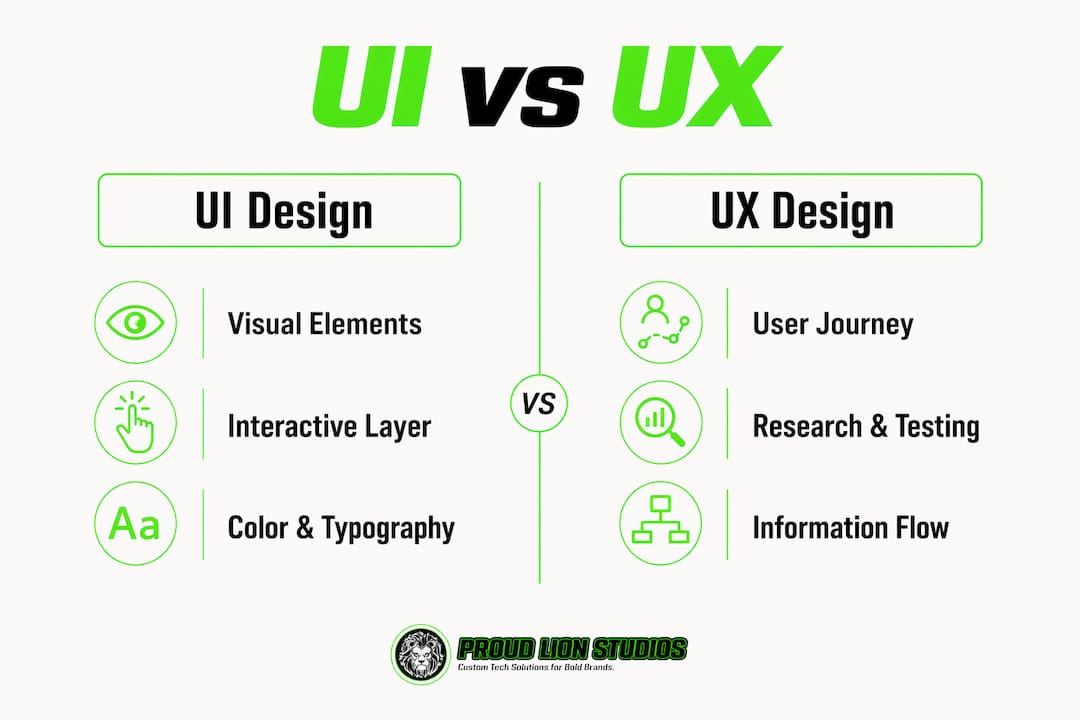
UI design is the visual and interactive layer users directly engage with. It includes every button, icon, color palette, spacing decision, and animation. A UI designer working on a banking app decides whether the "Transfer" button is green or blue, how large the font is on the confirmation screen, and whether a loading spinner appears after a tap. UI design principles like consistency in typography, color, and spacing create the design system that holds the entire product together visually.
UX design operates at a higher level. It shapes the end-to-end experience: how a user discovers a feature, completes a task, recovers from an error, and feels when they log out. A UX designer on that same banking app maps the full flow from login to completed transfer, identifies where users get confused, and redesigns the task path based on research. UX is research and testing driven, involving user interviews, behavior analysis, and iterative improvement cycles.
| Dimension | UI design | UX design |
|---|---|---|
| Focus | Visual and interactive elements | End-to-end user journey and satisfaction |
| Key deliverables | Style guides, design systems, high-fidelity mockups | User flows, wireframes, usability test reports |
| Primary question | Does it look right and feel responsive? | Does it help users achieve their goals? |
| Tools commonly used | Figma, Sketch, Adobe XD | Maze, UserTesting, Miro, Optimal Workshop |
| Measured by | Visual consistency, accessibility scores | Task completion rates, error rates, satisfaction |
A product can have stunning UI and terrible UX. Consider a luxury travel app with beautiful photography and polished animations that buries the booking button three screens deep. Users admire it, then abandon it. The reverse is equally damaging: a UX-perfect checkout flow wrapped in an interface so visually inconsistent that users distrust entering their credit card. Both disciplines must succeed together.
Pro Tip: Never hand off a UI design to developers before the UX flow has been validated with real users. Skipping that step is the single fastest way to build something beautiful that nobody can use.
What does the UI/UX design process involve?
The UI/UX design process is not a straight line. It follows the ISO 9241-210 user-centered design framework, which defines four cyclical stages that repeat until the product meets user needs at an acceptable quality level.
-
Understand the context of use. Designers identify who the users are, what tasks they need to complete, and what environment they work in. This stage uses interviews, ethnographic observation, and analytics review. A team building a logistics dashboard, for example, would shadow warehouse workers to understand how they actually interact with data on a shift.
-
Define user requirements. Based on research, the team translates observations into specific, testable requirements. "Users need to log a delivery in under 10 seconds" is a requirement. "The app should be fast" is not. This distinction separates evidence-based design from guesswork.
-
Develop design solutions. This is where wireframes, prototypes, and visual designs are produced. Wireframes establish structure and navigation without visual polish. Prototypes simulate interaction so users can respond to real flows, not static images. UI designers then apply the visual layer: color, typography, iconography, and motion.
-
Evaluate against requirements. Usability testing, heuristic evaluation (often using Jakob Nielsen's 10 heuristics), and A/B testing measure whether the design meets the requirements set in stage two. Testing with real users avoids the trap of superficial validation where teams confirm their own assumptions rather than genuinely improving the product.
The roles involved across these stages vary by organization. UX researchers handle discovery and testing. UX designers own flows, wireframes, and information architecture. UI designers own the visual system. Product designers, an increasingly common title at companies like Airbnb and Spotify, combine all three with strategic product thinking.
UX design activities across the full product lifecycle include user research, information architecture, wireframing, prototyping, usability testing, and iterative refinement. Each activity feeds the next. Skipping user research to jump straight to wireframes is the equivalent of writing code before reading the brief.
Pro Tip: Document your design decisions with the evidence behind them. When a stakeholder asks why a navigation pattern changed, "because three users in testing couldn't find the menu" is far more persuasive than "because it felt cleaner."
How do UI and UX design apply in digital product development?
UI/UX design is not a phase that happens before development. It runs in parallel with engineering, informs product strategy, and continues after launch through ongoing research cycles. Its application spans every category of digital product.
In mobile app development, UX design defines the onboarding flow, permission request timing, and gesture patterns. UI design delivers the component library that developers implement. A poorly timed permission request (asking for location access before explaining why) causes 60% of users to deny it, according to mobile UX research. Getting that sequence right is a UX decision, not a visual one.
In web applications and business websites, UI design principles govern grid systems, responsive behavior, and accessibility compliance. UX design handles user journey mapping: what a first-time visitor sees, where they go next, and what action they take. Brands like Notion and Linear have built cult followings partly because their interfaces feel considered at every interaction point.
In Web3 and blockchain products, the role of UI/UX in Web3 is especially critical because the underlying technology is genuinely complex. Wallet connections, gas fee explanations, transaction confirmations, and error states all require UX writing and flow design that translates technical reality into human language. Proudlionstudios has documented Web3 UX best practices specifically because the failure mode in this space is products that work technically but confuse every user who isn't already a developer.
Designing UI before completing UX research is the most common and costly pitfall in digital product development. Teams that skip research and jump to visual design routinely discover during testing that navigation structures don't match user mental models, requiring full redesigns. The rework cost is always higher than the research cost.
Iterative testing also catches accessibility failures early. Screen reader compatibility, color contrast ratios meeting WCAG 2.1 AA standards, and touch target sizing are all UX and UI concerns that, when addressed in prototyping, cost a fraction of what they cost to fix post-launch.
Why choose UI/UX design? Benefits and career outlook
UI/UX design improves usability, reduces errors, and increases user satisfaction while giving businesses a measurable competitive edge. For professionals considering the field, the case is equally strong on the career side.
From a business perspective, the benefits are concrete:
- Products with strong UX see higher task completion rates, lower support ticket volumes, and better retention metrics.
- Consistent UI design systems reduce development time because engineers work from reusable components rather than interpreting one-off designs.
- Accessibility-first design expands the addressable user base, a factor that matters to enterprises operating across markets with different regulatory requirements.
- Brand loyalty correlates directly with interaction quality. Users who complete tasks without friction return. Users who hit dead ends do not.
From a career perspective, the demand for UI/UX skills is growing faster than the supply of qualified practitioners. The U.S. Bureau of Labor Statistics projects web and digital interface designer roles to grow 16% through 2032, well above the average for all occupations. This means practitioners who combine UX research skills with UI execution and basic product strategy thinking command significant market value.
The role itself has also evolved. The title "product designer" now appears at companies like Meta, Google, and Figma to describe professionals who own the full design process from research to shipped interface. This convergence of UI and UX into a single strategic function reflects how mature organizations now treat design: not as decoration, but as a core driver of product outcomes.
For newcomers, the path into the field runs through tools like Figma for UI execution, Maze or UserTesting for UX validation, and frameworks like Google's Material Design or Apple's Human Interface Guidelines for understanding established UI design principles at scale.
Key takeaways
UI/UX design succeeds when UX research drives the structure and UI execution delivers the visual system, with both disciplines validated through iterative testing before and after launch.
| Point | Details |
|---|---|
| UI vs. UX distinction | UI covers visual elements; UX covers the full user journey and task satisfaction. |
| Process is cyclical | ISO 9241-210 defines four repeating stages: context, requirements, design, and evaluation. |
| Research before visuals | Designing UI without prior UX research leads to costly rework and navigation failures. |
| Web3 raises the stakes | Complex blockchain products demand exceptional UX to translate technical flows into usable experiences. |
| Career demand is rising | Product designer roles combining UI and UX skills are growing above average across the tech industry. |
Why aesthetics alone will never save a bad product
I've reviewed dozens of digital products over the years where the visual design was genuinely impressive and the experience was genuinely broken. A fintech startup once showed me a prototype with beautiful data visualizations and a color system that would make any design director proud. The onboarding flow required seven steps to connect a bank account. Users dropped off at step three in every single test session. The team had spent six weeks on the UI and two days on the UX research. That ratio is the problem.
The uncomfortable truth about UI/UX design is that most teams still treat UX as a phase rather than a practice. They run one round of user testing, make a few changes, and ship. Real UX maturity, as Jakob Nielsen has argued, means specifying interaction behavior and edge cases, not just producing wireframes and calling it done. The artifact is not the outcome. The outcome is a product that helps users accomplish something they couldn't accomplish as easily before.
For anyone entering this field, my honest advice is to spend more time watching users struggle with your designs than you spend creating them. That discomfort is where the real design work happens. Tools change. Figma will eventually be replaced by something else. The skill of observing human behavior and translating it into better interfaces does not expire.
— Amal
Build digital products that users actually want to use
Proudlionstudios designs and builds digital products where UI and UX work together from day one, not as separate handoffs. The team covers the full process: user research, wireframing, prototyping, and high-fidelity UI execution across mobile apps, web applications, and Web3 platforms. Whether you're launching a mobile app on iOS and Android or building a blockchain product that needs to make complex flows feel simple, Proudlionstudios delivers UI/UX design and prototyping grounded in real user research. Every solution is custom. No templates, no guesswork, and no beautiful interfaces that users abandon after one session.
FAQ
What is UI/UX design in simple terms?
UI/UX design is the practice of shaping how a digital product looks (UI) and how it works for the people using it (UX). UI covers visual elements like buttons and colors; UX covers the full experience of completing a task within the product.
What is the difference between UI and UX?
UI design focuses on the visual and interactive elements users see and touch, while UX design focuses on the overall journey, usability, and satisfaction a user experiences. A product can have strong UI and weak UX, or vice versa, but both must succeed for the product to work.
How does the UX design process work?
The UX design process follows the ISO 9241-210 framework: understand the context of use, define user requirements, develop design solutions, and evaluate them through usability testing. The cycle repeats until the product meets user needs at an acceptable quality level.
What is the role of UI/UX in Web3 products?
In Web3, UI/UX design translates technically complex flows like wallet connections, gas fees, and transaction confirmations into interfaces that non-technical users can navigate without confusion. Poor UX in blockchain products is the primary reason technically functional products fail to gain adoption.
Why should businesses invest in UI/UX design?
Strong UI/UX design reduces user errors, increases task completion rates, lowers support costs, and improves retention. Companies that treat design as a core product function rather than a finishing step consistently outperform those that treat it as decoration.
Recommended
- UI/UX Design & Prototyping - Proud Lion Studios | App, Blockchain & Game Development Company in Dubai UAE
- Web3 UX Design Best Practices for Product Teams
- Master the mobile app development process in 2026
- Game Art, Animation & UI/UX Design - Proud Lion Studios | App, Blockchain & Game Development Company in Dubai UAE