
TL;DR:
- D modeling involves creating digital representations of objects using specialized software like Maya or Blender. It serves industries such as architecture, gaming, and animation by enabling visualization, simulation, and communication of ideas before physical production. Separating modeling from rendering is essential for troubleshooting and understanding the process, with different techniques suited for specific project goals.
3D modeling is defined as the computer graphics process of creating a mathematical digital representation of a three-dimensional object using specialized software. Tools like Autodesk Maya, Blender, and Adobe Substance 3D are the industry standards for this work. Architecture firms, game studios, animation houses, and product designers all rely on 3D modeling to visualize, simulate, and communicate ideas before anything physical is built. If you are starting out in design, gaming, or animation, understanding this process is the single most useful foundation you can build.
What is 3d modeling and how does it work?
3D modeling creates a digital object made of mathematical data, specifically vertices, edges, polygons, and textures, that exists in a virtual three-dimensional space. You can rotate it, zoom in, apply materials, or export it for animation and manufacturing. Autodesk describes this process as central to visualization, simulation, and rendering across industries from architecture to video games.
The process typically starts with a simple shape called a primitive. A cube, sphere, or cylinder serves as the raw starting point. From there, you push and pull vertices, subdivide polygons, and add detail until the model matches your vision. This iterative approach is the same whether you are building a game character in Blender or an industrial component in Autodesk Fusion 360.
3D modeling is not the same as drawing or painting. A 2D illustration has no depth data. A 3D model carries spatial information that lets software calculate how light hits a surface, how a part fits into an assembly, or how a character's arm should move during animation. That depth of data is what makes 3D modeling so powerful across so many fields.

What are the main types of 3d modeling techniques?
Four core types of 3D modeling exist: wireframe, surface, solid, and sculpting or polygonal modeling. Each one represents objects differently and suits different project goals. Choosing the wrong type early in a project wastes time and forces rework later.
| Modeling Type | What It Represents | Best Use Case |
|---|---|---|
| Wireframe | Edges and vertices only, no filled surfaces | Structural layout, early concept sketches |
| Surface | Exterior shape only, no internal volume | Automotive design, complex organic curves |
| Solid | Watertight volumetric object with mass properties | Manufacturing, engineering, product prototyping |
| Sculpting/Polygonal | High-detail mesh with textures and organic forms | Game characters, animated creatures, film assets |
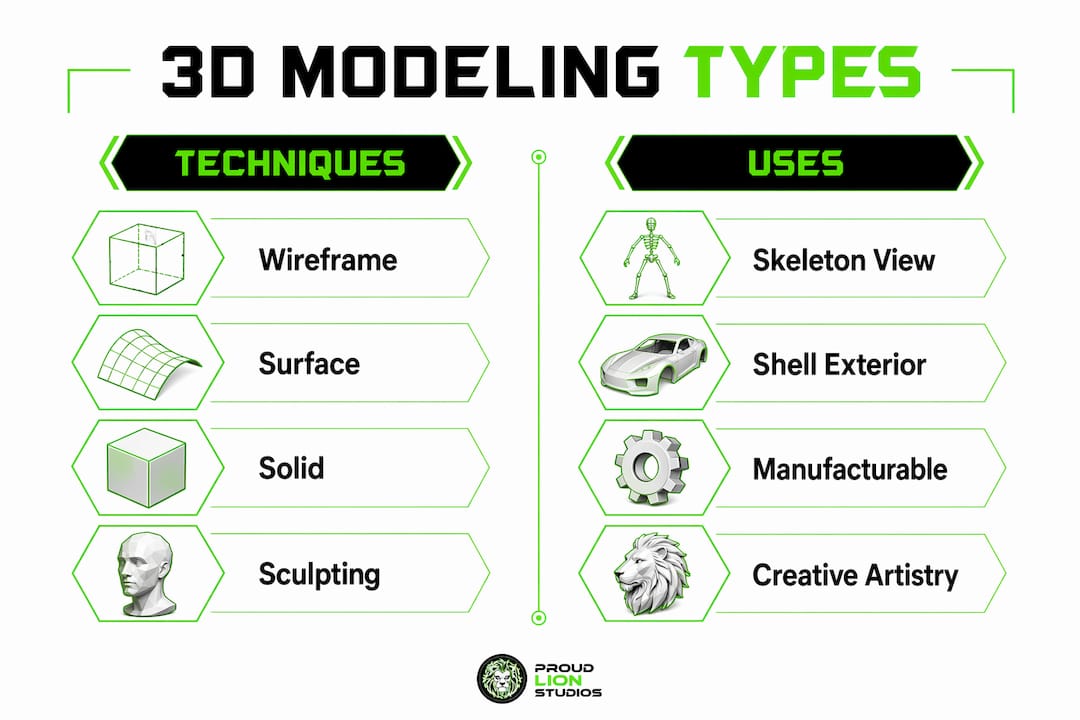
Wireframe modeling is the most basic form. It shows you the skeleton of an object without any filled surfaces. Designers use it to map out proportions and structure before committing to a heavier workflow.
Surface modeling defines only the exterior shell of an object. It handles complex curves beautifully, which is why automotive and industrial designers favor it for aesthetic work. Solid modeling, by contrast, creates a watertight volumetric object with calculable mass properties. If you need to manufacture a part or run a stress simulation, solid modeling is the correct choice. Solid models must have no gaps or open edges. A single hole in the mesh breaks the watertight requirement and makes the model unusable for manufacturing.
Sculpting and polygonal modeling give artists the most creative freedom. Software like ZBrush and Blender's sculpt mode let you push and pull a digital mesh the way a sculptor works with clay. The result is high-resolution organic detail that would be nearly impossible to achieve with solid or surface tools.
Pro Tip: Start every project by asking one question: will this model be manufactured or just viewed? If it needs to be built physically, use solid modeling from the start. If it only needs to look good on screen, surface or polygonal modeling gives you more flexibility.
How is 3d modeling different from 3d rendering?
3D modeling creates geometry; 3D rendering adds lighting, shading, and materials to produce a final image. Maxon describes modeling as digital construction and rendering as digital photography. These are two separate stages in a production pipeline, and confusing them is one of the most common beginner mistakes.
"A 3D model is data. It exists as vertices, edges, and polygons whether or not it has ever been rendered. Rendering is the process of translating that data into a visual output." — Maxon
Here is how the two stages relate in a typical workflow:
- Modeling: You build the geometry. The object has shape and structure but no final appearance.
- Texturing: You apply surface materials, colors, and detail maps to the model.
- Lighting: You place virtual light sources in the scene to define shadows and highlights.
- Rendering: Software calculates every pixel of the final image based on geometry, materials, and light.
This distinction matters practically. If your final image looks wrong, you need to know whether the problem lives in the model or in the render settings. Beginners often confuse a bad render with a bad model, which sends them back to fix geometry that was never the issue. Separating the two stages in your mind saves hours of troubleshooting.
A 3D model can also exist and be used without ever being rendered. Game engines like Unreal Engine and Unity display models in real time without a traditional rendering step. The model data is what matters. Rendering is just one of many ways to output it.
What tools and workflows do 3d modelers use?
The standard workflow in 3D modeling moves from primitives to refined geometry to textured, export-ready assets. Understanding this sequence helps you pick the right tools at each stage.
- Block out the shape. Start with a primitive like a cube or sphere. Scale and position it to approximate your target object. This stage is fast and low-commitment.
- Refine the geometry. Add edge loops, subdivide polygons, and adjust vertices to build accurate proportions. Tools like Blender, Autodesk 3ds Max, and Autodesk Maya are the industry standards for this stage.
- Add surface detail. Use sculpting tools or displacement maps to add fine detail like wrinkles, bolts, or surface texture. ZBrush is the dominant tool for high-resolution sculpting.
- Apply materials and textures. Adobe Substance 3D Painter is the leading tool for painting realistic surface materials directly onto a model.
- Export for use. Depending on the destination, you export to formats like FBX for game engines, OBJ for general use, or STEP for manufacturing software.
For gaming pipelines, the production pipeline adds optimization steps after the initial model is complete. Game assets need low polygon counts to run efficiently in real time. Artists create a high-resolution sculpt, then bake its detail onto a low-polygon version using normal maps. This technique lets a simple mesh look as detailed as a complex one without the performance cost.
Many professional teams use hybrid workflows that combine surface and solid modeling. Autodesk expert Shannon McGarry recommends sculpting surfaces first for aesthetic freedom, then converting the result to a solid model for manufacturing. This approach preserves creative flexibility without sacrificing the precision that production requires.
Pro Tip: Learn keyboard shortcuts in your chosen software before anything else. In Blender, mastering G (grab), R (rotate), S (scale), and E (extrude) cuts your modeling time in half compared to using menus.
How is 3d modeling used in the real world?
3D modeling supports feasibility and cost assessment before anything physical is built. That single capability explains why it has become standard practice across so many industries. You can test a design, find problems, and fix them digitally at a fraction of the cost of physical prototyping.
Real-world applications span a wide range of fields:
- Architecture and construction: Firms use 3D models to show clients finished buildings before a single brick is laid. Software like Autodesk Revit generates detailed building information models that include structural, electrical, and mechanical systems.
- Product design and manufacturing: Companies prototype new products in Autodesk Fusion 360 or SolidWorks, run stress simulations, and refine designs before committing to tooling costs.
- Gaming: Every character, vehicle, weapon, and environment in a video game is a 3D model. Studios like Epic Games and Rockstar Games employ hundreds of 3D artists to build the assets that fill their worlds.
- Animation and film: Pixar, DreamWorks, and similar studios build entire casts and environments as 3D models before a single frame is rendered.
- Medical and scientific visualization: Researchers use 3D models to visualize molecular structures, surgical procedures, and anatomical data.
3D models can be created manually, algorithmically through procedural generation, or by scanning existing physical objects. Each method affects how the model is optimized downstream. A scanned model of a real object carries dense, irregular geometry that needs cleanup before it works in a game engine. A procedurally generated landscape can cover vast areas with minimal manual effort. Knowing which creation method fits your project saves significant time in post-processing.
Key takeaways
3D modeling is the foundational process behind nearly every digital product you see in games, film, architecture, and manufacturing, and choosing the right modeling type from the start determines whether your project succeeds or stalls.
| Point | Details |
|---|---|
| Core definition | 3D modeling creates mathematical digital representations of objects using vertices, edges, and polygons. |
| Four modeling types | Wireframe, surface, solid, and sculpting each serve distinct use cases from manufacturing to animation. |
| Modeling vs. rendering | Modeling builds geometry; rendering produces the final visual output. Confusing them causes wasted troubleshooting time. |
| Hybrid workflows | Combining surface and solid modeling balances aesthetic flexibility with manufacturing precision. |
| Real-world impact | 3D modeling reduces physical prototyping costs by enabling feasibility checks and design iteration before production. |
Why most beginners get 3d modeling backwards
I have watched a lot of people start their 3D modeling journey the same way: they open Blender, find a tutorial for something impressive, and immediately try to replicate it without understanding the underlying structure. The result is frustration, not learning.
The most useful thing I can tell you is to start with your end goal, not your software. If you want to build game assets, polygonal modeling in Blender is your path. If you want to design physical products, Autodesk Fusion 360 and solid modeling will serve you far better. Jumping into sculpting before you understand polygon topology is like learning to paint before you can draw a straight line.
The modeling versus rendering confusion is also real and costly. I have seen beginners spend days rebuilding geometry because their render looked flat, when the actual problem was a missing light source or an incorrect material setting. Understand that your model and your render are separate problems. Fix them separately.
The best 3D modelers I know treat their work as iterative. They block out rough shapes fast, refine in passes, and never try to get everything perfect in one go. That mindset, more than any software skill, is what separates people who finish projects from people who abandon them. You can explore 3D modeling for games specifically to see how that iterative approach plays out in a professional pipeline.
— Amal
Take your 3d modeling projects further with proud lion studios
Proud Lion Studios brings professional-grade 3D modeling and animation expertise to gaming, product visualization, and digital product development. The Dubai-based studio works with startups and enterprises to build assets that perform in real production environments, not just look good in a preview window.

Whether you are building a mobile game, an AAA multiplayer title, or a digital product that needs high-quality visual assets, Proud Lion Studios delivers work built to specification. The team's AAA multiplayer game development service covers the full pipeline from concept art and 3D modeling through to engine integration and launch. Explore the 3D modeling and animation services to see what a professional studio workflow looks like for your type of project.
FAQ
What is the 3d modeling definition in simple terms?
3D modeling is the process of building a digital three-dimensional object using specialized software. The result is a mathematical representation made of vertices, edges, and polygons that can be viewed, animated, or manufactured.
What is 3d modeling used for in gaming and animation?
In gaming and animation, 3D models serve as assets that can be rotated, animated, and integrated into scenes. Every character, environment, and prop in a game or animated film starts as a 3D model.
What is the difference between 3d modeling and 3d rendering?
3D modeling builds the geometric structure of an object. 3D rendering uses that geometry along with lighting and materials to produce a final image. They are separate stages in a production workflow.
Which 3d modeling software is best for beginners?
Blender is the most accessible starting point because it is free, covers the full modeling-to-rendering pipeline, and has a large community of tutorials. Autodesk Fusion 360 is the better choice if your goal is product design or manufacturing.
What are the main types of 3d modeling techniques?
The four main types are wireframe, surface, solid, and sculpting or polygonal modeling. Each serves a different purpose, from structural layout and manufacturing to organic character creation for games and film.