

UiPath typically fits governance-heavy enterprises that need deep orchestration, detailed audit trails, and mature developer tooling for complex, multi-application workflows. Automation Anywhere typically fits cloud-first organizations prioritizing faster AI-assisted bot building and simpler deployment. Neither answer holds without a pilot and a real total cost of ownership review, so treat this as a starting shortlist, not a final verdict.
TL;DR:
- UiPath offers deeper orchestration and governance features, which are essential for regulated industries with complex compliance needs.
- Automation Anywhere enables faster pilots with its cloud-native architecture and AI-assisted tools, making it ideal for cloud-first, cost-sensitive organizations.
- Both platforms have similar overall satisfaction scores, but success depends heavily on the experience of the implementation partner and realistic timelines.
- Cloud-native deployments are faster to set up, but organizations with strict data residency requirements should plan for longer implementation with UiPath's hybrid options.
- Running a proof-of-concept on actual, complex documents before committing can reveal integration challenges and performance differences.
Table of Contents
- UiPath vs Automation Anywhere: The Executive Comparison
- What Are the AI and Document Processing Differences?
- How Do Orchestration and Governance Compare?
- Cloud-Native vs Hybrid: Which Deployment Model Fits?
- Developer Tooling, Citizen Developers, and Integrations
- What Does Each Platform Actually Cost?
- Which RPA Platform Fits Your Organization?
- Practical Implementation Lessons from Proud Lion Studios' Automation Projects
- Why a Services-First Approach Often Beats Going It Alone
- Let Proud Lion Studios Handle Your RPA Implementation
- Sources
- FAQ
UiPath vs Automation Anywhere: The Executive Comparison
Procurement teams rarely have time to read fifty pages of vendor documentation before building a shortlist. Here's the scorecard that actually matters when you're comparing UiPath vs Automation Anywhere for an enterprise rollout.
- AI and document processing: Automation Anywhere leans into AI-assisted bot creation and its Document Automation stack for faster proof-of-concept cycles; UiPath counters with a more mature AI Center for model lifecycle management, which pays off once you're running dozens of models in production.
- Orchestration and governance: UiPath's Orchestrator has a longer track record with role-based access controls and audit logging, a real advantage for regulated industries like banking or healthcare.
- Deployment model: Automation Anywhere's cloud-native architecture gets pilots running faster; UiPath supports cloud, hybrid, and on-prem with more configuration overhead but more control.
- Developer tooling: UiPath's Studio and debugging environment score well among professional developers, according to G2's side-by-side comparison, while Automation Anywhere often rates higher for ease of use among citizen developers.
- Pricing and TCO: Both vendors mix licensing and consumption pricing; expect implementation partner costs to swing the real total more than the license line item itself.
- Support and customer success: SoftwareReviews' comparative data shows the two platforms scoring within a point of each other on composite satisfaction, roughly 9.1 for UiPath against 8.9 for Automation Anywhere in recent listings, with differences concentrated in cost-fairness and renewal intent.
For procurement, that last point matters more than it looks. When satisfaction scores sit this close, the deciding factor usually isn't the platform. It's whether your implementation partner has actually deployed either tool at your scale before, and how realistic the vendor's timeline promises turn out to be once legacy systems enter the picture.
What Are the AI and Document Processing Differences?
Automation Anywhere has pushed hard into AI-assisted automation, with its AARI assistant and generative bot-building tools designed to shrink the gap between "we have an idea" and "we have a working proof-of-concept." That speed shows up in early demos. Document Automation handles unstructured extraction, think scanned invoices, handwritten claims forms, contracts with inconsistent layouts, with a workflow built to plug straight into a bot.
UiPath's answer is AI Center, a platform for managing machine learning models across their full lifecycle: training, deployment, monitoring, and retraining as data drifts. That lifecycle management is the part vendors rarely lead with in a sales demo, but it's the part that determines whether your invoice-processing bot still works accurately eighteen months after launch.
Independent hands-on comparisons find UiPath ahead on orchestration and governance while Automation Anywhere emphasizes its cloud-native, AI-first posture, a split that plays out clearly in AI tooling too. If your priority is a fast speed-to-POC for a single use case like claims triage, Automation Anywhere's toolchain gets you there quicker. If you're planning to run twenty or more models across departments and need someone accountable for retraining schedules, UiPath's governance layer earns its complexity.
Pro Tip: Run the same document type, ideally your messiest real invoice batch, through both platforms' trial environments before committing. Marketing demos use clean sample data; your actual documents won't be that forgiving.
How Do Orchestration and Governance Compare?
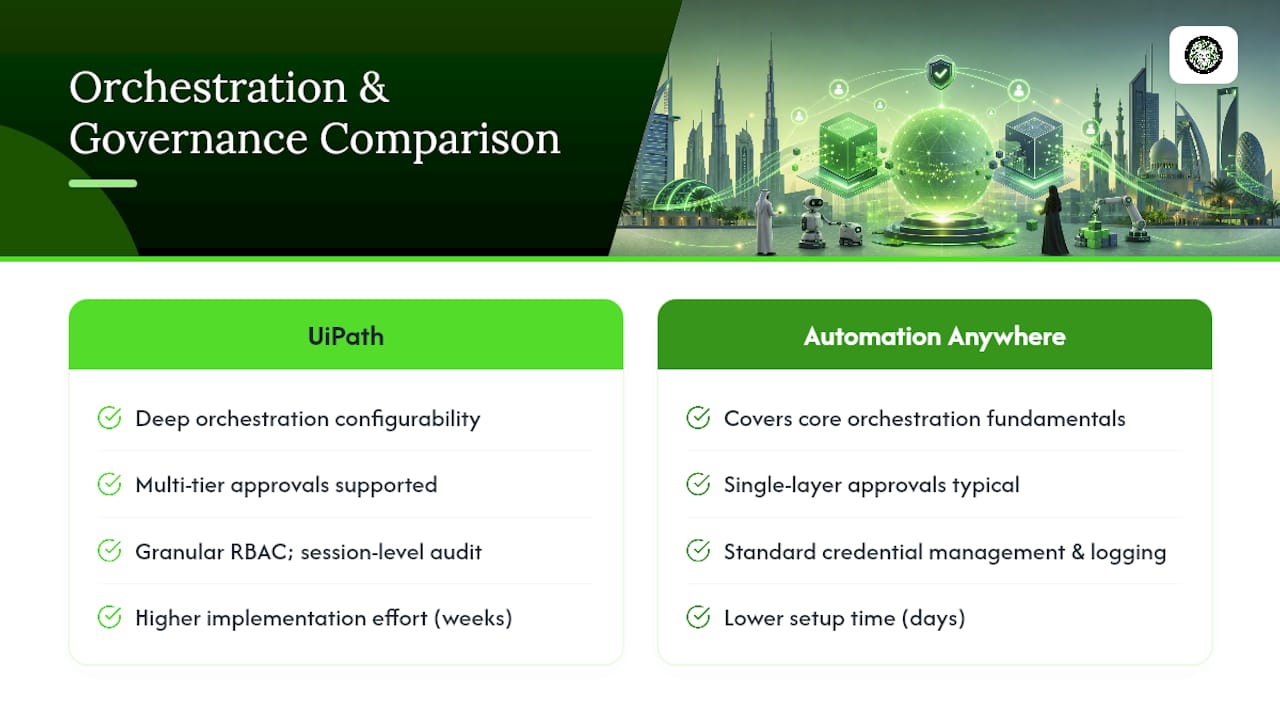
Orchestration is where UiPath has built its reputation, and the depth shows in the details: granular role-based access control, detailed audit trails timestamped down to the bot session, and credential vaulting that satisfies most compliance auditors without custom scripting. For a bank or insurer running SOX or HIPAA-adjacent processes, that depth reduces the number of workarounds your compliance team has to invent.
Automation Anywhere's Control Room covers the same fundamentals, job scheduling, credential management, centralized bot deployment, but reviewers and practitioners consistently describe UiPath's version as more configurable for complex approval chains and multi-tier audit requirements. Gartner's vendor analysis is a standard reference point here, since procurement teams lean on its peer-review data specifically to validate governance claims before a contract gets signed.
The practical translation: if your compliance team needs custom approval workflows with five sign-off tiers, UiPath's orchestration console will get you there with less custom development. If your governance needs are more standard (single approval layer, straightforward logging), Automation Anywhere's Control Room handles it with less setup time. That difference in implementation effort can run into weeks, not days, once you're integrating with an existing identity and access management system. Ask any implementation partner for a concrete hours estimate on RBAC configuration before signing, because "it's supported" and "it's fast to configure" are two very different claims.
Cloud-Native vs Hybrid: Which Deployment Model Fits?
Automation Anywhere was built cloud-native from the ground up, and that shows in how fast a new environment spins up. There's less infrastructure to provision, which matters if your IT team is stretched thin and can't dedicate weeks to server configuration.
UiPath supports cloud, hybrid, and on-prem deployments with more granular control over where data lives. That flexibility comes at a cost: more configuration decisions, more infrastructure to maintain, and a steeper learning curve for teams new to the platform.
The real question isn't which architecture is "better." It's which one matches your data residency requirements. Financial institutions in certain jurisdictions, or healthcare organizations bound by strict data locality rules, often need on-prem or private-cloud options that a pure cloud-native platform can't satisfy without workarounds. If none of your workflows touch regulated data that must stay on local infrastructure, cloud-native gets you to production faster and with less operational overhead. If even one high-value process involves data that legally can't leave a specific environment, budget extra migration time for whichever platform you choose, and get that requirement in writing during the RFP stage, not after the contract is signed.
Developer Tooling, Citizen Developers, and Integrations
UiPath Studio has the deeper reputation among professional developers, particularly for debugging complex workflows with branching logic and error handling. That reputation isn't accidental. UiPath built its tooling for developers first and added citizen-developer features later, while Automation Anywhere approached it from the opposite direction.
Automation Anywhere's citizen-developer tooling tends to score better for ease of use among business users with limited coding background, per G2's comparison data. That accessibility comes with a trade off: governance guardrails become more important as more non-technical staff build bots that touch production systems.
Both platforms run active marketplaces with prebuilt connectors and reusable components, and both have sizeable third-party communities. Forums, templates, and shared automation packages reduce build time meaningfully once your team knows where to look. Neither ecosystem is thin enough to be a dealbreaker on its own, but if your rollout leans heavily on non-technical staff building their own automations, ask specifically about approval workflows for bots built outside the IT department. That governance gap causes more production incidents than any feature comparison chart will show you.
What Does Each Platform Actually Cost?
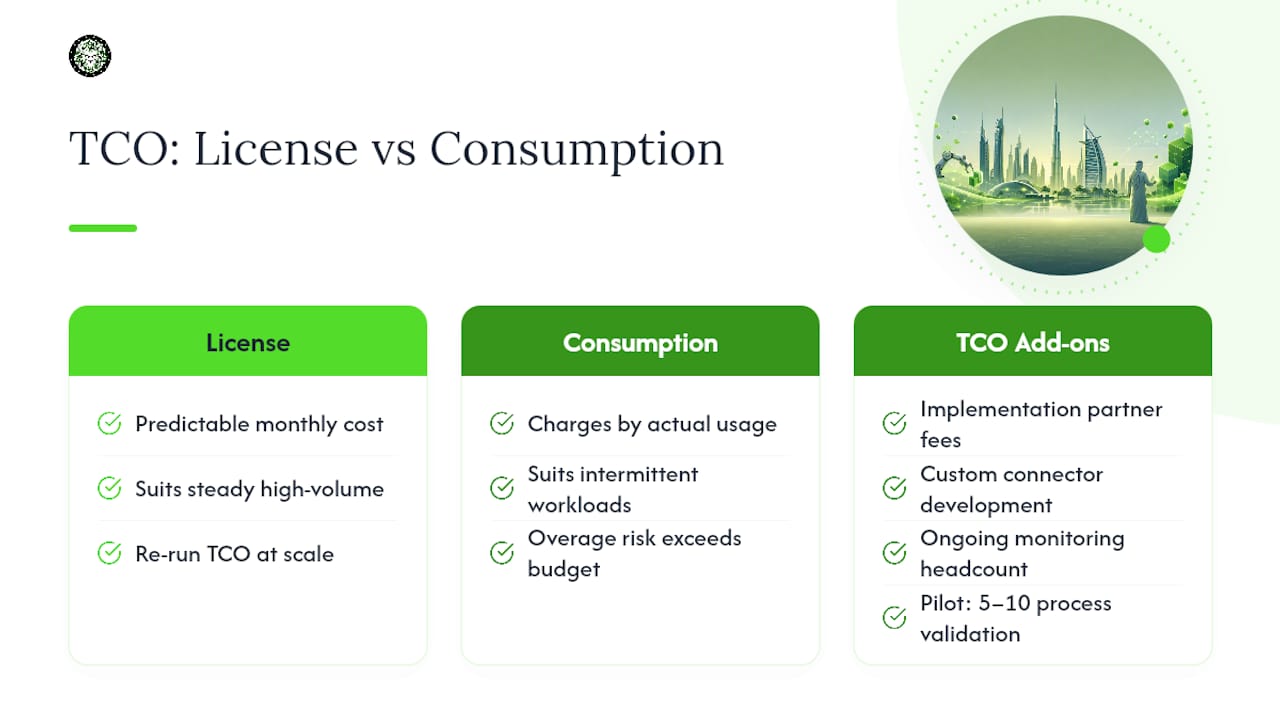
Both vendors mix license-based and consumption-based pricing, and the shape of your usage should decide which model you negotiate. License pricing gives predictable monthly costs regardless of bot activity, which suits steady, high-volume workloads. Consumption pricing charges by usage, attractive for intermittent or seasonal automations, but it carries real risk: underestimate usage and year-one costs can run well past budget once overage charges kick in.
The published sticker price is rarely where TCO surprises show up. Implementation partner fees, custom connector development for legacy systems, and ongoing monitoring headcount typically add more to first-year cost than the license itself. A pilot covering five to ten processes is a reasonable way to surface these costs before committing to enterprise-wide licensing.
Legacy system integrations almost always take longer than the vendor's timeline suggests, and that gap tends to show up in the invoice, not the sales deck. Teams scaling from a five-bot pilot to 10 to 50 unattended bots should re-run the TCO model at each stage rather than extrapolating linearly. Costs at that inflection point rarely move in a straight line.
Which RPA Platform Fits Your Organization?
Match your organizational profile to a starting point, then validate it in a pilot before signing anything multi-year.
- Regulated, compliance-heavy enterprise (banking, insurance, healthcare): start your evaluation with UiPath for its orchestration depth and audit trail granularity.
- Cloud-first, cost-sensitive program with a need for fast proof-of-concept: start with Automation Anywhere for quicker deployment and AI-assisted bot building.
- Mid-market organization already running Microsoft 365 heavily: consider a hybrid pattern where Power Automate handles simple Microsoft-centric flows while UiPath or Automation Anywhere covers complex, multi-application automation.
- Heavy citizen-developer rollout: weigh Automation Anywhere's accessibility against the governance guardrails you'll need to add.
Whichever direction you lean, bring these questions to the RFP stage: What's the real hourly cost of custom connector development for our specific legacy systems? What does model retraining cost after month twelve? Can you show a reference client at our transaction volume, not just a logo on a slide?
Practical Implementation Lessons from Proud Lion Studios' Automation Projects
Vendor demos rarely mention the integration effort that legacy systems demand, and that gap is where most rollouts lose their timeline. Our automation work consistently confirms it: a pilot scoped around three to five processes surfaces integration friction far earlier than a full enterprise rollout would.
A workable cadence looks like weeks 0 to 2 for process discovery and governance setup, weeks 3 to 8 for build and testing against real (not sample) data, and weeks 9 to 12 for production hardening and handoff to an internal steering committee. Skipping the governance setup step is the single most common mistake we see, because it's the one that feels safe to defer. It never is. Our enterprise AI workflow automation pilot framework walks through this cadence in more detail, and our process automation services page outlines the project types we typically support.
Why a Services-First Approach Often Beats Going It Alone
Enterprises that try to self-implement UiPath or Automation Anywhere without partner support often spend the first quarter learning the platform instead of shipping automations. That's a real cost, measured in delayed ROI, not just frustration.
A partner-led pilot compresses that learning curve because the integration mistakes have already been made, and fixed, on someone else's first project. It shortens time-to-value substantially when legacy systems are involved.
Pro Tip: Before choosing a platform, assemble a small RPA steering committee, IT, compliance, and one process owner, and have them agree on governance rules before the first bot goes live. Retrofitting governance after ten bots are running is far harder than building it in from bot one.
— Amal
Let Proud Lion Studios Handle Your RPA Implementation
A partner with expertise in the region can be an alternative to a slow, self-managed rollout for enterprises weighing UiPath vs Automation Anywhere, providing support for pilots, integrations, and governance setup.

Our AI agents development services cover the connective layer that most RPA rollouts underestimate, linking automation workflows to the AI models and business systems that actually make bots useful past the demo stage. We've built our approach around real business outcomes rather than templated packages, drawing on grant-backed technical work recognized by the Aptos Foundation. If your team is also weighing where automation fits inside a broader enterprise AI tool strategy, that selection framework pairs well with the platform decision covered here. Marketing and operations teams exploring how automation scales content and workflow output together may also find this overview of automated content for SEO useful for adjacent planning.
Book a discovery call with our team to scope a pilot and get a concrete implementation timeline, not a generic sales deck.
Sources
- G2 compare: Automation Anywhere vs UiPath
- InfoTech / SoftwareReviews compare: Automation Anywhere vs UiPath
- AutomationAtlas — UiPath vs AA vs Power Automate 2026 comparison
FAQ
Who Is UiPath's Biggest Competitor?
Automation Anywhere is widely considered UiPath's closest competitor in the enterprise RPA space, with both platforms scoring closely on composite satisfaction in SoftwareReviews' comparative data. Blue Prism and Microsoft Power Automate also compete for enterprise attention, though Power Automate tends to win Microsoft-centric, lower-complexity use cases rather than full-scale enterprise deployments.
Which RPA Tool Is Best?
There's no single "best" RPA tool. UiPath fits governance-heavy, complex enterprise deployments, while Automation Anywhere fits cloud-first organizations prioritizing faster deployment and AI-assisted bot building. The right choice depends on your compliance requirements, existing infrastructure, and how quickly you need a proof-of-concept running.
Who Are the Main Competitors of Automation Anywhere?
UiPath is Automation Anywhere's primary competitor, with Blue Prism and Microsoft Power Automate also competing in adjacent segments of the market. G2's comparison data shows Automation Anywhere often scoring stronger on ease of use, while UiPath scores stronger on process-mining and developer tooling.
Is UiPath Better Than Power Automate?
For complex, multi-application automations, UiPath generally offers deeper orchestration and governance tooling than Power Automate. For simple, Microsoft 365 centered workflows, Power Automate is often faster to deploy and more cost-effective, which is why many mid-market organizations run both platforms side by side for different process types.
Can Proud Lion Studios Help With RPA Implementation Instead of Vendor Self-Deployment?
Yes. Proud Lion Studios' AI agents development services and process automation projects support enterprises running pilot programs and integrations for platforms like UiPath and Automation Anywhere, with a UAE-based technical team handling governance setup and legacy system integration.