

Choose HubSpot if you run a small or mid-market, marketing-led team that needs to be selling within weeks, not quarters. Choose Salesforce if you're a large or heavily regulated organization that needs deep customization and an enterprise-grade data architecture. Many growing companies use both platforms, combining HubSpot's front-end marketing experience with Salesforce's back-end scalability.
TL;DR:
- Smaller teams under 50 users can implement HubSpot quickly and cost-effectively, while larger enterprises over 200 users often require Salesforce's customization.
- HubSpot's AI features are included across most tiers for immediate use, whereas Salesforce's advanced AI tools demand higher tiers and more setup time.
- Implementing HubSpot generally takes days to weeks, but Salesforce projects often extend to several months because of customization and complex configurations.
- Total three-year costs favor HubSpot at smaller scales due to lower onboarding and admin fees, but costs increase closer to scale for Salesforce with more customization.
- When both systems are used together, maintaining clear data synchronization and avoiding integration pitfalls is crucial for a seamless dual-platform setup.
Table of Contents
- HubSpot vs Salesforce: The Quick Comparison
- How Do Core Features and AI Capabilities Differ?
- What Does Three-Year Total Cost Really Look Like?
- How Long Does Implementation Actually Take?
- What Should You Check in Each App Marketplace?
- How Do You Decide Between HubSpot and Salesforce?
- What Are the Risks of Migrating or Running Both Platforms?
- How Proud Lion Studios Approaches CRM and AI Integration
- Why the "Which Is Better" Question Misses the Point
- Where Proud Lion Studios Fits Into Your CRM Strategy
- Sources
- FAQ
HubSpot vs Salesforce: The Quick Comparison
Before you sink weeks into demos, look at the five factors that actually separate these platforms in practice. Everything else is detail.
- Ease of use: HubSpot is built for marketers and sales reps to self-onboard. Salesforce usually needs an administrator or partner to configure it properly.
- Pricing shape: HubSpot's tiers are more predictable per user, while Salesforce layers enterprise features behind add-on modules and higher subscription tiers, which is where total costs climb.
- AI packaging: HubSpot's Breeze assistants come included across most tiers; Salesforce's Agentforce agents are more powerful but typically require higher-tier licensing and dedicated configuration.
- Integrations: HubSpot's App Marketplace favors marketing and go-to-market tools. Salesforce's AppExchange and owned products like MuleSoft and Data Cloud target enterprise stacks.
- Implementation time: HubSpot implementations generally take days to a few weeks, whereas Salesforce projects, particularly those involving custom objects and workflows, often extend over several months.
Costs and timelines tend to diverge hardest at two points: the moment you need custom objects or complex approval logic (Salesforce territory), and the moment you need AI-generated content and lead scoring without hiring a specialist (HubSpot territory).
Quick recommendations by profile:
A 10 to 30 person sales team with a lean marketing function should default to HubSpot. A 200 plus person enterprise with multiple business units, regulatory reporting requirements, or complex approval chains should default to Salesforce. A company scaling fast with distinct marketing and enterprise-ops needs should evaluate running both, with a clear system of record for contact data.
How Do Core Features and AI Capabilities Differ?
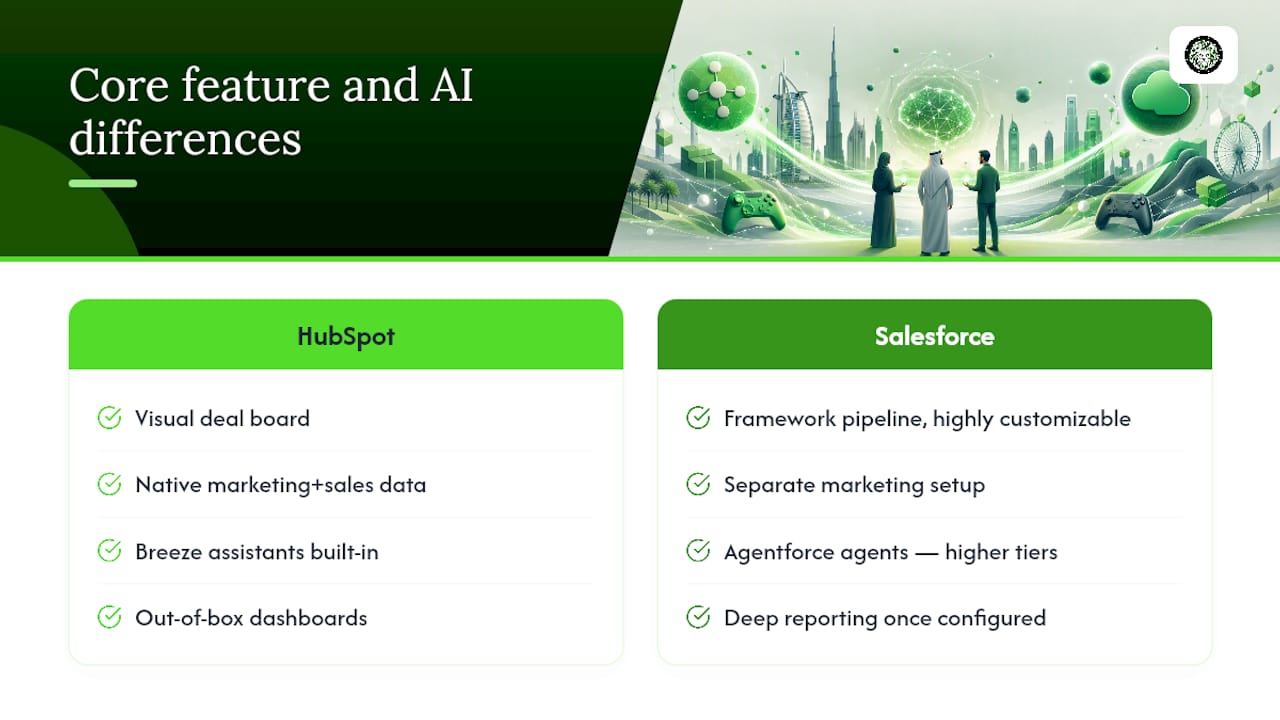
A standard HubSpot sales pipeline looks like a clean, visual deal board: stages, tasks, and email sequences that a rep can configure without engineering help. Marketing automation sits natively alongside it, sharing the same contact record, so a lead's website behavior, email opens, and deal stage all live in one place. That tight coupling between marketing and sales data is HubSpot's biggest structural advantage for teams where marketing and sales operate as one motion.
Salesforce's Sales Cloud pipeline is more of a framework than a finished product. It can be shaped into almost any workflow, with custom fields, validation rules, and approval processes that HubSpot doesn't attempt to match. That flexibility is exactly why large organizations with unusual sales processes, multiple business units, or complex partner channels tend to land on Salesforce. The tradeoff is that someone has to build that structure before the team can use it.
The AI story is where the two platforms have genuinely diverged heading into 2026. HubSpot's Breeze assistants are baked into the product broadly, so a marketer can generate campaign copy or a rep can get a deal summary without opening a configuration panel. Salesforce has bet the opposite direction with Agentforce, building toward autonomous agents that can be assigned specific jobs, like qualifying inbound leads or resolving support tickets, but that agentic architecture demands orchestration work and tends to sit behind higher pricing tiers. If you want AI that works the day you log in, HubSpot wins. If you want AI you can custom-build into a multistep business process, Salesforce's agent framework goes further, at a cost.
Reporting follows the same pattern. HubSpot's dashboards are strong out of the box for marketing attribution and pipeline visibility. Salesforce's reporting and forecasting tools go deeper once configured, particularly for multi-team revenue forecasting and territory management, but that depth isn't automatic.
What Does Three-Year Total Cost Really Look Like?
Sticker price is the least useful number in this decision. HubSpot's entry tiers price lower per user and scale predictably as you add seats, while Salesforce's list price often hides the fact that reporting, automation, or AI features you assumed were included actually sit behind an add-on module or a jump to the next tier.
Four cost drivers matter more than the license fee itself:
- Partner implementation. Salesforce projects beyond a basic setup commonly bring in a certified partner, and that cost can rival or exceed the first year of licensing.
- Onboarding fees. HubSpot frequently charges a mandatory onboarding fee on its paid tiers, which is smaller than a Salesforce implementation but still a real up-front number.
- Admin and maintenance. Salesforce generally needs a part-time or full-time administrator once you're past a handful of users; HubSpot often doesn't until you're deep into custom reporting or workflow automation.
- AI credits and add-ons. Agentforce's tiered pricing structure raises the ceiling on what advanced AI agents cost to run, and Breeze's more advanced features can also require an upgrade past entry tiers.
Picture two scenarios. For a 25-seat deployment, HubSpot Professional with onboarding typically results in a lower three-year total cost of ownership due to fewer ongoing partner fees; Salesforce deployments at this scale usually incur higher three-year costs when including part-time admin and customization, even if license fees appear similar. As seat counts increase, the cost difference between the two platforms generally decreases. Salesforce's per-seat economics improve at scale, and if your process genuinely needs the customization, the extra cost buys real capability rather than overhead. This is the seat count where a lot of buyers should stop comparing sticker prices and start comparing what each platform lets them do that the other can't.
Pro Tip: Build your three-year TCO model before you talk to either sales team. Include a line for admin headcount and a line for "features we assumed were included but weren't." Both numbers are usually bigger than buyers expect.
How Long Does Implementation Actually Take?
A basic HubSpot setup, importing contacts, connecting email, and building a first pipeline, can be live in days. A more involved rollout with marketing automation, custom properties, and integrations typically takes two to six weeks. Salesforce timelines run longer almost every time, often eight to sixteen weeks for a mid-size deployment and considerably more for enterprise builds with multiple business units or legacy data migration.
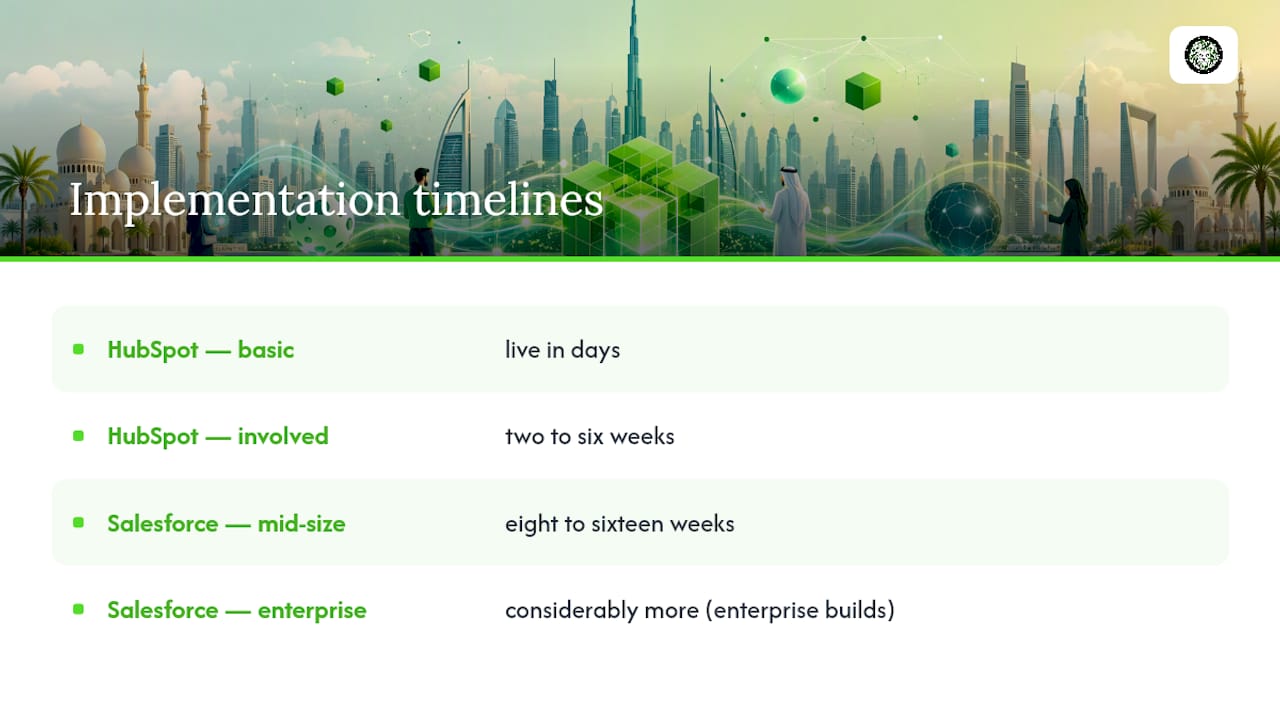
The gap comes down to configuration depth. Salesforce's flexibility means nothing is pre-built. Every custom object, validation rule, and approval flow has to be designed before your team can rely on it, and that design work is where projects stretch.
Whether you need a dedicated administrator depends less on company size and more on process complexity. A 15-person sales team with a straightforward pipeline can run HubSpot without a full-time admin. A 15-person team with multi-step approval chains, custom quoting logic, or complex territory rules will need Salesforce admin support regardless of headcount, because that complexity has to live somewhere.
Once you're live, governance is what keeps either platform useful past month three. Set a data-entry standard before rollout, not after: required fields, deduplication rules, and a single source of truth for lead status. Assign someone, even part-time, to own data hygiene. CRMs don't degrade because the software fails. They degrade because nobody owns the data quality once the excitement of launch wears off.
What Should You Check in Each App Marketplace?
Ecosystem breadth changes what "integration" means in practice. HubSpot's App Marketplace is curated and weighted toward marketing and go-to-market tools, which cuts friction for teams whose main integration needs are ad platforms, email tools, and website forms. Salesforce's AppExchange is larger and backed by owned enterprise products like MuleSoft for integration middleware and Data Cloud for unified customer data, making it the stronger foundation for organizations stitching together ERP, finance, and support systems at scale.
Before committing to either, get answers to three questions from the vendor or your internal team. First, is the specific connector you need officially maintained by the vendor, or is it a third-party build that could break on the next update? Second, what are the API call limits at your plan tier, and what happens when you exceed them? Third, who owns the maintenance of custom integrations once your initial implementation partner moves on?
For any stack touching more than three or four core systems, don't rely on point-to-point integrations. A middleware layer or dedicated integration platform, evaluated the same way businesses evaluate automation partners for commerce integrations, gives you a governance layer that survives vendor changes and reduces the risk of a fragile chain of one-off connections breaking every time one app updates its API.
How Do You Decide Between HubSpot and Salesforce?
Run through this checklist before you sign anything:
- Team size and complexity. Under 50 users with a straightforward sales process favors HubSpot. Complex approval chains, multiple business units, or 100 plus users favor Salesforce.
- Marketing-sales integration needs. If marketing and sales share pipeline data daily, HubSpot's native coupling saves real setup time.
- Regulatory and data residency requirements. If you operate under strict compliance regimes, ask both vendors directly about data residency options and audit trail depth.
- AI ambition. If you want AI content and assistance now with minimal setup, HubSpot's Breeze fits. If you want to eventually build autonomous agents into multi-step business processes, evaluate Salesforce's Agentforce roadmap and its governance controls.
- Sandbox and testing access. Ask for a sandbox environment with your actual data structure, not a generic demo, before you commit budget.
Once you've answered those, run a pilot instead of a full rollout. Scope it to one team, one pipeline, and a subset of real (anonymized where needed) contact data, 60 to 90 days is enough. Set success metrics up front: time to first logged deal, percentage of reps actively using it without prompting, and one AI-assisted task (a generated email, a lead score) measured against your current baseline. If adoption and speed don't show up inside that window, the platform isn't the problem, but the fit might be.
What Are the Risks of Migrating or Running Both Platforms?
Migrations fail in predictable ways: field mappings that don't match, duplicate contact records multiplying instead of merging, activity history getting flattened or lost, and reporting that breaks because historical data doesn't map to the new structure. Budget time to audit your existing data model before you touch a migration tool, not after.
Running both platforms simultaneously, HubSpot for marketing and sales enablement, Salesforce for enterprise operations, is a legitimate strategy, not a compromise. It works when you designate one platform as the contact-of-record and build clear, one-directional or carefully reconciled sync rules so reps aren't chasing conflicting data in two systems. This is exactly the kind of CRM and ERP integration challenge that determines whether a dual-platform setup feels seamless or becomes a daily headache.
Before any full cutover, migrate a small, representative data subset first. Check field mapping accuracy, deduplication results, and whether your team can pull the same report in the new system that they relied on in the old one. If that test fails, fix the mapping before you touch the rest of your data.
How Proud Lion Studios Approaches CRM and AI Integration
Proud Lion Studios builds AI agents, automation workflows, and CRM and ERP integrations for businesses navigating exactly this kind of platform decision. A sound approach to a CRM plus AI pilot: scope it to 90 days, one team, one measurable outcome, such as lead response time or qualified-lead volume, and start with read-only AI agent access before expanding permissions. Bring in a specialist integration partner when your stack touches more than a few core systems or when agentic AI governance is unfamiliar territory internally; keep it in-house when your pipeline and data model stay simple.
Why the "Which Is Better" Question Misses the Point
The honest answer is that neither platform is better in the abstract, and framing the decision that way is how buyers end up overpaying for capability they'll never use. Most companies I'd advise to model three-year TCO first, then measure real adoption during a 60 to 90 day pilot before committing further. Pick for the impact you need in the next twelve months, not the enterprise scale you might reach in five years. You can always migrate up. It's much harder to unwind an overbuilt system that your team never fully adopted.
— Amal
Where Proud Lion Studios Fits Into Your CRM Strategy
If you've landed on a dual-platform approach, or you're staring down a Salesforce implementation that needs custom logic HubSpot can't touch, the harder problem isn't which CRM to buy. It's making that CRM talk to the rest of your stack without duct-tape integrations that break every quarter.

Proud Lion Studios builds the connective layer most CRM vendors don't: custom AI agents that qualify leads or route support tickets, CRM and ERP integration workflows that keep HubSpot and Salesforce data in sync without manual cleanup, and automation pilots scoped to a real business outcome instead of a vague transformation promise. If you're also building out mobile access for reps in the field, our mobile app development) work extends CRM data to wherever your team actually works. Reach out for a pilot scoping call, and we'll help you define the 90-day test that tells you whether your integration plan holds up before you commit further budget.
Sources
For further reading directly from the source material used throughout this comparison:
- Salesforce vs HubSpot | Forbes Advisor
- Salesforce CRM foundations | Salesforce
- HubSpot vs Salesforce 2026: Pricing, Features, and Which CRM Actually Wins — WeekCRM
FAQ
Which One Is Better, Salesforce or HubSpot?
Neither is universally better. HubSpot suits smaller, marketing-led teams needing fast time-to-value, while Salesforce suits larger or highly regulated organizations needing deep customization.
Does HubSpot Replace Salesforce?
For small to mid-market teams with straightforward sales processes, HubSpot can fully replace Salesforce. For enterprises with complex approval chains or custom data architecture, HubSpot typically supplements rather than replaces it.
Who Is Salesforce's Biggest Competitor?
HubSpot is Salesforce's most commonly compared competitor for CRM buyers, particularly among small and mid-market companies choosing between ease of use and deep customization.
Is Salesforce or HubSpot Cheaper?
HubSpot's entry tiers are typically cheaper per user with more predictable pricing, while Salesforce's enterprise features and add-on modules usually push total costs higher at scale.
How Long Does It Take to Implement Each Platform?
A basic HubSpot setup can launch in days to a few weeks, while a comparable Salesforce deployment commonly takes two to four months due to its configuration depth.