

TL;DR:
- App security involves implementing controls like encryption, strong authentication, sandboxing, and input validation to protect app code and data from threats. Android and iOS provide native security features such as hardware-backed key storage and sandboxing, but their enforcement mechanisms differ, requiring developers to understand platform specifics. Adhering to standards like OWASP Mobile Top 10 and MASVS, along with continuous testing, ensures resilient security practices against evolving mobile threats.
App security is defined as the set of controls, protocols, and platform mechanisms that protect an application's code, data, and runtime environment from unauthorized access, tampering, and exploitation. The key features of app security include data encryption, strong authentication, sandboxing, input validation, secure API communication, and runtime integrity protections. Frameworks like the OWASP Mobile Top 10 and the Mobile Application Security Verification Standard (MASVS) give developers a structured baseline for implementing these controls. Platforms like Android and iOS each provide native mechanisms that reinforce these protections at the operating system level, and understanding both the standards and the platform specifics is what separates a secure app from a vulnerable one.
What are the essential app security features developers should implement?
The foundation of any secure application rests on six controls that address the most exploited attack surfaces in mobile and web apps.
Authentication and session management are the first line of defense. Authentication must be enforced server-side with session validation and multi-factor authentication (MFA) on every request. Client-only checks are not adequate. An attacker who intercepts or replays a session token can bypass any client-side gate entirely, which makes server-side validation non-negotiable.

Encryption at rest and in transit protects data whether it is stored on device or moving across a network. AES-256 covers storage; TLS 1.3 covers transport. Certificate pinning goes one step further by binding the app to a specific server certificate, which prevents man-in-the-middle attacks even on compromised networks. Without pinning, a rogue certificate authority can silently intercept encrypted traffic.
Sandboxing isolates each app from others and from the operating system. This means a compromised app cannot read another app's files or escalate privileges to the system level. Both Android and iOS enforce sandboxing at the kernel level, making it one of the most structurally sound protections available without any developer effort beyond respecting platform boundaries.
Code signing and app integrity checks verify that the binary a user installs has not been modified since the developer signed it. Tampered binaries are a primary delivery mechanism for malware in sideloaded apps.
Input validation on every endpoint prevents injection attacks, cross-site scripting (XSS), and parameter tampering. Validation must happen server-side. Client-side validation is a usability feature, not a security control.
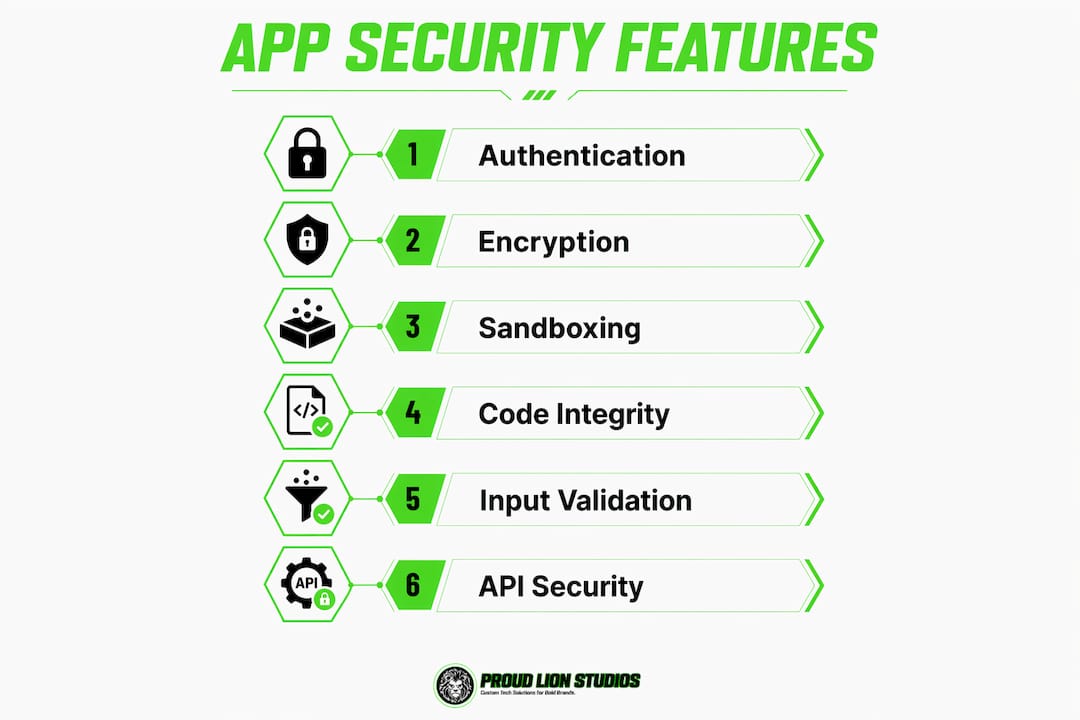
Secure API design closes the gap between a secure app and a vulnerable backend. Effective API security requires validating inputs, controlling responses, and applying rate limiting to block brute force and abuse. An app can be perfectly hardened while its API leaks sensitive data through unfiltered responses.
Pro Tip: Never treat runtime anti-tampering tools as a substitute for server-side validation. Tools like ProGuard, DexGuard, or iXGuard slow down reverse engineering, but a determined attacker will bypass them. Your backend must assume the client is hostile.
How do Android and iOS implement security features differently?
Platform-specific implementations matter because they determine what protections you get for free and where you need to add your own controls.
Android's security model centers on isolation and privilege reduction. Each app runs under a unique user ID with SELinux mandatory access controls, which means even a fully compromised app is contained within its own process boundary. The Android Keystore system stores cryptographic keys in hardware-backed secure storage, making key extraction extremely difficult even with root access. The Play Integrity API verifies genuine app interactions on genuine devices, allowing your backend to reject requests from tampered or emulated environments before processing them. Android also encrypts user data at rest automatically once device encryption is enabled, which removes the burden of implementing full-disk encryption from the developer.
Apple's approach layers multiple controls that work together rather than independently. Code signing, notarization, and strict sandboxing form the core of iOS and macOS app security. Notarization on macOS, required by default since macOS 10.15, combines code signing with a hardened runtime check and Apple's malware scanning service. An app that fails notarization will not launch on a standard macOS system. Apple's App Transport Security (ATS) enforces TLS for all network connections by default, and any exception requires explicit justification in the app's Info.plist. iOS sandboxing mediates app access to user data through entitlements, so an app can only access the resources it explicitly declared at submission time.
| Feature | Android | iOS / macOS |
|---|---|---|
| App isolation | Unique UIDs + SELinux | Entitlement-based sandboxing |
| Key storage | Android Keystore (hardware-backed) | Secure Enclave (hardware-backed) |
| Integrity verification | Play Integrity API | Code signing + notarization |
| Network security | Network Security Config | App Transport Security (ATS) |
| Malware scanning | Play Protect | Notarization (macOS), App Review (iOS) |
| Encryption at rest | Automatic with device encryption | Data Protection API (file-level) |
The practical takeaway from this comparison: both platforms provide hardware-backed key storage and mandatory sandboxing, but the enforcement mechanisms differ. Android gives developers more configuration flexibility, which also means more surface area for misconfiguration. iOS is more prescriptive, which reduces developer error but requires careful entitlement management.
What standards and best practices underpin solid app security?
Recognized frameworks give your security work a defensible structure and make compliance conversations with clients or auditors far easier.
-
Map risks with OWASP Mobile Top 10. The OWASP Mobile Top 10 2024 defines ten major risk categories including Insecure Authentication and Insecure Data Storage. It is a risk awareness taxonomy, not a compliance checklist. Use it to identify where your app is most exposed, then move to MASVS for the specific controls.
-
Apply MASVS for control requirements. The Mobile Application Security Verification Standard (MASVS) maps directly to testable security controls across storage, cryptography, authentication, network communication, and platform interaction. OWASP guidance stresses authenticating and authorizing on the backend, not relying on client state, and MASVS codifies exactly how to implement that.
-
Run SAST, DAST, and penetration testing. Static Application Security Testing (SAST) identifies code issues early; Dynamic Application Security Testing (DAST) observes runtime behavior; penetration tests simulate attacks for comprehensive pre-release coverage. Each method catches different vulnerability classes, so using all three is not redundant. It is thorough. Authentication and storage controls are the highest risk sources in pentesting, so weight your test plans accordingly.
-
Apply least privilege to permissions. Minimizing app permissions on Android reduces attack surface and misuse risk. Request only what the app genuinely needs at the moment it needs it. Every unnecessary permission is a potential exploit path.
-
Avoid common ATS exceptions on iOS. Disabling ATS globally to fix a network issue is a shortcut that exposes every connection the app makes. Scope exceptions to specific domains and document the business reason.
-
Treat security as a continuous process. Threat models evolve. A control that was sufficient in 2024 may be bypassed by a technique documented in 2026. Schedule regular dependency audits, rotate secrets, and re-test after major feature releases.
Pro Tip: Integrate SAST tools like Semgrep or Checkmarx into your CI/CD pipeline so security checks run on every pull request. Catching a hardcoded API key at code review costs minutes. Catching it after a breach costs far more.
How can you apply these features to protect against real threats?
Knowing the controls is one thing. Knowing which ones to prioritize when you have limited sprint capacity is another.
- Start with authentication and session management. Account takeover is the most common and highest-impact attack against mobile apps. Server-side session validation with MFA stops the majority of credential-based attacks before they reach your data layer.
- Encrypt every data state. Data at rest, in transit, and in use each require separate controls. AES-256 for storage, TLS 1.3 with certificate pinning for transport, and memory protection for sensitive values like decryption keys held in RAM.
- Use platform integrity APIs actively. The Android Play Integrity API and iOS code signing are not passive protections. Call the Play Integrity API on sensitive transactions, not just at app launch, so your backend can reject requests from compromised environments in real time.
- Validate all input server-side. Injection attacks succeed when developers trust client-submitted data. Every parameter that reaches your API should be validated for type, length, format, and range before it touches your database or business logic.
- Rate-limit and filter API responses. Rate limiting blocks brute force attacks on login and OTP endpoints. Response filtering prevents your API from returning fields the requesting user has no right to see, which closes a common data exposure path that static analysis tools often miss.
- Review and test continuously. Security debt compounds. A mobile security budget checklist helps teams allocate testing resources against the most current threat categories rather than last year's priorities.
- Balance security with usability. Overly aggressive session timeouts or excessive permission prompts push users toward workarounds. A user who disables a security feature because it is inconvenient creates more risk than the feature was designed to prevent.
Key takeaways
Secure apps require server-side enforcement of authentication, encryption across all data states, platform-native sandboxing, and continuous testing against OWASP MASVS controls.
| Point | Details |
|---|---|
| Server-side authentication | Validate every session and user role on the backend; client checks are not sufficient. |
| Encryption at every layer | Apply AES-256 for storage, TLS 1.3 with certificate pinning for all network traffic. |
| Use platform integrity tools | Call Android's Play Integrity API and enforce iOS notarization to detect tampered environments. |
| Test with SAST, DAST, and pentests | Combine all three methods; prioritize authentication and data storage in your test plans. |
| Treat security as ongoing | Re-test after major releases, audit dependencies regularly, and update threat models as attacks evolve. |
Why client-side trust is the most dangerous assumption in app security
I have reviewed enough mobile app architectures to say this with confidence: the single most common security failure is not a missing encryption library or an outdated dependency. It is the assumption that the client can be trusted.
I see it repeatedly. A developer implements biometric authentication on the device, marks the session as authenticated locally, and the backend accepts that state without re-validating. The OWASP guidance on client-side authentication is explicit on this point, yet it remains the most exploited pattern in mobile pentests. The fix is not complex. It requires discipline: every privileged action must be authorized by the server, every time.
The other pattern I find underestimated is the operational chain on macOS. Developers sign their code and assume they are done. Notarization is a separate step, and skipping it means users on standard macOS configurations will see a security warning or a hard block at launch. That is not a theoretical risk. It is a distribution failure that happens in production.
My practical advice: build your security test plan around authentication and data storage first. These are the highest-risk sources in mobile pentests and the areas where a single flaw can compromise everything else you built correctly. Platform sandboxing and encryption are strong foundations, but they do not compensate for a backend that trusts client assertions. Leverage what Android and iOS give you natively, then layer your own server-side controls on top. That combination is what actually holds under attack.
— Amal
Build secure mobile apps with Proudlionstudios

Proudlionstudios builds iOS and Android applications with security controls embedded from the architecture phase, not bolted on after launch. The Dubai-based team implements authentication frameworks, encryption standards, and platform integrity checks as part of every mobile app development engagement, whether the project is a consumer app, an enterprise tool, or a blockchain-integrated solution. For teams building on Web3, the studio's blockchain development services apply the same security-first approach to smart contracts and decentralized applications. If you are building an app that handles sensitive user data or operates in a regulated industry, the right time to involve a security-aware development partner is before the first line of code is written.
FAQ
What are the key features of app security?
The key features of app security include strong authentication with MFA, data encryption at rest and in transit, platform sandboxing, code signing, input validation, secure API design with rate limiting, and runtime integrity checks. Together, these controls address the risk categories defined by the OWASP Mobile Top 10.
Why is server-side authentication critical for mobile apps?
Client-side authentication checks can be bypassed by an attacker who intercepts or replays session tokens. Authentication and authorization must be validated on the backend for every request to prevent privilege escalation and account takeover.
How does Android's Play Integrity API improve app security?
The Play Integrity API verifies that an app is running on a genuine, unmodified device and has not been tampered with. Backend servers use the API's verdict to reject requests from compromised or emulated environments before processing sensitive transactions.
What is the difference between OWASP Mobile Top 10 and MASVS?
The OWASP Mobile Top 10 is a risk taxonomy that identifies the ten most critical mobile security risk categories. MASVS (Mobile Application Security Verification Standard) provides the specific, testable security controls developers implement to address those risks. Use the Top 10 to prioritize and MASVS to build and verify.
How often should mobile apps be security tested?
Security testing should run continuously. SAST tools integrate into CI/CD pipelines for every code change, while DAST and penetration testing should occur before major releases and after significant feature additions. Threat models and dependency audits need review at least annually, or whenever a new vulnerability class emerges in your technology stack.